V5
Dynamic Routing
Routing that takes place as your app is rendering, not in a configuration or convention outside of a running app.
Primary Components
<BrowserRouter>
A <Router> that uses the HTML5 history API (pushState, replaceState and the popstate event) to keep your UI in sync with the URL.
Container of other <Route>s.
import {
  BrowserRouter as Router
} from "react-router-dom";

<Router>
  <App />
</BrowserRouter>
<Route>
Its most basic responsibility is to render some UI when its path matches the current URL.
A Route is always technically “rendered” even though it’s rendering null. When the <Route>‘s path matches the current URL, it renders its children.
  <Router>
    <div>
      <Route exact path="/">
        <Home />
      </Route>
      <Route path="/news">
        <NewsFeed />
      </Route>
    </div>
  </Router>
Render methods
- component:
The router usesReact.createElementto create a new React element from the given component
  <Router>
    <Route path="/user/:username" component={User} />
</Router>- render: func
This allows for convenient inline rendering and wrapping without the undesired remounting
  <Router>
    <Route path="/home" render={() => <div>Home</div>} />
</Router>- children: func
It works exactly likerenderexcept that it gets called whether there is a match or not.
    <Route
      path={to}
      children={({ match }) => (
        <li className={match ? "active" : ""}>
          <Link to={to} {...rest} />
        </li>
      )}
    />
Priority:
children > component > render
Props of render methods:
- location
- history
- match
Props of <Route>:
- path: string | string[]
Routes without apathalways match. - exact: bool
- strict: bool
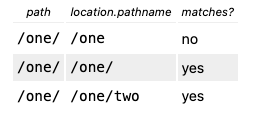
- location: object
- sensitive: bool
<Redirect>
<Route exact path="/">
  {loggedIn ? <Redirect to="/dashboard" /> : <PublicHomePage />}
</Route>

// object "to" example:
  {
    pathname: "/login",
    search: "?utm=your+face",
    state: { referrer: currentLocation }
  }
Props:
- to: string or object
- push: bool
Whentrue, redirecting will push a new entry onto the history instead of replacing the current one. - from: string
- exact, strict and sensitive
<Switch>
Renders the first child <Route> or <Redirect> that matches the location.
<Link>
props:
- to: string | object | func
- replace: bool
<Link to="/about">About</Link>

<Link
  to={{
    pathname: "/courses",
    search: "?sort=name",
    hash: "#the-hash",
    state: { fromDashboard: true }
  }}
/>

<Link to={location => ({ ...location, pathname: "/courses" })} />
<Link to={location => `${location.pathname}?sort=name`} />
<NavLink>
A special version of the <Link> that will add styling attributes to the rendered element when it matches the current URL.
props:
- className: string | func
- activeClassName: string
- style: object | func
- activeStyle: object
- isActive: func
A function to add extra logic for determining whether the link is active. This should be used if you want to do more than verify that the link’s pathname matches the current URL’spathname. - aria-current: string
- exact, strict, location
<NavLink to="/about">About</NavLink>

<NavLink
  to="/faq"
  className={isActive =>
    "nav-link" + (!isActive ? " unselected" : "")
  }
>
  FAQs
</NavLink>

<NavLink to="/faq" activeClassName="selected">
  FAQs
</NavLink>

<NavLink
  to="/faq"
  style={isActive => ({
    color: isActive ? "green" : "blue"
  })}
>
  FAQs
</NavLink>
Static Props
history:
history is mutable!
properties:
length– (number) The number of entries in the history stackaction– (string) The current action (PUSH,REPLACE, orPOP)location– (object) The current location.push(path, [state])– (function) Pushes a new entry onto the history stackreplace(path, [state])– (function) Replaces the current entry on the history stackgo(n)– (function) Moves the pointer in the history stack bynentriesgoBack()– (function) Equivalent togo(-1)goForward()– (function) Equivalent togo(1)block(prompt)– (function) Prevents navigation (see the history docs
location:
properties:
pathname– (string) The path of the URLsearch– (string) The URL query stringhash– (string) The URL hash fragmentstate– (object) location-specific state that was provided to e.g.push(path, state)when this location was pushed onto the stack. Only available in browser and memory history.
Hooks
useHistory
Give access to the history instance that you may use to navigate.
import { useHistory } from "react-router-dom";

function HomeButton() {
  let history = useHistory();

  function handleClick() {
    history.push("/home");
  }

  return (
    <button type="button" onClick={handleClick}>
      Go home
    </button>
  );
}
useParams
useParams returns an object of key/value pairs of URL parameters.
import React from "react";
import ReactDOM from "react-dom";
import {
  BrowserRouter as Router,
  Switch,
  Route,
  useParams
} from "react-router-dom";

function BlogPost() {
  let { slug } = useParams();
  return <div>Now showing post {slug}</div>;
}

ReactDOM.render(
  <Router>
    <Switch>
      <Route exact path="/">
        <HomePage />
      </Route>
      <Route path="/blog/:slug">
        <BlogPost />
      </Route>
    </Switch>
  </Router>,
  node
);
useLocation
The useLocation hook returns the location object that represents the current URL.
Utility Functions
generatePath
import { generatePath } from "react-router";

generatePath("/user/:id/:entity(posts|comments)", {
  id: 1,
  entity: "posts"
});
// Will return /user/1/posts
Ref:

