Introduction to GCP & the Cloud
- Common personal uses of Cloud Services
- Backups & Sharing
- Between Mobile Device, Home computer and Work Computer
- Key Feature: Fault Tolerant & High Availability
- Common Enterprise Uses of Cloud Services
- Key Feature: Scalability & Elasticity
- Compute Engine – Application hosting on Virtual Server/Computer – “Instance“
- Computer / Server (Application Hosting)
- CPU
- RAM
- Hard Drive / Storage
- Network Card
- Firewall (Security)
- Operating System Windows/Linus
- Computer / Server (Application Hosting)
- Virtual Private Cloud (VPC) – Private Network
- Resources can use internal (private) and external (public) addresses
- Where to place GCP resources
- Cloud Storage – Mass Storage / Longterm Storage
- Managed Services
- Customers do not worry about the infrastructure configurations
- Regions & Zones
- Zone – Isolated Date Center – Fault Tolerance
- Regions – Geographic Groups of Zones – High Availability
Introduction to Google Cloud
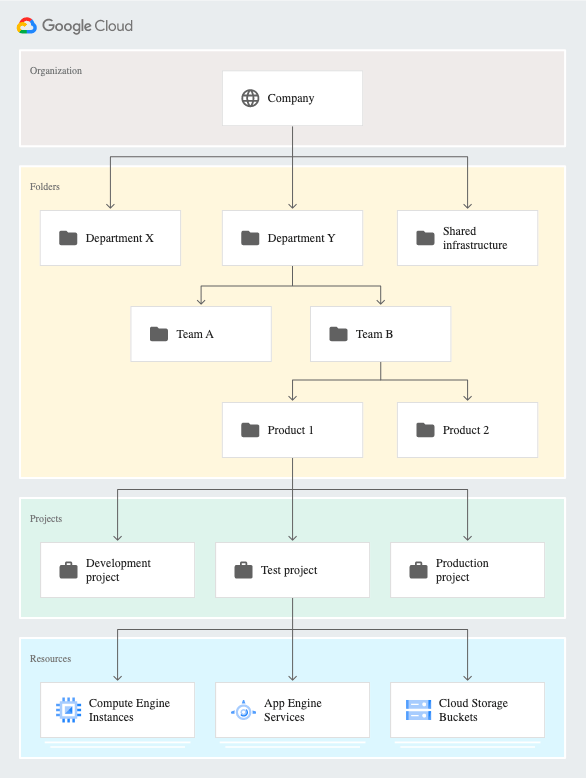
- Different Types of Compute Engine Instance
- E: General-purpose
- N: General-purpose with balancing price to performance
- M: Memory-optimized
- C: Compute-optimized
Overview of Linux
- What is Linux?
- A free and open-source operating system
- 3 major sections:
- The kernel – the lowest layer
- The system user space – an administrative layer
- Configuration or software installation
- Applications – Software
- Very reliable
- High uptimes
- Only needs reboots with kernel updates
- “livepatch” to minimize reboots
- Distributions (Different versions)
- Versions packaged up with associated software
- Software is released in packages
- Ensure updates are current
- Open Source
- Code is freely available for possible modification and redistribution
- Not all are 100% free
- Software License
- A legal instrument governing the use or redistribution of software
- A mix for organizations
- Mix it up – Use both Windows and Linux Servers and Windows and macOS desktops
- Windows Servers – Used for a domain controller, managing users, network shares and printers
- Linux Servers – Used more for database servers, web servers, or backend processes
- Linux as a Server
- A server can be a computer in a data center somewhere
- It could in the cloud, AWS or Azure
- Normally don’t have a graphical interface, a keyboard, or mouse plugged in
- Managed via remote terminals, the webpage or the inter-providing software already installed
- Server design
- Dedicated servers are designed for throughput and reliability
- For heavy workloads and tuned for server-style tasks
- Have multiple redundancies as backup
- Linux is great at
- Databases
- Web Servers
- Email Servers
- Used for high traffic and uptime
- Linux as a desktop
- The GUI makes it easier
- Installed applications – most are free
- Mobile Linux
- Android is a modified version of the Linux kernel with additional software
- Hypervisor or Virtual
- A copy of Linux running inside another operating system
- Virtualization creates simulated hardware, but they rarely interact directly at the hardware layer, only in the software
- For efficient hardware use
- What is SSH?
- A secure protocol to connect to servers SSH, a program ssh
- Secure SHell
- Three layers
- Transport – cache and compression available
- Authentication
- Connection
- Installing and updating softwares
- A high level of access is required
- Best practice is to not use the root user directly
- sudo command allows you to assume permissions for another user, as they were the root user
- For Ubuntu and Debian Distributions
- sudo apt update – firstly to update all installed softwares
- sudo apt install vim
- A high level of access is required
- Docker
- A docker container image is a lightweight, standalone, executable package of software that includes everything needed to run an application
- Easy and quick to deploy
- Containers can have external resources
- Vagrant (?)
- An an open-source tool helps automate the creation of virtual machines
- A tool for building and managing virtual machine environments in a single workflow
- CIA model
- Confidentiality because only those who require access should have it.
- Integrity because your data and systems should be kept safe from unauthorized changes.
- Availability because systems must be available to those who should have access.
Cost Control on GCP
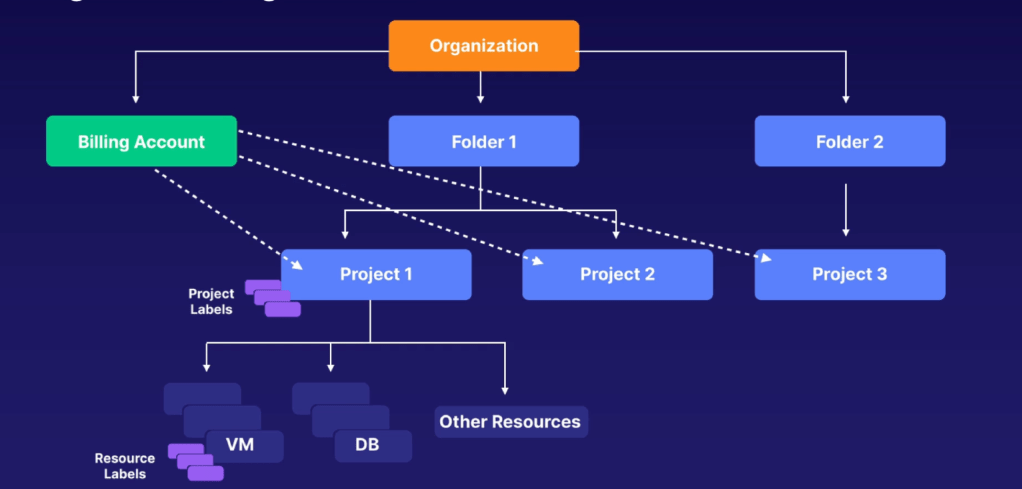
- Control Access
- Account Ownership
- Billing Account Administrator
- Manages and assigns access to others
- Billing Account Administrator
- Account Creation
- Billing Account Creator
- Creates but cannot assign rights
- Billing Account Creator
- Associate Accounts with Projects
- Billing Account User
- Can associate projects with billing accounts
- Prevents unrestricted creation of billable resources
- Often paired with the Project Creator role
- Billing Account User
- Account Ownership
- IAM Access Scopes
- Organization Layer
- Inherited by all attached billing accounts
- Individual Billing Account
- Organization Layer
- Best Practice
- Limit scope of access
- Principle of least privilege
- Assign multiple billing account administrators
- Limit scope of access
- Export billing data to BigQuery
- Perform further in-depth analytics of billing data
- Steps:
- Create a BigQuery dataset – BigQuery User role
- Configure billing export to the above dataset – Billing Account Administrator role
- Billing Alerts with Budgets
- Avoid surprises on bill
- Steps:
- Create a budget
- Set alerts thresholds
- Configure notifications based on threshold reached
- Tools to reduce cost
- Rightsize VMs
- Sustained Use Discounts
- Long running compute (at least 25% of a month), discount is automatically applied
- Discount up to 30%
- Committed Use Discounts
- 1- or 3-year commitments
- Committed use resources not eligible for sustained use discount – but resources above committed amount are eligible
- Preemptible VMs
- Short-lived, low-cost VM at huge discounts
- Can be shut down at anytime when capacity is needed
- Cloud Storage Classes and Lifecycle policies
- Standard, Nearline, Coldline, Archive
- Retrieving data incurs a fee (higher with cheaper class)
- Automatically delete/change class of old data
- Free Tier Products
Google Cloud Essentials
- IAM policies can only be applied to resources, not end-users.
- BigTable is a wide column database instead of a document database
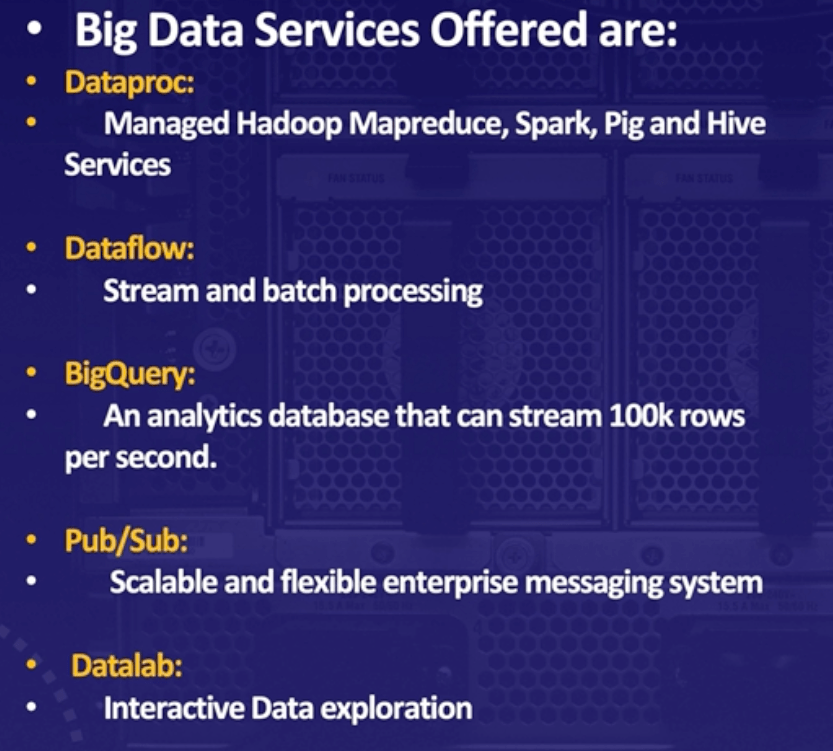
- Dataflow handles both streaming (live) and batch (archived) data
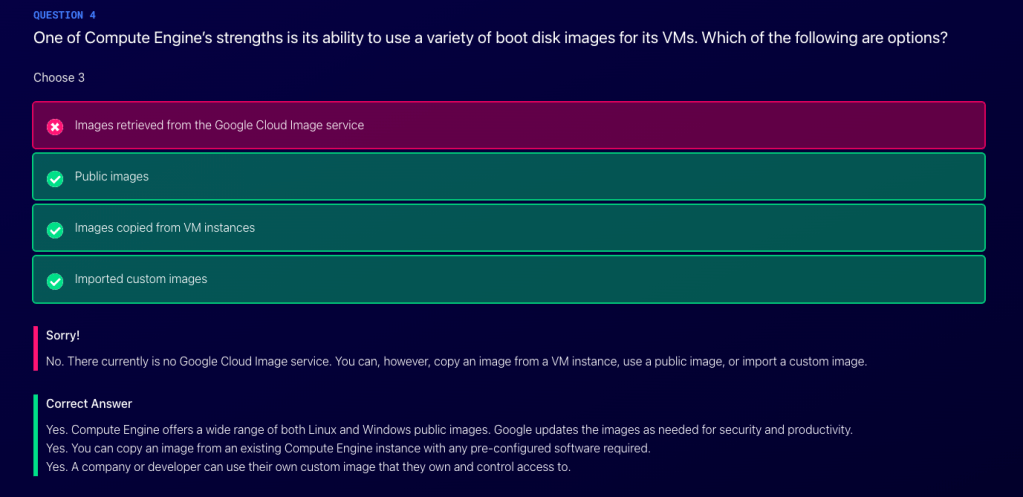
Google Certified Associate Cloud Engineer
- ACE responsibilities:
- Setting up Cloud Environments and Deploying Applications
- Configuring Security Access
- Creating and Maintaining Enterprise Solutions
- Projects, networks, and subnets build the 3-layer network of Google Cloud
- IAM permissions and firewall rules allow ingress and egress traffic inside of your network
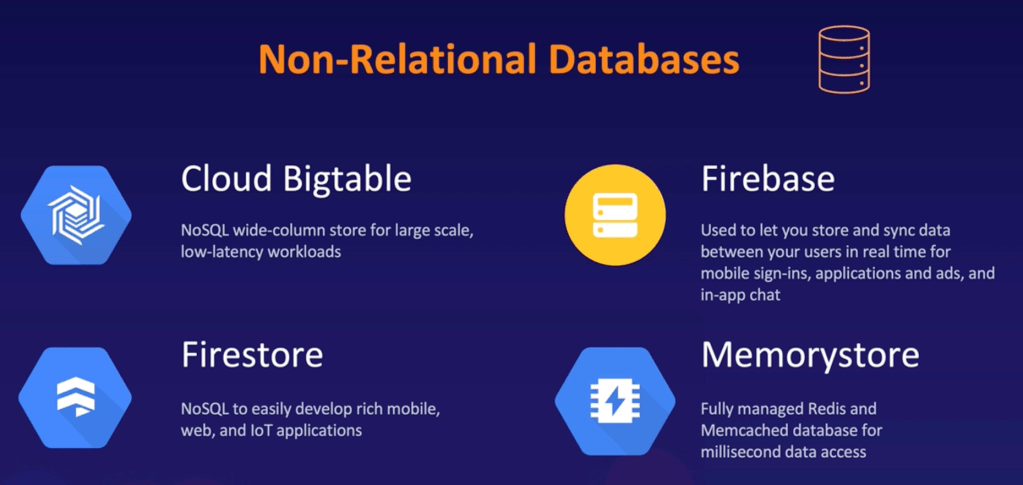
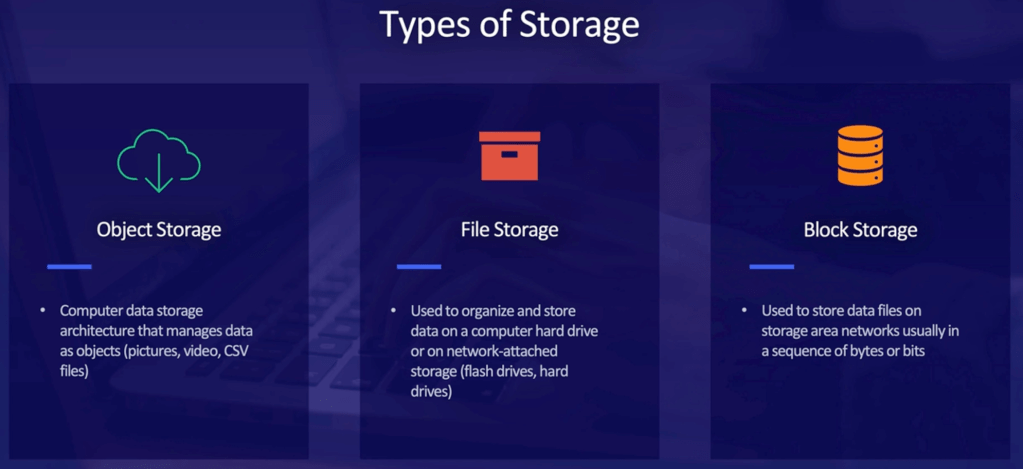
- 3 types of storage services
- Object (Cloud Storage)
- File (Cloud Filestore)
- Block (Persistent Disk)
- Zonal
- Regional
- Local SSD
- Managed Instance Groups: an instance group is a collection of virtual machine instances that can manage as a single entity
- Instance Groups are created from Instance Templates
- Security: Custom SSH Keys (?)
- Snapshots: Persistent Disks
- Monitoring and Logging
- Snapshot VS Image VS Instance Template
- A snapshot reflects the contents of a persistent disk in a concrete instant in time. An image is the same thing, but includes an operating system and boot loader and can be used to boot an instance.
- Snapshots do not save the google configurations of the instance using it.
- In order to create an instance group, you have to create an image from you snapshot you’ve taken and you have to create an instance template base on that newly created image.
- Major components and services of VPC
- Routes
- Firewall Rules
- VPN
- VPC Peering
- Cloud Load Balancing
- Subnets
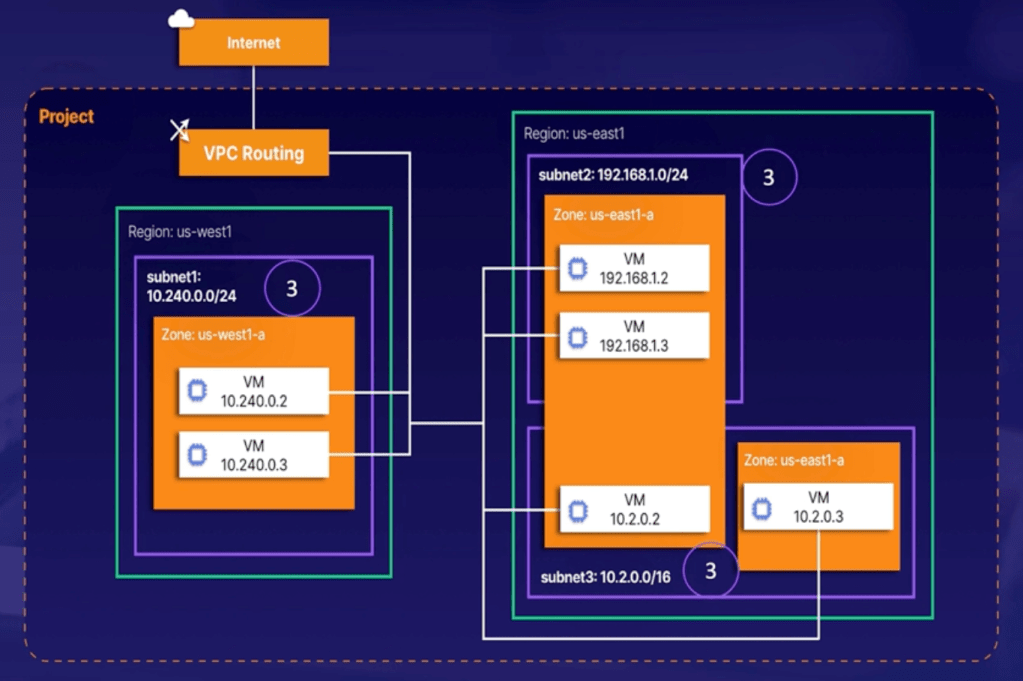
- Google VONs allow you to create a private connection between on-prem and a VPC
- Shared VPC (?)
- Shared VPC allows organizations to connect projects, resources and services in other VPCs
- A project that participate is either a host or service project
- Host project: contains 1 or more shared VPCs
- Services project: Project attached to a host project
- GKE
- Types of workloads
- Stateless applications
- Frontend applications that do not save data in one session for use in the next
- Stateful Applications with persistent volumes
- Batch Jobs
- Daemons
- Stateless applications
- Update cluster
- Enable autoscaling
- Node Pools
- Types of workloads
- App Engineer
- Fully-managed serverless platform offered by GCP
- Deploy different versions for testing
- Cloud Function
- Simple code that is executed when events are sent from cloud infrastructure or services
- Node.js, Python 3, Go and Java
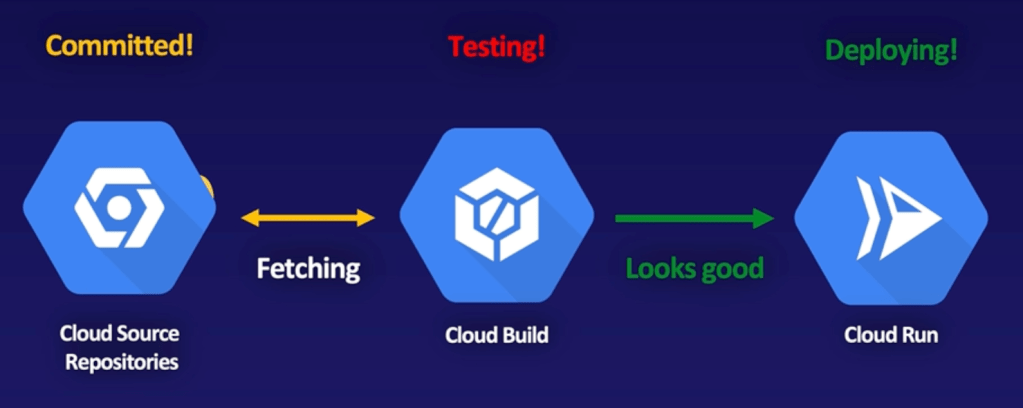
- Cloud Run
- Fully-managed serverless platform that deploys scalable containerized applications
- Java, Python, Ruby, Go, PHP, JavaScript
- 4 different types of Audit Logs
- Admin Activity
- Data Access
- System Event
- Policy Denied
- HIPAA (Health Insurance Portability and Accountability Act)
- Sets the standard for sensitive patient data protection
 Yujin's Amusement Park