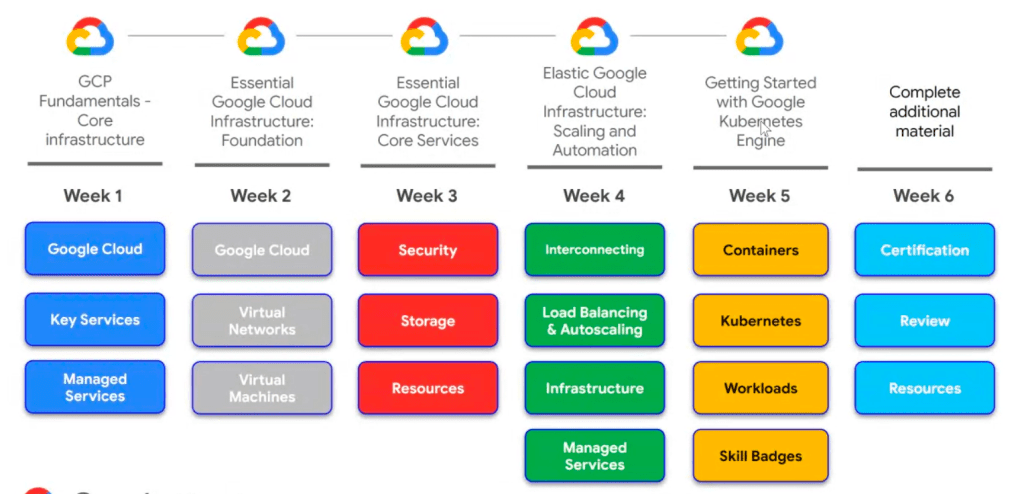
Getting Started with Google Kubernetes Engine
- Kubernetes: a software layer that sits between applications and hardware infrastructure
Introduction to Google Cloud
- Cloud computing has five fundamental attributes
- On-demand & self-service: No human intervention needed to get resources
- Broad network access: resources are accessible over a network from any location
- Resource pooling: Provider shares resources to customers
- Rapid elasticity: Get more resources quickly as needed
- Measured service: Pay only for what you consume
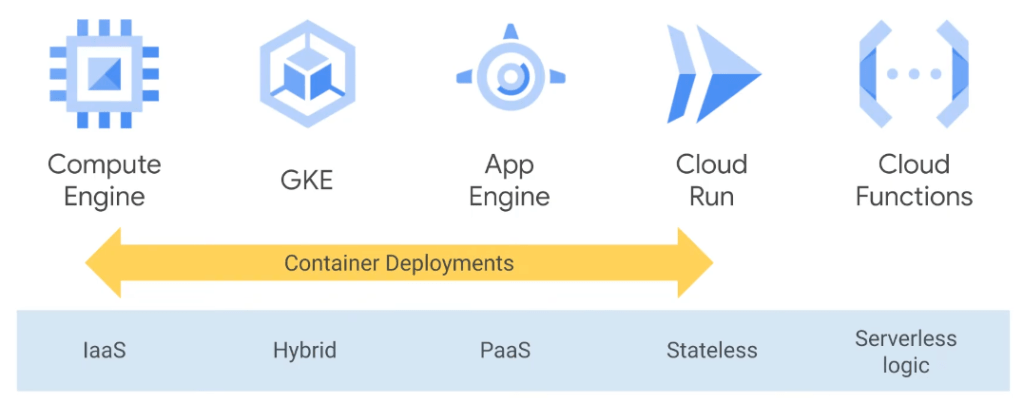
- Google Cloud offers a range of services
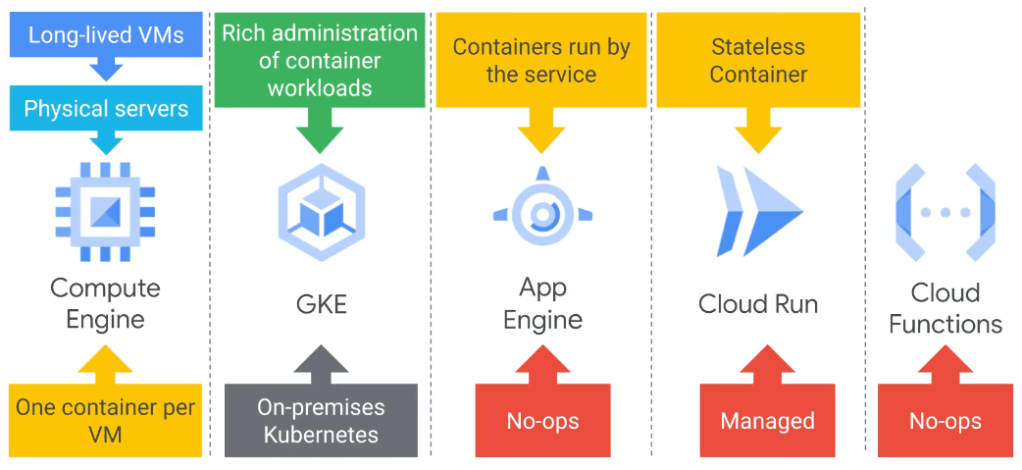
- Computer Engine: run VM on-demand in the cloud; infrastructure as a service; maximum flexibility to manage the server instances
- Google Kubernetes Engine (GKE): run containerized application in the cloud; google cloud manages the infrastructure under your administrative control
- Containerization: a way to package code that’s designed to be highly portable and to use resources very efficiently
- Kubernetes: a way to orchestrate code in containers
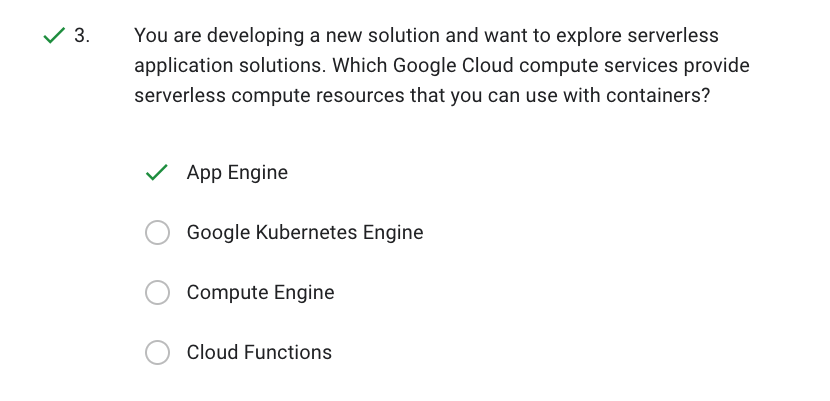
- App Engine: GCP’s fully managed platform as a service framework; a way to run code in the cloud without having to worry about infrastructure
- Cloud Functions: serverless execution environment or function as a service;
Introduction to Containers and Kubernetes
- A hypervisor
- Software layer
- Breaks the dependencies of an operating system with its underlying hardware
- Allows several virtual machines to share the same hardware
- Example: kvm
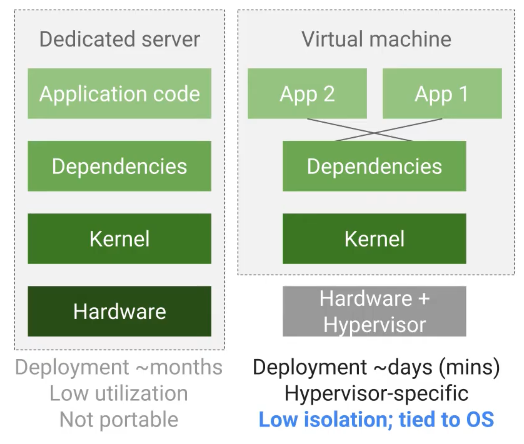
- Virtualization
- Pros: waste less resources; improved portability
- Cons:
- All of the dependencies of the application and the operating system are bundled together
- Applications that share dependencies are not isolated to each other
- VM-centric way to solve the problem
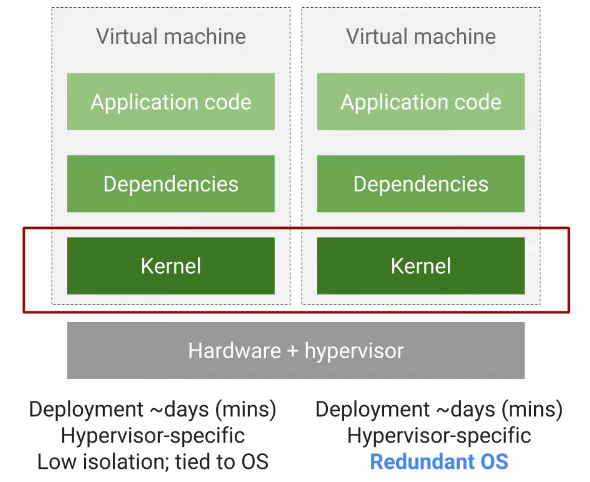
- Kernel is system software which is part of operating system
- User space abstraction and containers
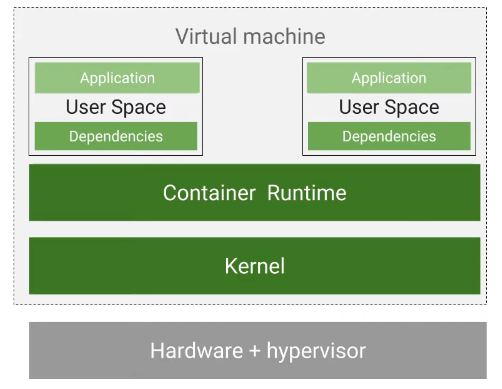
- Implement abstraction at the level of the application and its dependencies
- Containers are isolated user spaces for running code
- It packs all your code with the dependencies it needs
- And the engine that executes container is responsible for making them available at runtime
- Docker
- An application and its dependencies are called an image (?)
- A container is a running instance of an image
- A software is needed to build container images and to run them -> Docker
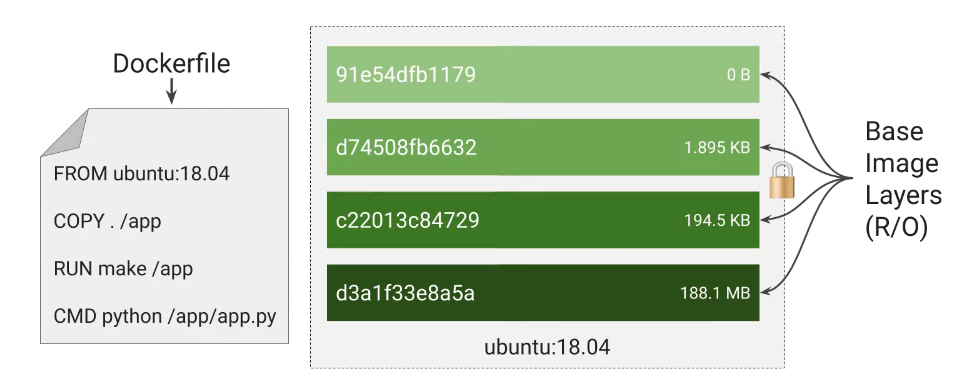
- Container image is structured in layers
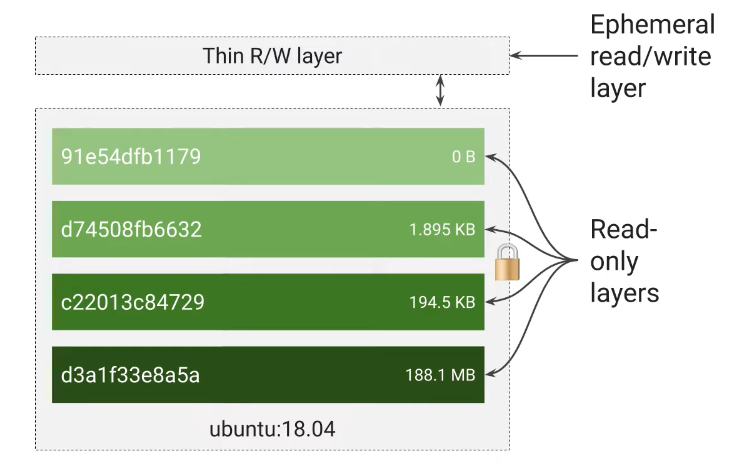
- Instructions are specified in container manifest
- Each layer is read-only when a container runs from this image
- They will have a writable ephemeral topmost layer
- Kubernetes
- Container management and orchestration solution
- Features:
- Supports both stateful and stateless applications
- Autoscaling
- Resource limits
- Extensibility
- Google Kubernetes Engine (GKE)
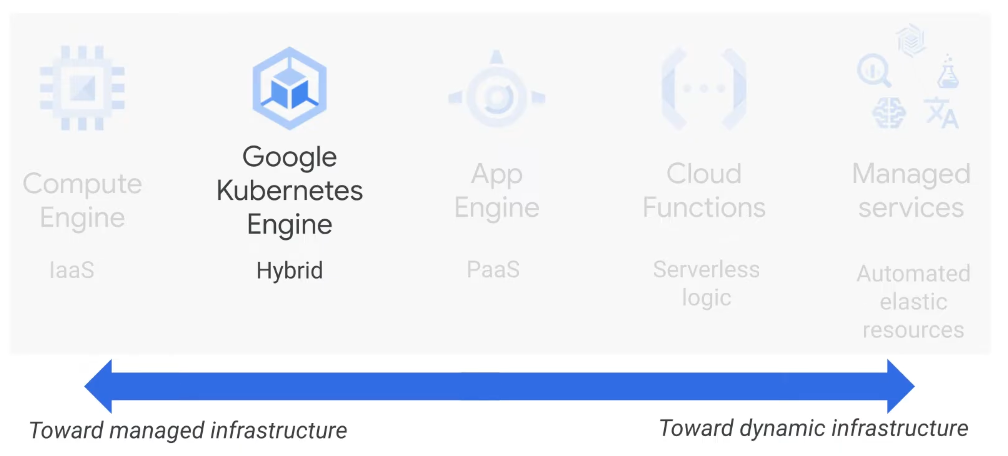
- Fully managed
- Container-optimized OS
- Auto upgrade k8s
- Auto repair node
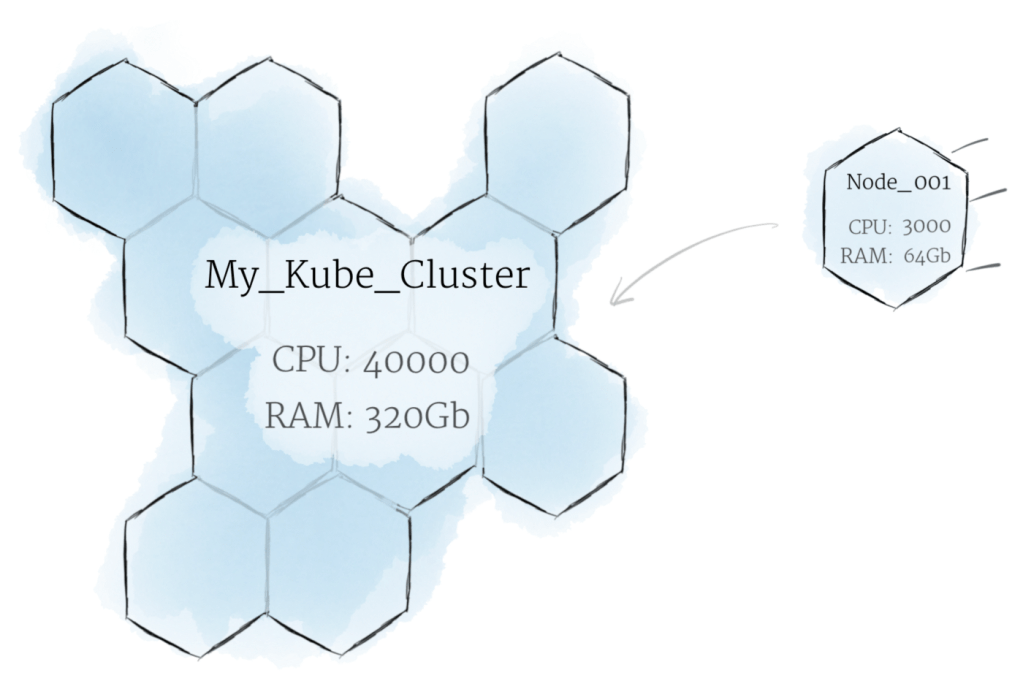
- Cluster (a kubernetes system) scaling
- Seamless integration with Container Registry and Cloud Build
- IAM
- Integrated logging and monitoring
- Integrated networking
- Cloud Console
- Compute Engine
- Fully customisable virtual machines
- Persistent disks and optional local SSDs
- Global load balancing and autoscaling
- Per-second billing
- Use cases:
- Complete control over the IS and virtual hardware
- Well suited for lift-and-shift migration to the cloud
- Most flexible compute solution, often used when a managed solution is too restrictive
- App Engine
- Provides a fully managed, code-first platform
- Streamlines application deployment and scalability
- Provides support for popular programming languages and application runtimes
- Supports integrated monitoring, logging, and diagnostics
- Simplifies version control, canary testing and rollbacks
- Use cases:
- Websites
- Mobile app and gaming backends
- RESTful APIs
- Google Kubernetes Engine
- Fully managed Kubernetes platform
- Supports cluster scaling, persistent disks, automated upgrades, and auto node repairs
- Built-in integration with Google Cloud services
- Portability across multiple environments
- Hybrid computing
- Multi-cloud computing
- Use cases:
- Containerized applications
- Cloud-native distributed systems
- Hybrid applications
- Cloud Run
- Run stateless containers via web request or cloud pub/sub events
- Abstracts away infrastructure management
- Automatically scales up and down
- Open API and runtime environment
- Use cases:
- Deploy stateless containers that listen for requests or events
- Build application in any language using any frameworks and tools
- Cloud Function
- Event-driven, serverless compute service for single purpose functions
- Automatic scaling with highly available and fault-tolerant design
- Charges apply only when your code runs
- Triggered based on events in Google Cloud services, HTTP endpoints and Firebase
- Use cases:
- Supports microservice architecture
- Serverless application backends:
- Mobile and IoT backends
- Integrate with third-party services and APIs
- Intelligent applications
- Virtual assistant and chat bots
- Video and image analysis
Kubernetes Architecture
- Two concepts:
- Each thing Kubernetes manage is represented by an object, you can view and change their attributes and state
- Declarative mangement
- Two elements to Kubernetes objects:
- Object spec: desired state described by us
- Object status: current state described by Kubernetes
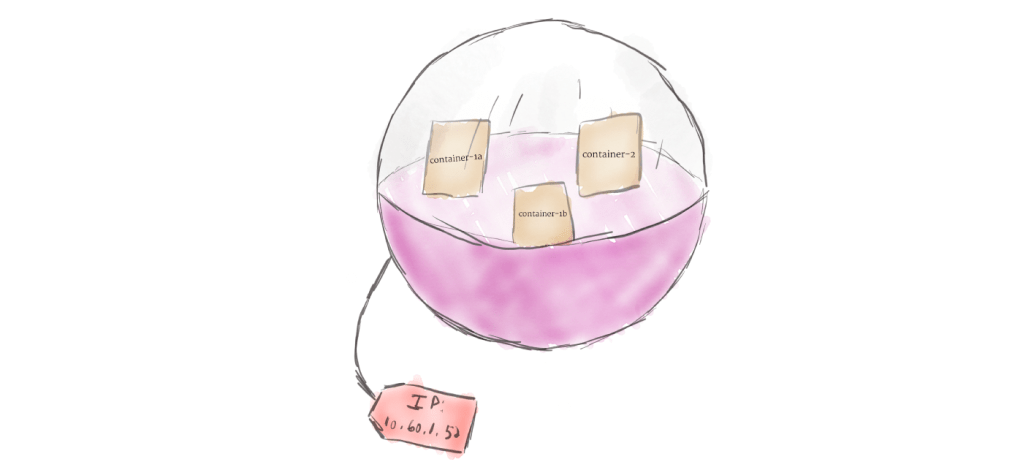
- Containers in a Pod share resources
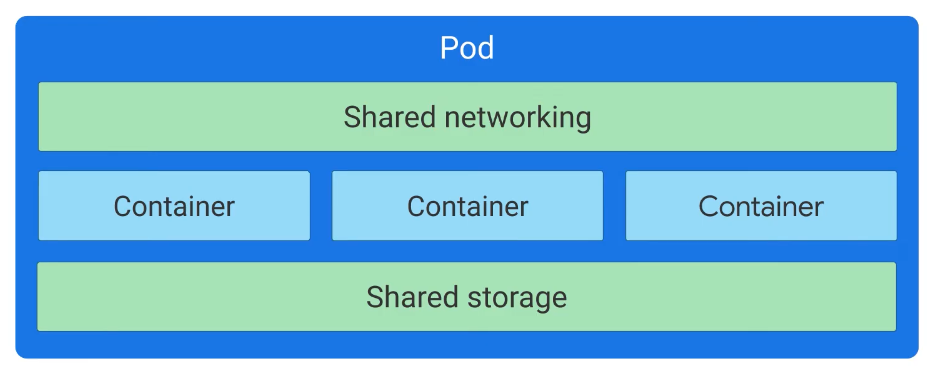
- The smallest deployable Kubernetes object
- Embodies the environment where containers live
- Can accommodate one or more containers
- Each pod has a unique IP address
- Kubernetes Control Plane
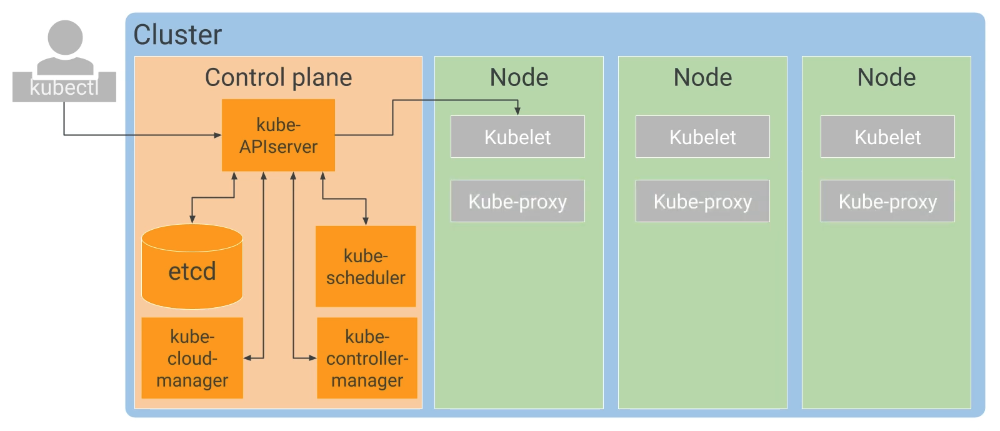
- Control plane (master node)
- Coordinate the entire cluster
- Critical Kubernetes components:
- kube-APIserver: direct interaction, accept commands (kubectl)
- etcd: clusters database; reliably store state of the cluster
- kube-scheduler: scheduling pods onto nodes
- kube-controller-manager: continuously monitors the state of the cluster through kube-APIserver
- kube-cloud-manger: interact with the underlying cloud providers
- Nodes
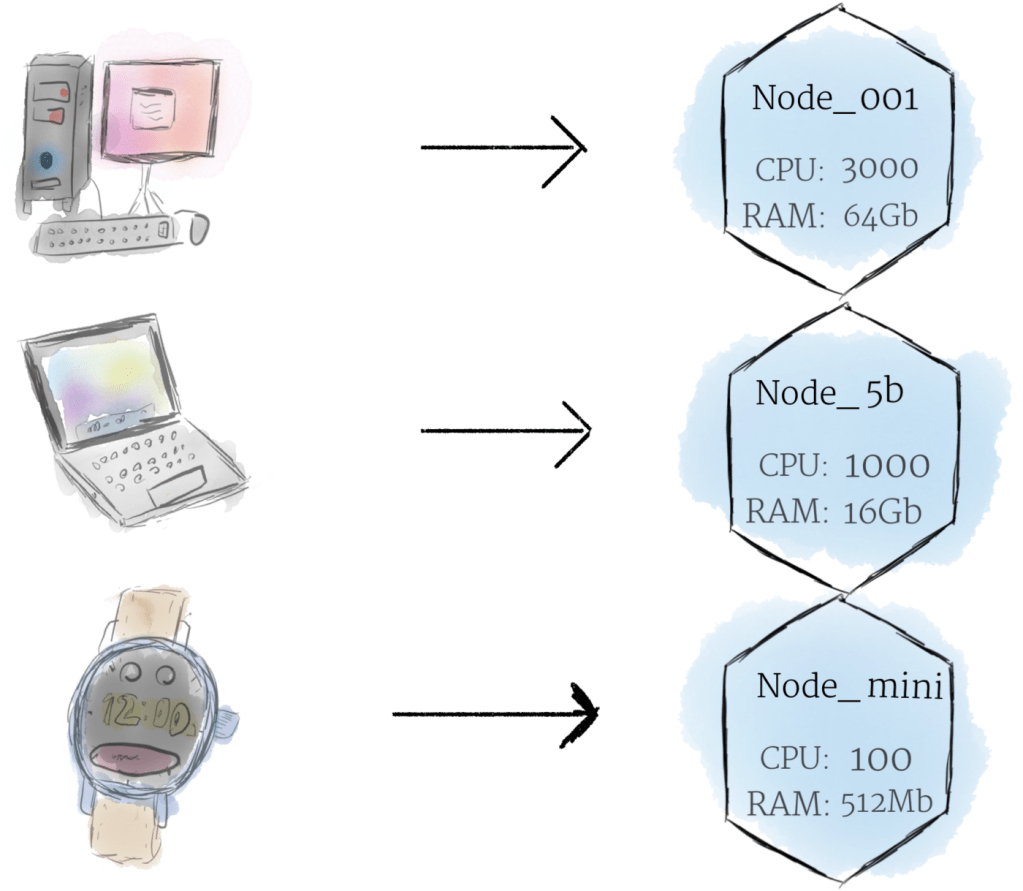
- A node represents a computing instance
- Job is to run pods
- Each node runs a small family of control plane: Kubelet
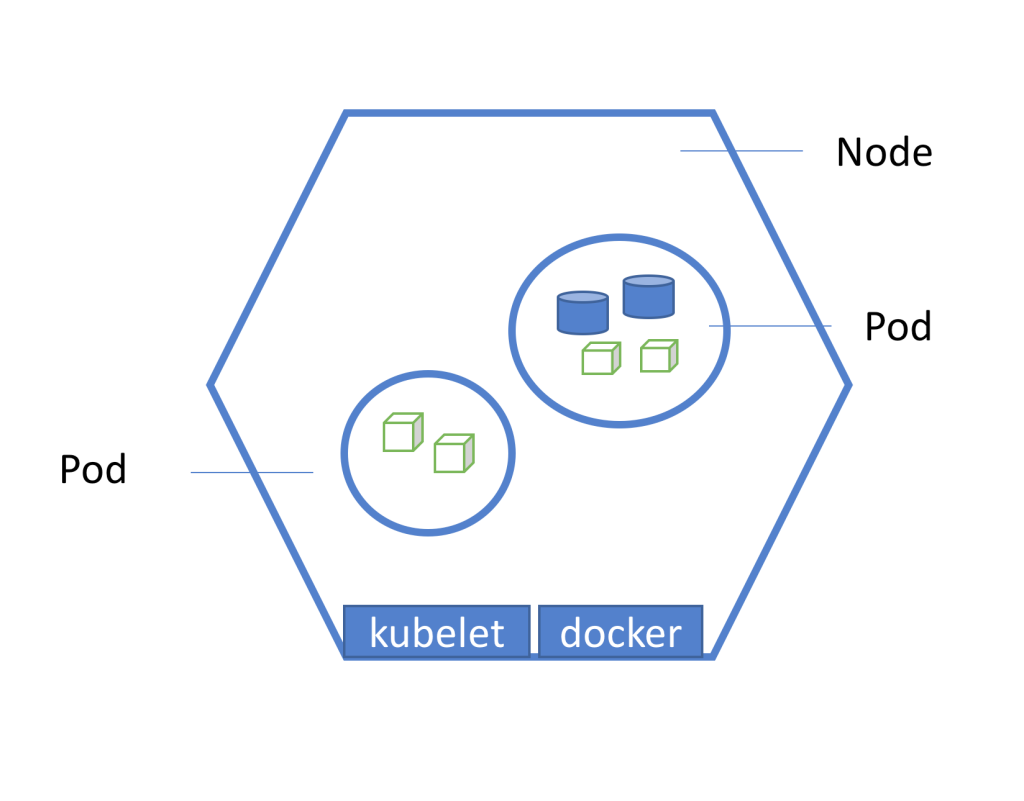
- Control plane (master node)
Kubernetes 101: Pods, Nodes, Containers, and Clusters
Hardware

Software

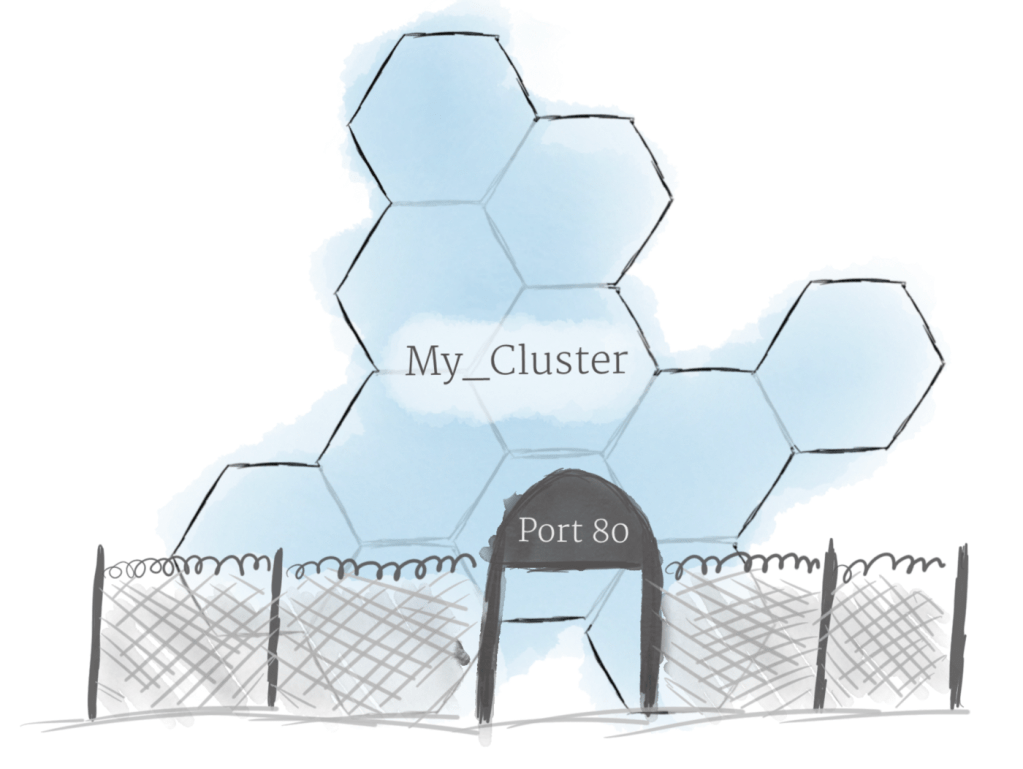
- Google Kubernetes Engine
- Regarding Nodes:
- Kubernetes doesn’t create nodes, cluster admins create nodes and add them to Kubernetes
- GKE manages this by deploying and registering Compute Engine instances as nodes
- GEK feature: A node pool is a subset of nodes within a cluster that share a configuration
- By default, a cluster with three nodes in same zone; regional cluster to improve availability with single API endpoint
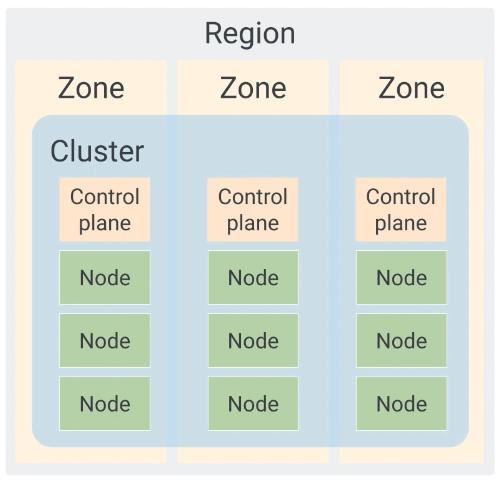
- A regional or zonal GKE cluster can be set up as a private cluster
- Not accessible to the public
- Accessible to
- Google cloud products
- Authorized networks
- Object Management
- Use version control on YAML files
- All objects are identified by name
- All objects are assigned a unique identifier (UID) by k8s
- Labels can be matched by label selectors
- Controller objects:
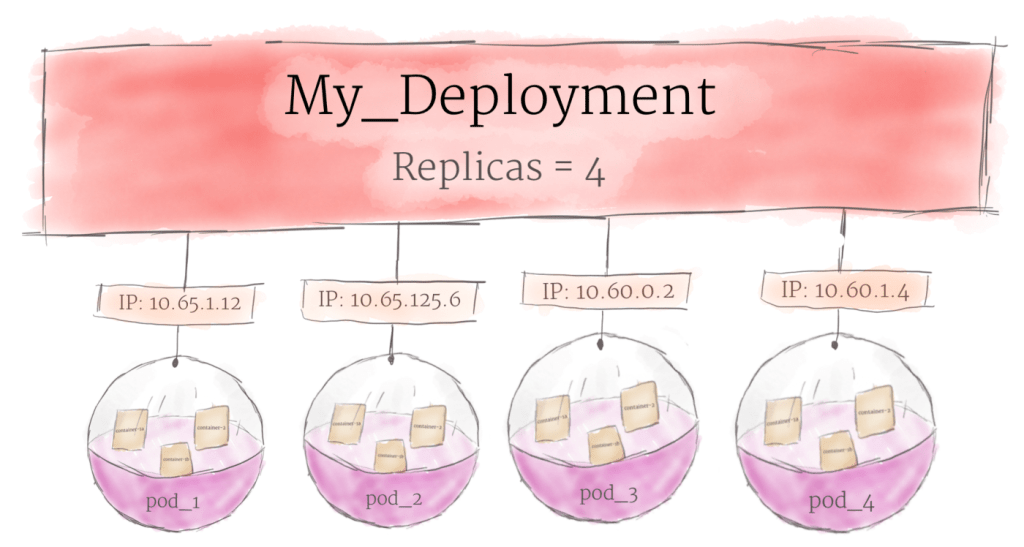
- Manage pods
- Types:
- Deployment: long-lived software components
- StatefulSet
- DaemonSet
- Job
- Namespaces
- More flexible assign namespace when run kubectl cmd instead of write in YAML file
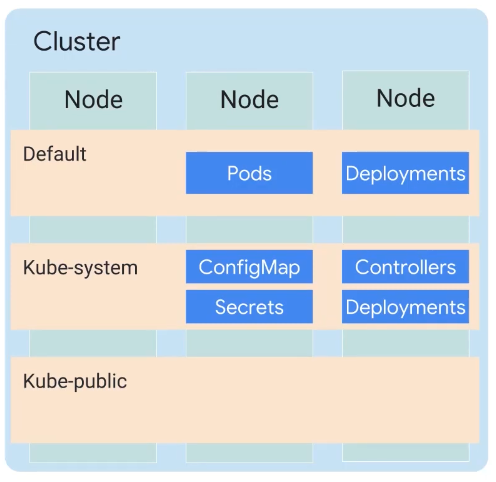
- More flexible assign namespace when run kubectl cmd instead of write in YAML file
- Regarding Nodes:
- Services:
- Provide load-balanced access to specified Pods
- Three types:
- ClusterIP: exposes the service on an IP address that is only accessible from within this cluster (default)
- NodePort: exposes the service on the IP address of each node in the cluster, at a specific port number
- LoadBalancer: expose the service externally, using a load balancing service provided by a cloud provider
- Controller objects:
- ReplicaSets
- Deployments
- Replication Controllers
- StatefulSets
- DaemonSets
- Jobs

- Application Migration: Migrate for Anthos
- Anthos is Google’s new managed applications platform, which lets you run Kubernetes and other workloads consistently, across on-premises data centers and multiple public clouds
- A migration requires an architecture to be built
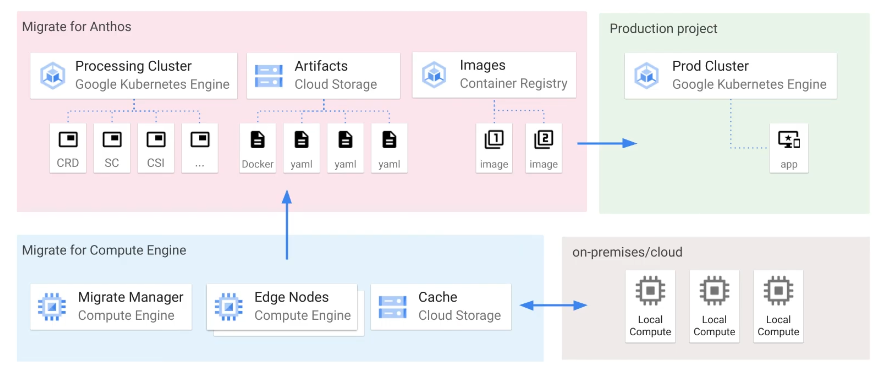
- Steps:
- Configure processing cluster, install Migrate For Anthos component
- Add migration source
- Generate and review plan, a plan template in YAML file
- Generate artifacts
- Test
- Artifacts & Image
- The runnables/libs are the artifact(s) produced when compiling source
- The image is the artifact produced by the whole “build”-step, basically an artifact containing one or more other artifact(s)
Kubernetes Workloads
- kubectl command
- kubectl transforms command-line entries into API calls
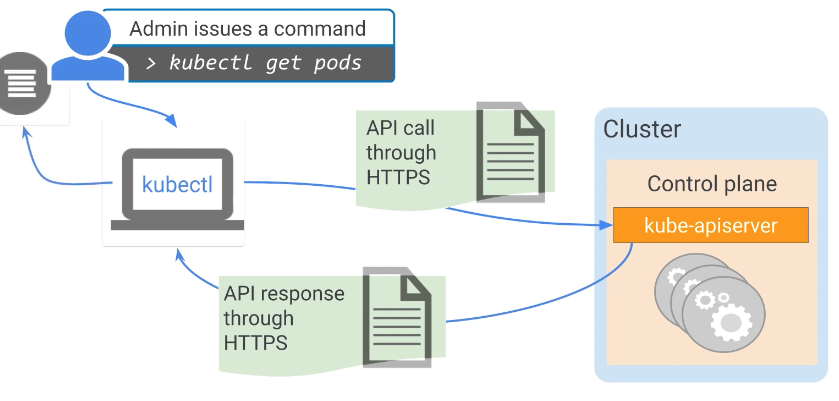
- Must be configured first
- Target cluster name
- Credentials for the cluster: gcloud get-credentials
- A tool for administering internal state of an existing cluster
- Uses:
- Create Kubernetes objects
- View objects
- Delete objects
- View and export configurations
- kubectl transforms command-line entries into API calls
- Deployment
- Describes a desired state of pods
- Well-suited for stateless applications, eg web frontend
- Three ways to create a Deployment
- Declaratively using a manifest file, kubectl apply -f
- Imperatively using kubectl run that specifies the parameters inline
- GCP console
- Scaling a Deployment
- Manually
- Autoscale
- Updating a Deployment
- kubectl apply -f <updated-yaml file>
- kubectl set image deployment
- kubectl edit
- GCP console
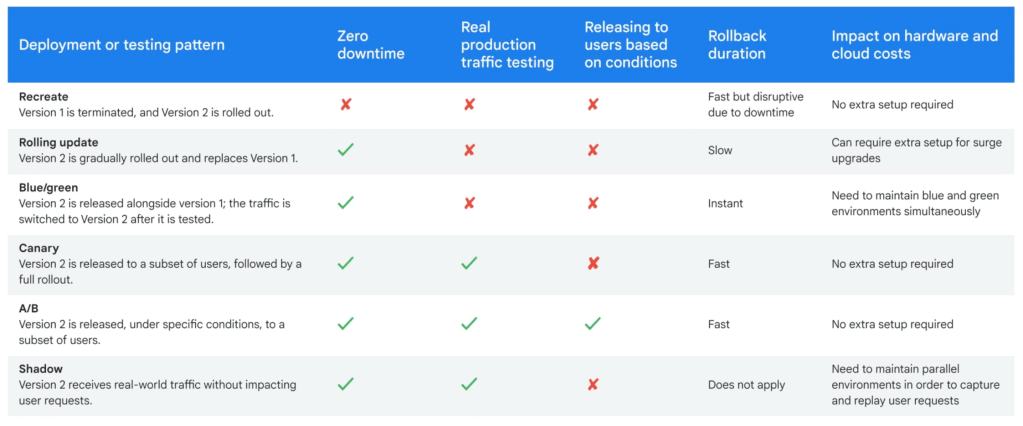
- Blue/green Deployment strategy
- Canary Deployment
- Based on Blue/Green method
- The traffic is gradually shifted to the new version
- Session affinity ensures that all client requests are sent to the same Pod
- A/B testing is used to measure the effectiveness of functionality in an application
- Shadow testing (?) allows you to run a new, hidden version
- Pod networking (?)
- A Pod is a group of containers with shared storage and networking
- Within the same Pod
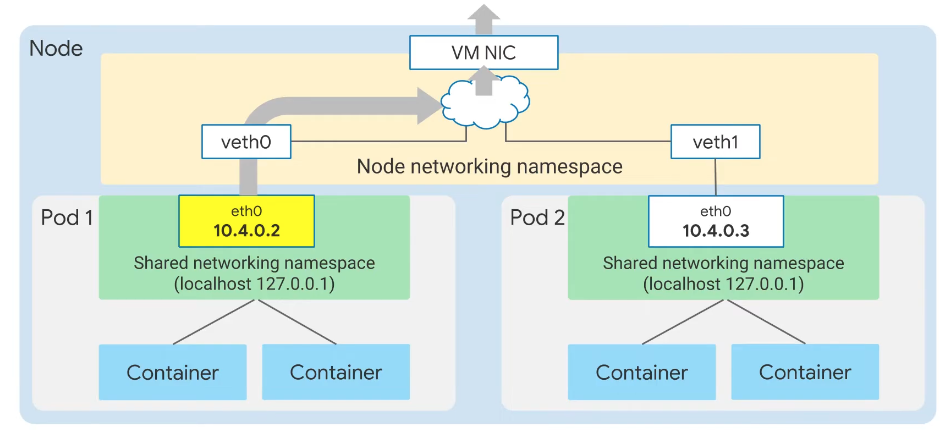
- Nodes get Pod IP addresses from address ranges from VPC
- Volumes
- Are a directory which is accessible to all of the containers in a Pod
- Some Volumes are ephemeral
- emptyDir:
- Attach to a Pod
- Allow the containers within the Pod to read and write
- Safe across container crushes
- ConfigMap:
- Inject application configuration data into Pods
- Object can be referenced in a volume
- Secret
- Stores sensitive info, such as passwords
- downwardAPI
- Makes data about Pods data available to containers
- emptyDir:
- Some are persistent
- PersistentVolume
- Manage durable storage in a cluster by Kubernetes
- Are independent of the Pod’s lifecycle
- Persistent Disks are used by GKE as PersistentVolumes
- PersistentVolumeClaim
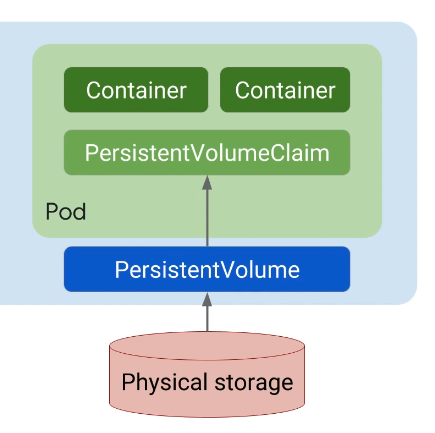
- PersistentVolume
- Stateful & Stateless
- Stateful services keep track of sessions or transactions and react differently to the same inputs based on that history
- Stateless services rely on clients to maintain sessions and center around operations that manipulate resources, rather than the state.
App Engine
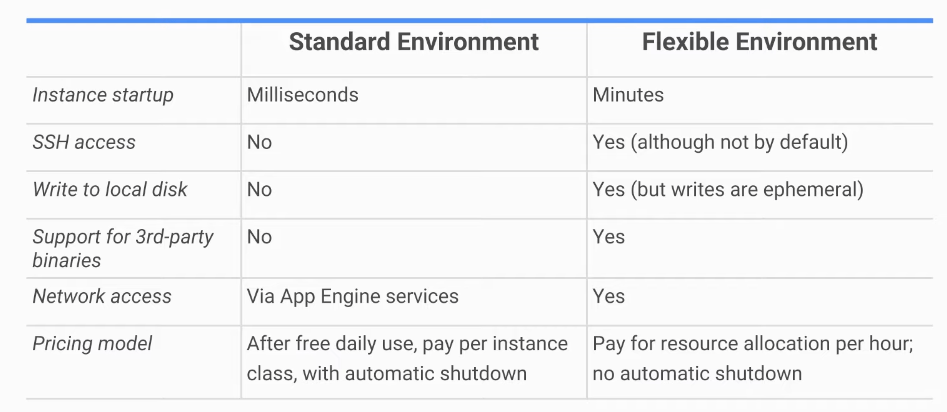
- Standard
- Easily deploy your applications
- Autoscale workloads
- Free daily quota
- Usage based pricing
- SDKs for development, testing locally and deployment to cloud
- Specific versions of Java, Python, PHPm and Go
- Sandbox constraints:
- No writing to local files
- All requests time out at 60s
- Limits on third-party software
- Access a variety of services using dedicated APIs
- Flexible
- Build and deploy containerized apps with a click
- No sandbox constraints
- Can access App Engine resources
Bonus
- Kubernetes VS Docker Compose
- Both container orchestration frameworks
- Kubernetes runs containers over a number of computers, virtual or real
- Docker Compose runs containers on a single host machine
 Yujin's Amusement Park