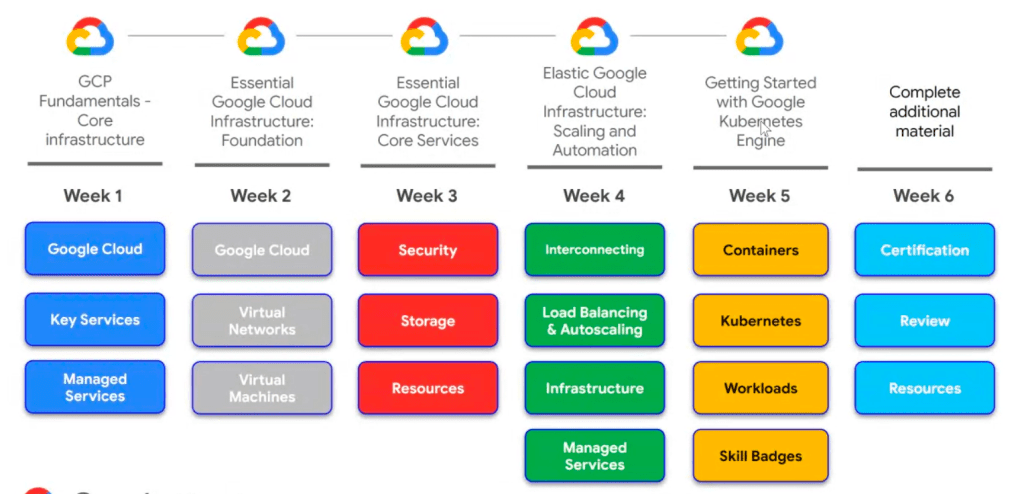
Identity and Access Management (IAM)
- IAM (Identity Access Management)
- Authentication & Authorisation
- Who? Can do what? On which resource?
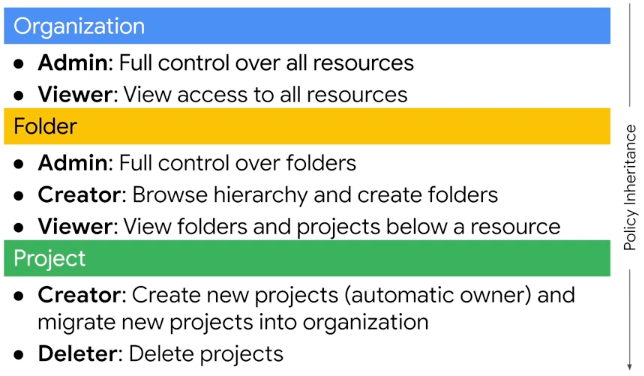
- IAM resource hierarchy
- Organization -> Folders -> Projects -> Resources
- Organization
- Root node for GC resources
- Roles:
- Organization Admin: Control over all cloud resources; useful for auditing
- Project Creator: Controls project creation; control over who can create projects
- Creating and managing organizations
- Created when a Google Workspace or Cloud Identity account creates a Google Cloud Project
- Folders provide an additional grouping mechanism and isolation boundary between projects
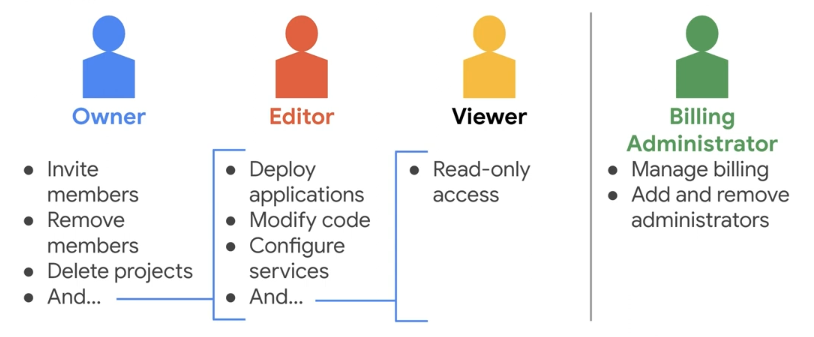
- There are three types of IAM roles
- Basic
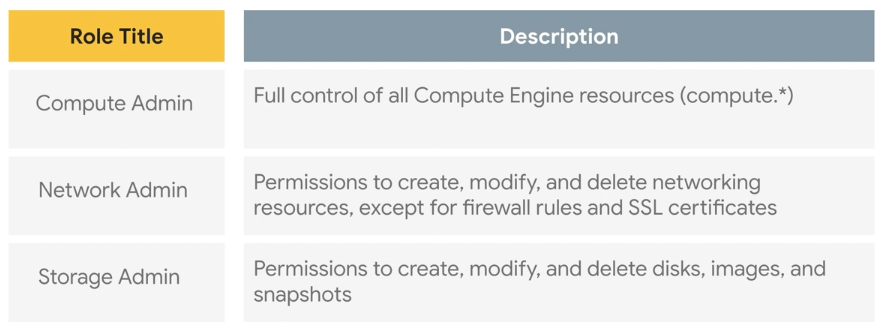
- Predefined
- Offer more fine-grained permissions on particular services
- A collection of permissions
- Custom
- Let you define a precise set of permissions
- Basic
- Members
- Google Account
- Service Account
- Google Group
- Cloud Identity
- Google Workspace Domain
- IAM policies
- A policy consists of a list of bindings
- A binding binds a list of members to a role
- Child policies cannot restrict access granted at the parent level
- Least privilege to identities, roles and resources
- Select the smallest scope that’s necessary for a task in order to reduce your exposure to risk
- Role recommendations suggest you remove or replace a role that gives your principals excess permissions
- IAM Conditions
- Temporary access for users in the event of a production issue
- To limit access to resources only for employees making requests from corporate office
- Specified in the role bindings of a resource’s IAM policy
- Organization policies
- A configuration of restrictions
- Defined by configuring a constraint with desired restrictions
- Applied to the organization node, folders or projects
- Service Account
- Belongs to an application, provides an identity for carrying out server-to-server interactions in a project without supplying use credentials
- Identified by an email address
- Three types of service accounts:
- User-created (custom)
- Built-in: Compute Engine and App Engine default service account
- Google APIs service account: runs internal Google processes on your behalf
- Default Compute Engine service account
- Automatically created per project with auto-generated name and email address
- Default project Editor
- Enabled on all instances created using gcloud or Cloud Console
- Authorization is the process of determining what permissions an authenticated identity has on a set of specified resources
- Scopes are used to determine whether an authenticated identity is authorised (read-only or read-write)
- IAM best practice
- Leverage and understand the resource hierarchy
- Use projects to group resources that share the same trust boundary
- Check policy granted on each resource
- “Principles of least privilege”
- Audit policies in Cloud Audit Logs
- Audit membership of groups used in polices
- Grant roles to groups instead of individuals
- Service accounts
- Be careful with serviceAccountUser role
- Give it display name clearly identifies its purpose
- Establish a naming convention for service accounts
- Establish key rotation policies and methods
- Audit with serviceAccount.keys.list() method
- Cloud Identity-Aware Proxy (IAP)
- Access control policies for applications and resources
- Identity-based access control
- Central authorization layer for applications accessed by HTTPS
- Access control policies for applications and resources
- Leverage and understand the resource hierarchy
Storage and Database Services
- Cloud Storage
- Object storage suitable for:
- Website content
- Storing data for archiving and disaster recovery
- Distributing large data objects to users via direct download
- Key features:
- Scalable to exabytes
- Time to first byte in milliseconds
- High availability across all storage class
- Single API across storage classes
- A collection of buckets that stores objects, a specific URL to access objects
- Four classes with three location types:

- Multi region: a large geographic area that contains two or more places
- Dual region: a specific pair of regions
- Region: a specific region
- Buckets
- Global unique name required
- Cannot be nested
- Objects
- Inherit storage class of bucket when created
- No minimum size; unlimited storage
- Access
- gsutil command
- (RESTful) JSON API or XML API
- Changing default storage classes
- Default class is applied to new objects
- Regional bucket can never be changed to multi-region/dual region
- Multi-region bucket can never be changed to regional
- Objects can be moved from bucket to bucket
- Object lifecycle management can mange the classes of objects
- Access control
- IAM
- ACLs (Access Control Lists)
- Who have access to buckets and objects, and the level of access
- a list of permit or deny rules detailing what can or can’t enter or leave the interface of a router
- If you have a large number of ACLs to update you might want to use the gsutil -m option, to perform a parallel (multi-threaded/multi-processing) update
- Signed URL
- Grant limited time access tokens that can be used by any user
- The URL is signed using a private key associated with their service account (?)
- Signed Policy Document
- Cloud Storage features:
- Customer-supplied encryption key (CSEK)
- Object Lifecycle Management
- Automatically delete or archive objects
- Object Versioning
- Supports the retrieval of objects that are deleted or overwritten
- Directory synchronization
- Object change notification
- Data import
- Transfer Appliance: hardware appliance
- Storage Transfer Service: high-performance of online data
- Offline Media Import: third-party service
- Strong consistency
- Objects are immutable in Cloud Storage
- Object storage suitable for:
- Filestore
- A managed file storage service
- Fully managed network attached storage (NAS) for Computer Engine and GKE instances
- A file system interface and a shared file system for data
- Use cases:
- Application migration
- Media rendering
- Electronic Design Automation (EDA)
- Data analytics
- Genomics processing
- A managed file storage service
- Cloud SQL
- A fully managed database service (MySQL, PostgreSQL, MS SQL Server)
- Patches and updates automatically applied
- You administer MySQL users
- Supports many clients
- Cloud Shell
- App Engine, Google Workspace scripts
- Applications and tools: SQL Workbench, Toad, External applications using standard MySQL drivers
- Services:
- HA(high availability) configuration: primary + standby instances
- Backup service: point-in-time recovery
- Import/export
- Scaling
- Up: machine capacity (require restart)
- Out: read replicas
- Connection type to an instance will influence security, performance and automation
- Private IP
- Cloud SQL Proxy
- Manual SSL connection / Authorized Networks
- A fully managed database service (MySQL, PostgreSQL, MS SQL Server)
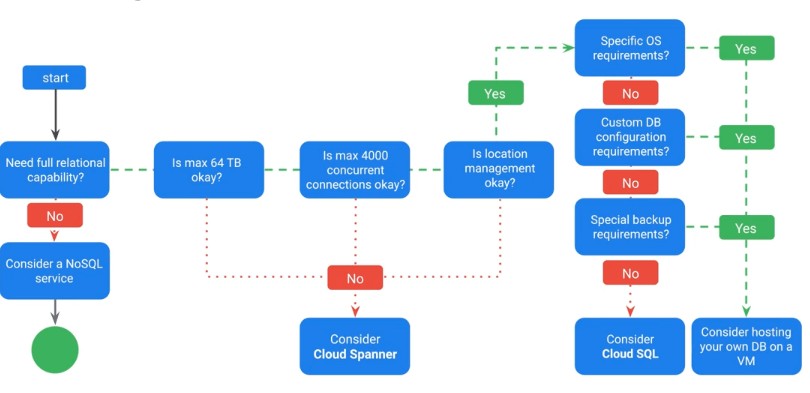
- Cloud Spanner
- Relational database with horizontal scale
- Scale to petabytes
- Strong consistency
- High availability
- Used for financial and inventory applications
- High monthly uptime
- Relational database with horizontal scale
- Firestore
- A NoSQL doment database
- Mobile, web and IoT apps at global scale
- Live sync and offline support
- Security features
- ACID transactions
- Multi-region replication
- Powerful query engine
- A NoSQL doment database
- Cloud Bigtable
- A NoSQL big data database service
- Petabyte-scale
- Consistent sub-10ms latency
- Seamless scalability for throughput
- Ideal for AdTech, Fintech, and IoT
- Storage engine for ML applications
- Easy integration with open source big data tools
- A NoSQL big data database service
Resource Management
- Project accumulates the consumption of all its resources
- Track resource and quota usage
- Enable billing
- Manage permissions and credentials
- Enable service and APIs
- Projects use three identifying attributes
- Project Name
- Project Number
- Project ID
- Track resource and quota usage
- Quota
- All resources are subject to project quotas or limits
- How many resources you can create per project
- 15 VPC networks per project
- How quickly you can make API requests in a project: rate limits
- 5 admin actions/second (Cloud Spanner)
- How many resources you can create per region
- 24 CPUs region/project
- How many resources you can create per project
- Purposes:
- Prevent runaway consumption in case of an error or malicious attack
- Prevent billing spikes or surprise
- Forces sizing consideration and periodic review
- All resources are subject to project quotas or limits
- Labels
- A utility for organizing GCP resources
- Attached to resources: VM, disk, snapshot, image
- key-value pairs
- Propagated through billing (?)
- Use cases:
- Inventory
- Filter resources
- In scripts:
- Help analyse costs
- Run bulk operations
- Comparison with tags
- Tags are user-defined strings that applied to instances, mainly used for networking
- A utility for organizing GCP resources
- Billing
- Budgets and email alerts
Resource Monitoring
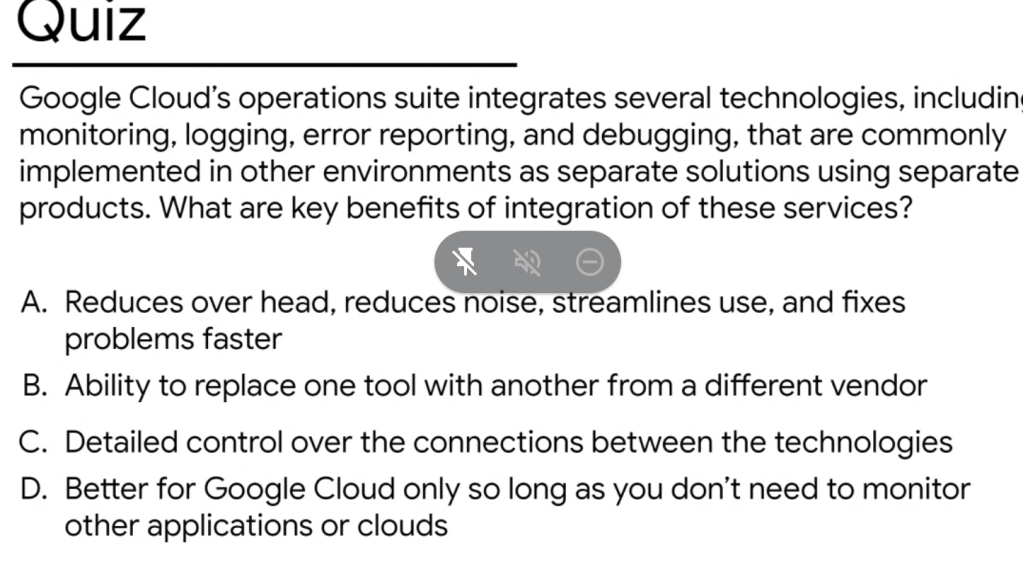
- Google Cloud’s operations suite (previously Stackdriver)
- Monitoring, logging, error reporting, trace and debugger
- Monitoring
- The base of site reliability engineering (SRE) to create ultra scalable and highly reliable software systems
- Features:
- Dynamic config and intelligent defaults
- Platform, system and application metrics
- Ingests data: Metrics, events, metadata
- Generates insight through dashboards, charts, alerts
- Uptime/health check
- Dashboards: visualize utilisation and network traffic
- Alerts: send notification under certain conditions
- Workspace is the root entity that holds monitoring and configuration information
- Determine monitoring needs up front
- Consider using separate Workspaces for data and control isolation
- Logging
- Store, search, analyze, monitor and alert on log data and events
- Logs are retained for 30 days, data can be exported to Cloud Storage, BigQuery, and Pub/Sub
- Analyze logs in BigQuery and visualize in Data Studio
- If your VMs are running in Google Kubernetes Engine or App Engine, the logging agent is already included in the VM image
- Error Reporting
- Aggregate and display errors for running could services
- Tracing
- Tracing system:
- Display data in near real-time
- Latency reporting
- Per-URL latency sampling
- Collects latency data
- App Engine
- Google HTTP(s) load balancers
- Applications instrumented with the Cloud Trace SDKs
- Tracing system:
- Debugging
- Inspect an application without stopping it or slowing it down significantly
- Debug snapshots
- Capture call stack and local variables of a running application
- Debug logpoints
- Inject logging into a service without stopping it (?)
- Storage
- Classification according to data structure stored
- Structured (RDBMS): Cloud SQL & Cloud Spanner
- No-SQL: Cloud Firestore (Datastore) & Cloud Bigtable
- Unstructured: Cloud Storage (S3)
- Analytical: Bigquery
- Classification according to data structure stored
- Structured DB
- Cloud SQL
- My-SQL, Postgre SQL, SQL Server
- Max 30 TB
- Regional Replication
- Cloud Spanner
- Unlimited Capacity
- Global Replication
- Cloud SQL
- No-SQL
- Streaming & Batch processing
- Cloud Firestore / Datastore
- Unlimited Capacity
- Global Replication
- Mobile (“Fire”) & Web
- Key-value pairs, Document DB, “User profiles”
- Cloud Bigtable
- Unlimited Capacity
- Global Replication
- < 10ms latency
- “Analytic” (“Big”)
- Unstructured
- Cloud Storage
- Bucket (folder, unique name) -> Data (Object)
- Cloud Storage
- Storage Class
- Standarded
- Multi-Regional
- Regional
- Dual Region
- Backup – cost also incurs with retrieval
- Nearline: min duration 30 days
- Coldline: min duration 90 days
- Archive: min duration 365 days
- Standarded
- Operation suite
- Logging
- Monitoring
- Debug
- Error Reporting
- Trace
- Profiler
Developing, Deploying, and Monitoring in the Cloud
- Cloud Source Repositories
- Fully featured Git repositories hosted on GCP
- Supports collaborative development of cloud apps
- Includes integration with Debugger
- Cloud Functions
- Create single-purpose functions that respond to events without a server or runtime
- Written in JavaScript; execute in managed Node.js environment on GCP
- Deployment Manager
- Infrastructure management service
- Create a .yaml template describing your environment and use Deployment Manager to create resources
- Provides repeatable deployments
- Monitoring: proactive instrumentation
Regions and zones
A region is a specific geographical location where you can host your resources
Bonus
- Service Level Agreement (SLA)
 Yujin's Amusement Park