
Content
- Virtual Networks (VPCs)
- Projects, networks, subnets
- Firewall rules and routes
- Virtual Machines
- Virtual machines, service accounts, differentiations
Virtual Machines in the Cloud
- Virtual Private Cloud Networking (VPC)
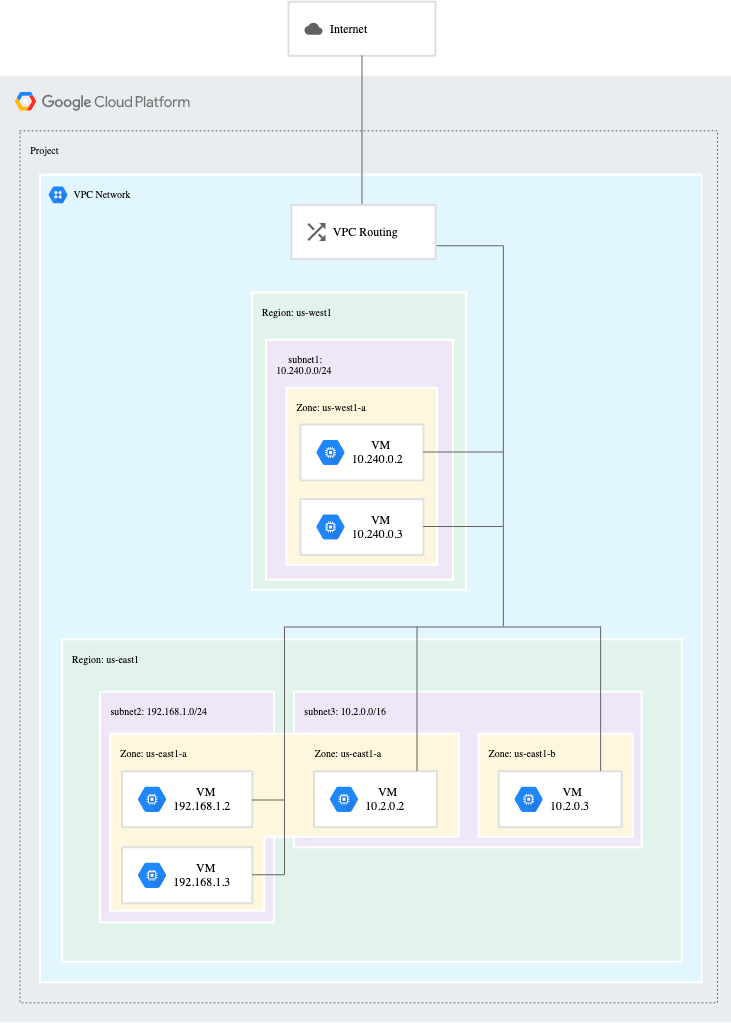
- Each VPC network is contained in a GCP project
- Connect your GCP resources to each other and to the internet
- Google Cloud VPC networks are global; subnets are regional (?)
- Compute Engine
- Managed virtual machines
- High CPU, high memory, standard and shared-core machine types
- Persistent disks
- Standard (default) or SSD,
- local SSD for scratch space
- Snapshots
- Resize disks with no downtime
- Instance metadata and startup scripts
- Customer friendly pricing
- Per-second billing, sustained use discounts, committed use discounts
- Preemptible instances: give Compute Engine permission to terminate it if its resources are needed elsewhere
- High throughput to storage at no extra cost
- Custom machine types: only pay for the hardware
- Scale up or scale out
- Big VMs for memory- and compute-intensive applications
- Autoscaling for resilient, scalable applications
- Managed virtual machines
- Control topology of VPC network
- Use route table to forward traffic within the network, even across subnets
- Firewall to control what network traffic is allowed
- Shared VPC to share a network or individual subnets, with other GCP projects
- VPC Peering to interconnect networks in GCP projects
- With global Cloud Load Balancing, application presents a single front-end to the world
- Users get a single, global anycast IP address
- Traffic goes over the Google backbone from the closest point-of-presence to the user
- Backends are selected based on load
- Only healthy backends receives traffic
- No pre-warming is required
- Load-balancing options (?)
- Global HTTP(S) – cross-regional for web application
- Global SSL Proxy – for secure sockets layer traffic that is not http
- Global TCP Proxy – tcp traffic that does not use secure sockets layer
- Regional – TCP, UDP on any port number
- Regional internal – GCP internal IP address
- Cloud DNS is highly available and scalable
- Create managed zones, then add, edit, delete DNS records
- Programmatically manage zones and records using RESTful API or command-line interface
- Cloud CDN (Content Delivery Network)
- Use Google’s globally distributed edge caches to cache content close to your users
- Use CDN interconnect if prefer to use a different CDN
- Interconnect options
- VPN – cloud router
- Direct Peering
- Carrier Peering
- Dedicated Interconnect – google service level agreement
- Partner Interconnect
Storage in the Cloud
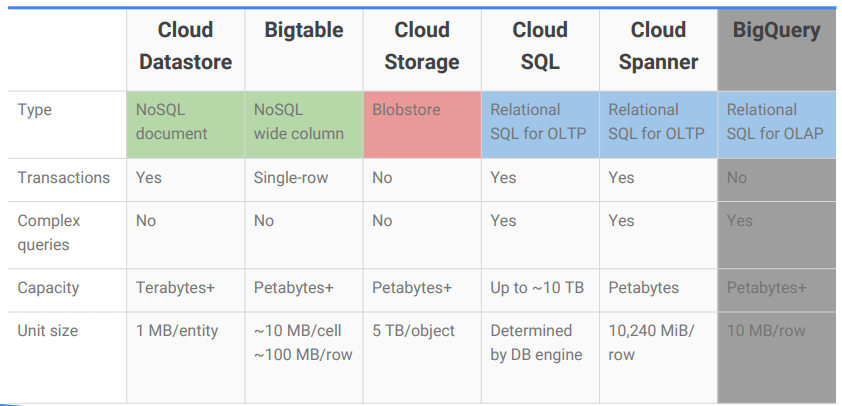
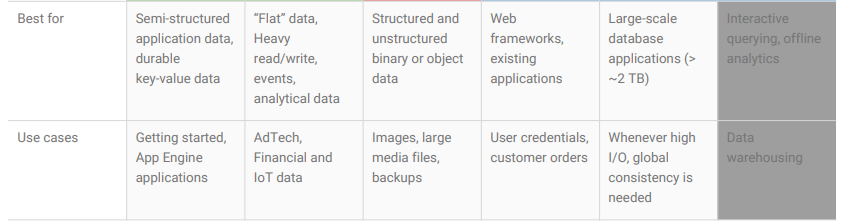
- Cloud Storage – binary large-object storage
- High performance, internet-scale
- Simple administration
- Does not require capacity management
- Data encryption at rest, and in transit by default from Google to endpoint
- Stored data is “immutable”, can only be updated to new version instead being modified
- Online and offline import services are available (?)
- Object storage
- Store arbitrary sequence of bytes, identified by a unique key
- File storage -> manage data as a hierarchy of folders
- Block storage -> operating system manages data as chunks of disk
- Cloud Storage files are organized into buckets
- Global unique name
- Location
- Storage class
- Regional – cheaper but less redundancy
- Multi-regional – costs more but geo-redundant, frequently accessed data and better performance for data-intensive computations
- Nearline – read and modification once a month or less
- Coldline – data archiving, online backup and disaster recovery
- Access Control List (ACL)
- Finer control
- Scope + Permission
- Update data into Cloud Storage
- Online transfer – self-managed copies using cmd tools or drag-and-drop
- Storage Transfer Service – scheduled, managed batch tranfers
- Transfer Appliance – Securely ship data in amount of petabyte
- Cloud Bigtable
- Fully managed NoSQL, wide-column database service for terabyte applications
- High throughput and scalability for non-structured key/value data, where each value is typically no larger than 10 Mb
- Integrated
- Accessed using HBase API
- Native compatibility with big data, Hadoop ecosystems
- Data attributes:
- Big, Fast and NoSQL
- Time series, big data and machine learning
- Bigtable Access Patterns
- Application API
- Streaming
- Batch Processing
- Cloud SQL is a managed RDBMS
- Offers MySQL and PostgreSQL databases as a service
- Automatic replication
- Managed backups
- Vertical scaling (read and write)
- Horizontal scaling (read)
- Google security
- Cloud SQL can be used with other GCP services
- App Engine
- Compute Engine
- External applications
- Cloud Spanner is a horizontally scalable RDBMS
- Supports:
- Automatic replication
- Strong global consistency
- Managed instances with high aviailability
- SQL (ANSI 2011 with extensions)
- Supports:
- Cloud Datastore is a horizontally scalable NoSQL DB
- NoSQL designed for application backends
- Fully managed
- Uses a distributed architecture to automatically manage scaling
- Built-in redundancy
- Supports ACID transactions
- Benefits:
- Schemaless access
- No need to think about underlying data structure
- Local development tools
- Includes a free daily quota
- Access from anywhere through a RESTful interface
- Schemaless access
- Firewall rules protect your VM instances from unapproved connections
- VPC network functions as a distributed firewall
- Firewall rules are applied to the network as a whole
- Connections are allowed or denied at the instance level
- Firewall rules are stateful (?)
- Implied deny all ingress and allow all egress
- Disk
- Local disk: same machine with VM, high performance
- Persistant disk:
- Bootable
- No change after Reboot, Restart and Deletion of the VM
- Resizable (Dynamic): cannot increase
- Memory disk
Virtual Networks
- VPC objects
- Projects
- Networks
- Default, auto mode, custom mode
- Subnetworks
- Regions
- Zones
- IP addresses
- Internal, external, range
- Virtual machines (VMs)
- Routes
- Firewall rules
- Projects and networks
- A project
- Associates objects and services with billing
- Contains networks (up to 5 for free) that can be shared/peered
- A network
- Has no IP address range
- Is global and spans all available regions
- Contains subnetworks
- Is available as default, auto or custom
- Types:
- Default
- Every project
- One subnet per region
- Default firewall rules
- Auto mode
- Default network
- One subnet per region
- Regional IP allocation
- Fixed /20 subnetwork per region
- Expandable up to /16
- Custom Mode
- No default subnets created
- Full control of IP ranges
- Regional IP allocation
- Expandable to IP ranges you specify
- Default
- A project
- Expand subnets without re-creating instances
- Cannot overlap with other subnets
- IP range must be a unique valid CIDR block
- New subnet IP ranges have to fall within valid IP ranges
- Can expand but not shrink
- Auto mode can be expanded from /20 to /16
- Avoid large subnets
- CIDR (Classless Inter-Domain Routing)
- Simplifies routing table
- Reduces Ipv4 exhaustion

- VMs have internal IP and external IP addresses
- Internal IP
- Allocated from subnet range to VMs by DHCP (Dynamic Host Configuration Protocol)
- DHCP lease is renewed every 24 hours
- VM name + IP is registered with network-scoped DNS
- External IP
- Assigned from pool (ephemeral)
- Reserved (static)
- Bring Your Own IP address (BYOIP)
- Internal IP
- Mapping IP addresses (?)
- A route is a mapping of an IP range to a destination
- Every network has:
- Routes that let instances in a network send traffic directly to each other
- A default route that directs packets to destinations that are outside the network
- Every network has:
- Firewall rules protect VM instances from unapproved connections
- VPC network functions as a distributed firewall
- Firewall rules are applied to the network as a whole
- Connections are allowed or denied at the instance level
- Firewall rules are stateful
- Implied deny all ingress and allow all egress
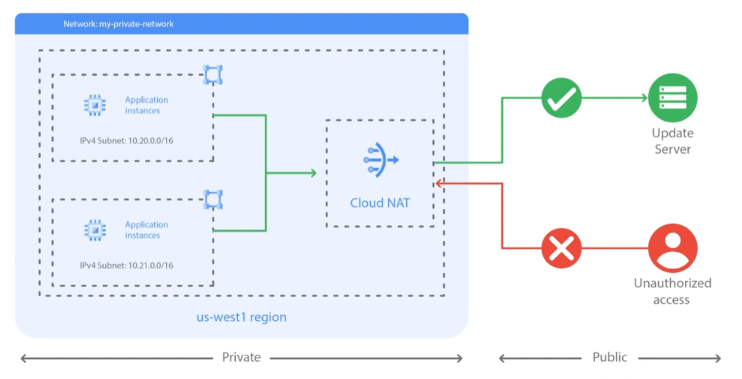
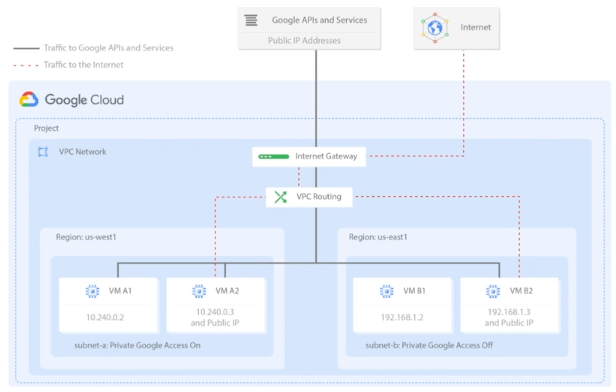
- Cloud NAT (Network address translation) provides internet access to private instances
- Allows instances without public IP addresses, and to have access to the internet in a controlled and efficient manner
- Enable private Google Access to allow VM instances that only have internal IP addresses to reach the external IP addresses of Google APIs and services
- Common network designs
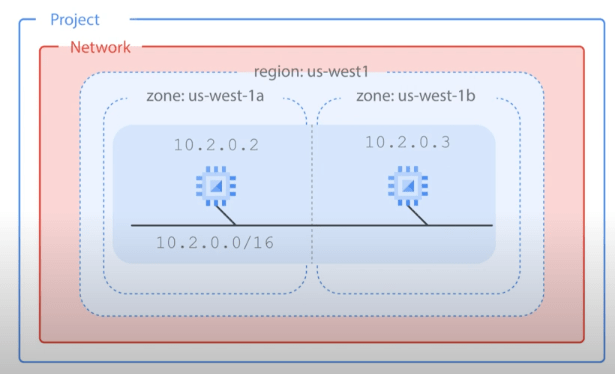
- Increased availability with multiple zones
- Improved availability without additional security complexity
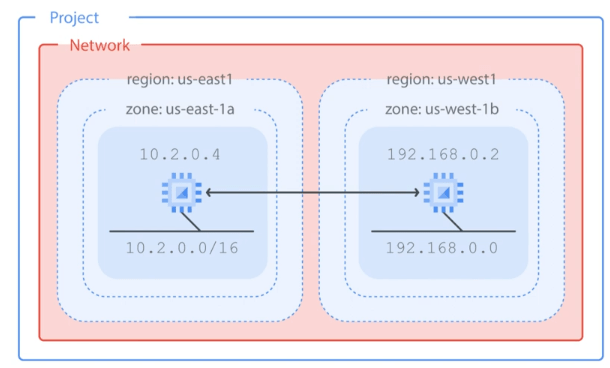
- Globalization with multiple regions
- Higher degree of failure independence
- Increased availability with multiple zones
Virtual Machines
- Them main VM options are CPU, memory, discs and networking.
- Compute Engine
- Infrastructure as a Service (IaaS)
- Predefined of custom machine types:
- vCPUs (cores) and Memory (RAM)
- Storage
- Zonal or regional persistent disk (HDD or SSD)
- Local SSD
- Cloud Storage
- Networking
- Linux or Windows
- Compute options
- Network throughput scales 2 Gbps per vCPU
- Theoretical max of 32 Gbps with 16 vCPU or 100 Gbps with T4 over V100 GPUs
- (A vCPU is equal to 1 hardware hyper-thread)
- Storage (Disks)
- Standard, SSD or local SSD
- Standard and SSD PDs scale in performance for each GB of space allocated
- Resize disks or migrate instances with no downtime
- Networking
- Default, custom networks
- Inbound/outbound firewall rules
- IP based
- Instance/group tags
- Regional HTTPS load balancing
- Network load balancing
- Dose not require pre-warming
- Global and multi-regional subnetworks
- VM access
- Linux: SSH
- SSH from Cloud Console or Cloud Shell via Cloud SDK
- SSH from computer or third-party client and generate key pair
- Requires firewall rule to allow tcp:22
- Windows: RDP (Remote Desktop Protocol)
- RDP clients
- Powershell terminal
- Requires setting the windows password
- Requires firewall rule to allow tcp:3389
- Linux: SSH

- Availability policy: “scheduling options”
- Automatic restart
- Automatic VM restart due to crash or maintenance event
- Not preemption or a user-initiated terminate
- Automatic VM restart due to crash or maintenance event
- On host maintenance
- determines whether host is live-migrated or terminated due to a maintenance event.
- Live migration (Default)
- During maintenance event, VM is migrated to different hardware without interruption
- Metadata indicates occurrence of live migration
- Automatic restart
- OS updates are a part of managing an infrastructure
- Patch management is an essential part of managing an infrastructure
- Keep infrastructures up-to-date
- Reduce the risk of security vulnerabilities
- OS patch management:
- Patch compliance reporting
- Patch deployment
- Several tasks:
- Create patch approvals
- Set up flexible scheduling
- Apply advanced patch config settings
- Manage these patch jobs or updates from a centralised location
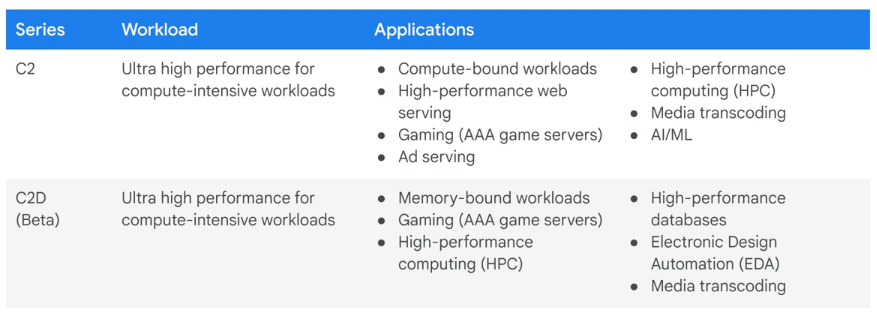
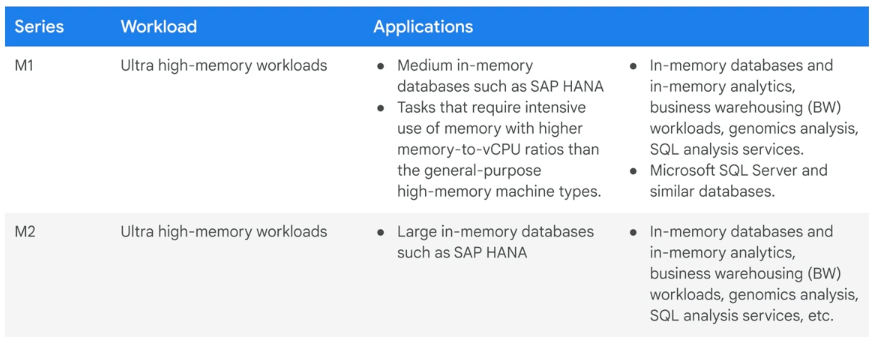
- Compute Options (vCPU & Memory)
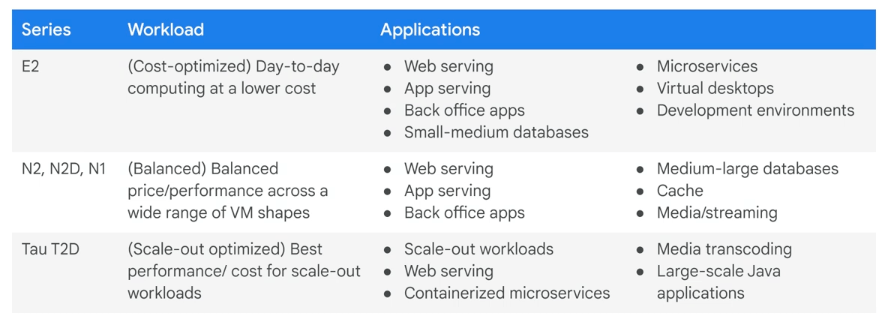
- Machine families – a curated set of processor and hardware configurations optimized for specific workloads
- General-purpose
- Compute-optimized
- Memory-optimized
- Accelerator-optimized
- Machine families – a curated set of processor and hardware configurations optimized for specific workloads

- Pricing
- Per-second billing, with minimum of 1 minute
- vCPUs, GPUs and GB of memory
- Resource-based pricing
- Each vCPU and each GB of memory is billed separately
- Discount:
- Sustained use
- Committed use
- Preemptible VM instances
- Recommendation Engine
- Notifies you of underutilized instances
- Free usage limits
- Per-second billing, with minimum of 1 minute
- Special compute configurations
- Preemptible
- Lower price for interruptible service (up to 80%)
- VM might be terminated at any time
- No charge if terminated in the first minute
- 24 hours max
- 30-second terminate warning, but not guaranteed
- Time for a shutdown script
- No live migrate, no auto restart
- One major use case: batch processing jobs
- CPU quota for a region could be split between regular and preemption (?)
- Default: preemptible VMs count against region CPU quota
- Sole tenant node
- A physical Compute Engine server that is dedicated to hosting VM instances only for your specific project
- When have existing operating system licenses
- Shielded VMs offer verifiable integrity
- Secure Boot
- Virtual trusted platform module (vTPM)
- Integrity monitoring
- Confidential VMs allow you to encrypt data in use
- Encrypts data while it’s being processed
- Easy to use with no changes to code or performance compromise
- N2D Compute Engine VM running on second generation AMD Epyc processors
- High memory capacity, high throughput and supports parallel and compute heavy workloads
- Preemptible
- Images
- What is in an image?
- Boot loader
- Operating system
- File system structure
- Software
- Customizations
- Public base images
- Google, third-party vendors, and community; Premium images
- Linux
- CentOS, CoreOS, Debian, RHEL(p), SUSE(p), Ubuntu, openSUSE, and FreeBSD
- Windows
- Windows Server 2019(p), 2016(p), 2012-r2(p)
- SQL Server pre-installed on windows(p)
- Custom images
- Create new image from VM: pre-configured and installed SW
- Import from on-prem, workstation, or another cloud
- Management features: image sharing, image family deprecation
- Machine image
- A compute engine resource that stores all the configuration, metadata, permissions and data from one or more disks required to create a virtual machine instance
- Disk backups, as well as instance cloning and replication
- What is in an image?
- Boot disk
- VM comes with a single root persistent disk
- Image loaded onto root disk during first boot
- Bootable: you can attach to a VM and boot from it
- Durable: can survive VM terminate
- Some OS images are customized for Compute Engine
- Can survive VM deletion if default is disabled
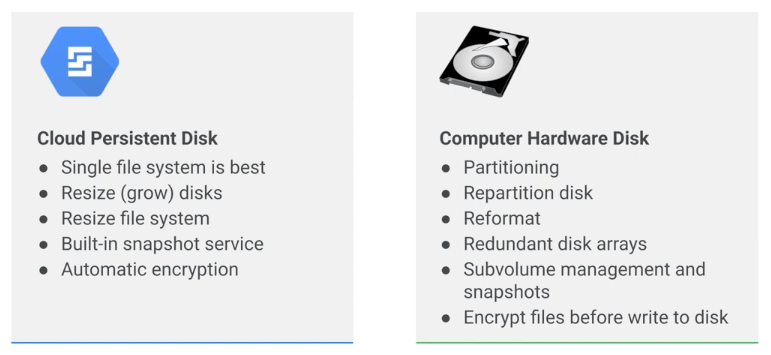
- Persistent disks
- Network storage appearing as a block service
- Attached to a VM through the network interface
- Durable storage / Bootable
- Snapshots: incremental backups
- Performance: scales with size
- HDD (magnetic) or SSD (faster, solid-state) options
- Disk resizing: even running and attached
- Can be attached in read-only mode to multiple VMs
- Zonal or Regional
- pd-standard
- pd-ssd
- pd-balanced
- pd-extreme (zonal only)
- Encryption keys
- Google-managed
- Customer-managed
- Customer-supplied
- Network storage appearing as a block service
- Local SDD disks are physically attached to a VM
- Ephemeral
- More IOPS, lower latency and higher throughput than persistent disk
- 375GB disk up to eight, total of 3TB
- Data survives a reset, but not a VM stop or terminate
- VM-specific: cannot be reattached to a different VM
- RAM disk
- tmpfs
- Faster than local disk, slower than memory
- Use when your application expects a file system structure and cannot directly store its data in memory
- Fast scratch disk, or fast cache
- Very volatile, erase on stop or restart
- May need a larger machine type if RAM was sized
- Consider using a persistent disk back up RAM disk data
- Common Compute Engine actions
- Metadata server, startup and shutdown scripts
- Move an instance to a new zone
- Automated process (within the same region)
- gcloud compute instances move
- Update references to VM (not automatic)
- Manual process (between regions)
- Snapshot all persistent disks on the source VM
- Create new persistent disks in destination zone restored from snapshots
- Create new VM in the destination zone and attach new persistent disks
- Assign static IP to new VM
- Update references to VM
- Delete the snapshots, original disks, and original VM
- Automated process (within the same region)
- Snapshot:
- Backup critical data
- Migrate data between zones
- Persistent disk snapshots
- Snapshot is not available for local SSD
- Creates an incremental backup to Cloud Storage
- Not visible in your bucket, managed by the snapshots service
- Consider cron jobs for periodic incremental backup
- Snapshots can be restored to a new persistent disk
- New disk can be in another region or zone in the same project
- Basic of VM migration
- Snapshot doesn’t backup VM metadata, tags, etc
- Resize persistent size
- Can grow but not shrink
Bonus
- Apache VS NGINX
- Both are Web Server
| Apache | NGINX | |
| History | Playing a key role in the initial growth of the World Wide Web | Address the performance limitations of Apache web servers |
| Process-driven | Event-driven | |
| various server roles | A reverse proxy server for HTTP, HTTPS, SMTP, POP3, and IMAP protocols A load balancer and HTTP cache A frontend proxy for Apache and other web servers, combining the flexibility of Apache with the good static content performance of NGINX |
Bonus
- Border Gateway Protocol (BGP)
- a gateway protocol that enables the internet to exchange routing information between autonomous systems (AS)
 Yujin's Amusement Park