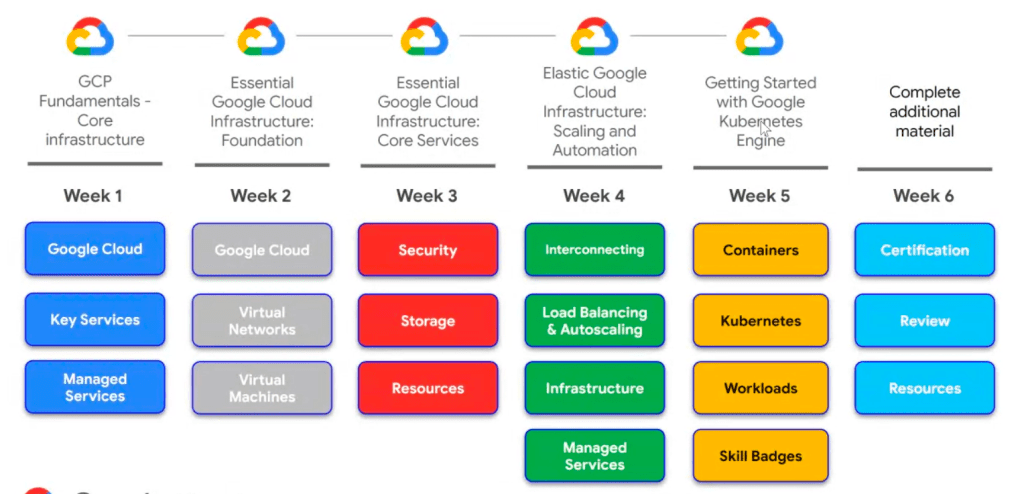
- Google Cloud Pillars
- Compute
- Storage
- Networking
- Security
Compute
- GCE (VM) – highly customized
- GKE
- App Engineer
- Cloud Functions
- Cloud Run
Introducing Google Cloud
- What is Cloud Computing?
- On-demand self-service – No human intervention needed to get resources
- Broad network access – Access from anywhere
- Resource pooling – Provide shares resources to customers
- Rapid elasticity – Get more resources quickly as needed
- Measured service – Pay only for what you consume
- Cloud history
- Colocation
- User-configured, managed and maintained
- Virtualization
- User-configured, Provider-managed and maintained
- Serverless
- Fully automated
- Colocation
- Every company is a data company
- GCP computing architectures (?)
- Compute Engine – IaaS
- Kubernetes Engine – Hybrid
- App Engine – PaaS
- Cloud Functions – Serverless logic
- Managed Services – Automated elastic resources
- From managed infrastructure to dynamic infrastructure
- GCP is organized into regions and zones
- Regions are independent geographic areas that consist of zones
- Locations within regions tend to have round-trip network latencies of under 5 milliseconds on the 95th percentile
- A zone is a deployment area for Google Cloud Platform resources within a region
- Regions are independent geographic areas that consist of zones
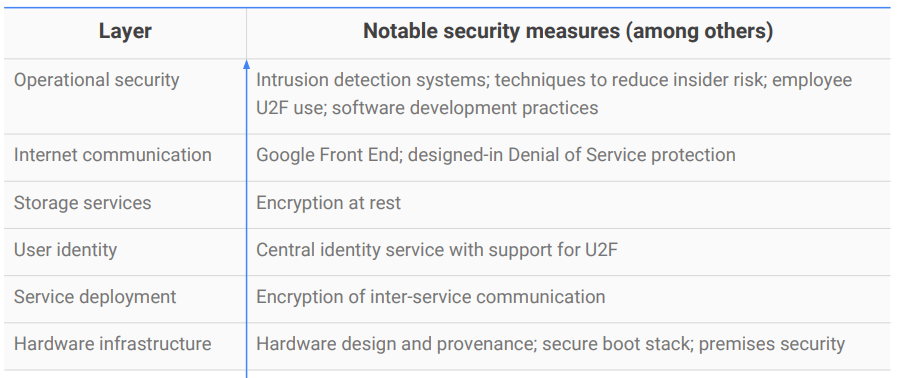
- Security is designed into Google’s technical infrastructure
- Google Cloud security foundations guide
- Open API
- GCP services are compatible with open source products
- Quiz:
- Platform as a Service
- Infrastructure as a Service
- Virtualized data center
Getting Started with Google Cloud
- Cloud security requires collaboration
- Google is responsible for managing its infrastructure security
- Customer is responsible for securing data (Content, access policies etc )
- Resource Management
- Projects, folders, and organization nodes are all places where policies can be defined
- Identity and Access Management (IAM): who can do what on which resources
- Least privilege: each user should have only those privileges needed to do their job
- All GCP services are associated with a project
- Track resource and quota usage
- Enable billing
- Manage permissions and credentials
- Enable services and APIs
- Projects have three identifying attributes:
- Project ID: unique, unchangeable, human-readable string chosen by customer
- Project name: not unique, changeable, chosen by customer
- Project number: unique, unchangeable, assigned by Google
- Folders offer flexible management
- The Cloud IAM Folders feature lets you assign policies to resources at a level of granularity you choose
- The resources in a folder inherit IAM policies assigned to the folder
- Folders group projects under an organization
- Folders can contain projects, other folders or both
- Use folders to assign policies
- IAM resource hierarchy
- A policy is set on a resource
- Each policy contains a set of roles and role members
- Resources inherit policies from parent
- Resource policies are a union of parent and resource
- A less restrictive parent policy overrides a more restrictive resource policy
- A policy is set on a resource
- IAM policy
- Who:
- Google account or Cloud Identity user
- Google group
- Service account
- Cloud identity or G Suite domain
- Can do what:
- IAM role: a collection of permissions
- Primitive – apply across all GCP services in a project
- Owner
- Editor
- Viewer
- Billing administrator
- Predefined – apply to a particular GCP service in a project
- Custom – let you define a precise set of permissions, cannot be used at folder level
- Primitive – apply across all GCP services in a project
- IAM role: a collection of permissions
- Who:
- Service Accounts control server-to-server interactions
- Give permissions to a service rather than to a person
- Authenticate from one service to another
- Control privileges used by resources
- Identified with an email address and authenticate with cryptographic keys
- Identity and resource at the same time
- Ways to interact with Google Cloud
- Cloud Platform Console
- Cloud Shell and Cloud SDK
- Cloud Console Mobile App
- REST-based API
- Cloud Platform Console – web user interface
- Centralized console for all project data
- Developer tools
- Cloud Source Repositiories
- Cloud Shell
- Test Lab (mobile app testing)
- Access to product APIs
- Manage and create projects
- Google Cloud SDK
- SDK includes CLI tools for Cloud Platform products and services
- gcloud, gsutil (Cloud Storage), bq (BigQuery)
- Available as Docker image
- Available via Cloud Shell
- SDK includes CLI tools for Cloud Platform products and services
- RESTful APIs
- Programmatic access to products and services
- Typically use JSON as an interchange format
- Use OAuth 2.0 for authentication and authorization
- Enabled through the Google Cloud Platform Console
- To help control spend, most include daily quotas and rates
- APIs Explorer
- Programmatic access to products and services
- Use client libraries to control GCP resources from within code (?)
- Cloud Client Libraries
- Community-owned, hand-crafted client libraries
- Google API Client Libraries
- Open source, generated
- Support various languages
- Cloud Client Libraries
- Cloud Console Mobile App
- Manage virtual machines and database instances
- Manage apps in Google App Engine
- Manage billing
- Visualize projects with a customisable dashboard
- Cloud Marketplace gives quick access to solutions
- Quickly deploy functional software packages that run on Google Cloud Platform offered both by Google and other third-party vendors
- Pay for the underlying GCP resource usage
- Some solutions also assess third party license fees
Essential Google Cloud Infrastructure: Core Services
- Compute services
- Compute Engine
- Google Kubernetes Engine
- App Engine
- Cloud Functions
- Cloud Run
- Interacting with Google Cloud
- GCP Console
- Web-based graphical UI
- console.cloud.google.com
- Cloud Shell
- Browser-based interactive shell environment
- A temporary VM with 5GB of persistent disk storage that has the Cloud SDK pre-installed
- GCP Console
 Yujin's Amusement Park