Once specify one field to retain, must specify all fields need to retain
_id field is by default retained
Reassign existing field values and derive entirely new fields
When selecting on subfields, must surround arguments with quotes
Lab
// $match -> Title is a string
  {
    $match: {
      title: {
        $type: "string"
      }
    }
  }

// $project -> split the title on spaces
{
  $project: {
    titleArray: { $split: ["$title", " "] },
    _id: 0
  }
}

// Size of the array
  {
    $match: {
      titleArray: { $size: 1 }
    }
  }


// Array is not empty
{ $match: { writers: { $elemMatch: { $exists: true } } }
Chapter 2: Basic Aggregation – Utility Stages
$addFields
Similar to project
Functions:
New computed fields
Modify existing fields
$geoNear (?)
Perform geoqueries within the pipeline
Must be the first stage in a pipeline
$geoNear can be used in sharded collections while $near can’t
The collection can have one and only one 2dsphere index
If using 2dsphere, the distance is returned in meters
Cursor-like Stages
$sort can take advantage of indexes if used early within a pipeline
By default, $sort will only use up to 100 megabytes of RAM, Setting allowDiskUse: true will allow for larger sorts
$sample
Select a set of random documents in a collection
{$sample: {size: <N, how many documents>}}
Case 1:
N <= 5% of the number of documents AND source collection has >= 100 documents AND $sample is the first stage
Pseudo-random cursor
Case 2:
Other conditions
In-memory random sort and select specific number of documents
Lab
// the 25th
  {
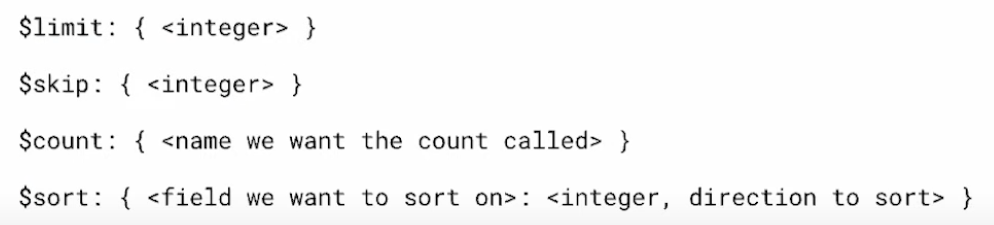
    $skip: 24
  },
  {
    $limit: 1
  }
$group
Group documents according to criteria
{ $group: { _id: <matching/grouping criteria> }}
Accumulator expressions will ignore documents with a value at the specified field that isn’t of the type the expression expects or if the value is missing, will return null
_id is where to specify what incoming documents should be grouped on
Can use all accumulator expressions within $group
$group can be used multiple times within a pipeline
It may be necessary to sanitise incoming data
{
  $group:
    {
      _id: <expression>, // Group By Expression
      <field1>: { <accumulator1> : <expression1> },
      ...
    }
 }
Accumulator Expressions with $project
The accumulator expressions within $project operate over an array in the current document, they do not carry values over all documents
Available Accumulator Expressions:
$sum, $avg, $max, $min, $stdDevPop, $stdDevSam
Expressions have no memory between documents
May still have to use $reducer or $map for more complex calculations
group all documents together -> _id: null
$match: { awards: /Won \d{1,2} Oscars?/ }
$unwind
Deconstructs an array field from the input documents to output a document for each element
$unwind only works on array values
There are two forms for unwind
Using unwind on large collections with big documents may lead to performance issues
$lookup
Collection in from field cannot be sharded and must exist within the same database
$lookup forms a strict equality comparison
Often after a lookup, we want to follow it with a match stage to filter documents out
Lookup retrieves the entire document that matched
as if already exists in the working document that field will be overwritten
{
   $lookup:
     {
       from: <collection to join>,
       localField: <field from the input documents>,
       foreignField: <field from the documents of the "from" collection>,
       as: <output array field>
     }
}
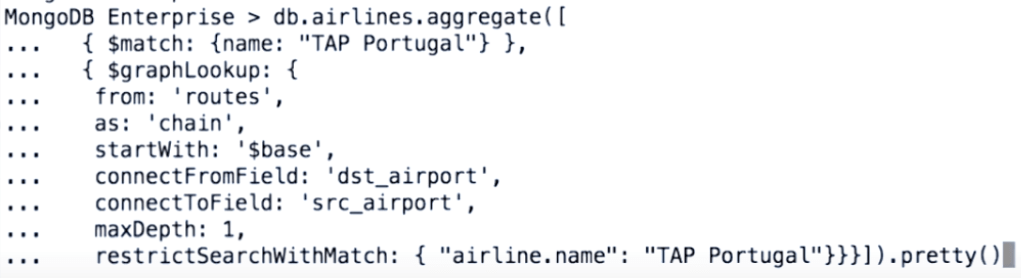
graphLookup (!)
MongoDB -> general purpose database to support operational and analytical use cases
Recursive common table expressions in SQL
Transitive closure
graphLookup allows looking up recursively a set of documents with a defined relationship to a starting document
Limitation:
Memory allocation -> $allowDiskUse
Indexes -> connectToField
No Sharding
Chapter 4: Core Aggregation – Combining Information
Facet navigation to enable creating an interface that characterizes query results across multiple dimensions or facets
Faceting is a popular analytics capability that allow users to explore data by applying multiple filters and characterizations
Views contain no data themselves, they are stored aggregations that run when queried
Read-only
Chapter 6: Aggregation Performance
“Realtime” Processing
Provide data for applications
Query performance is more important
Batch Processing
Provide data for analytics
Query performance is less important
Index Usage
Some stages can make use of index, put them as front as possible
Memory Constraints
Results are subject to 16MB document limit
Use $limit and $project
100MB of RAM per stage
use indexes
allowDiskUse, last option, do not work with $graphLookup
Aggregation Pipeline on a sharded cluster
Primary shard will do the merge results:
$out
$facet
$lookup
$graphLookup
Optimization
$match before $sort
$limit before $skip
Pipeline Optimization
Avoid unnecessary stages, for example $project, the Aggregation Framework can project fields automatically if final shape of the output document can be determined from initial input
Use accumulator expressions, $map, $reduce, $ filter in project before an $unwind
Every high order array function can be implemented with $reduce if the provided expressions do not meet needs
 Yujin's Amusement Park