Chapter 0: Introduction & Setup
- Linux Basics
- Grant read-only access to the user
- chmod 400 <path-to-the-file>
- Change file ownership
- chown [new owner]:[group] <file name>
- Grant read-only access to the user
Chapter 1: The Mongod
- The Mongod
- d stands for daemon
- Core server of MongoDB, handling connection, request and persisting data
- Default configuration
- port: 27017
- dbpath: /data/db
- bind_ip: localhost
- auth: disabled
// Example Configuration File
storage:
  dbPath: "/data/db"
systemLog:
  path: "/data/log/mongod.log"
  destination: "file"
replication:
  replSetName: M103
net:
  bindIp : "127.0.0.1,192.168.103.100"
tls:
  mode: "requireTLS"
  certificateKeyFile: "/etc/tls/tls.pem"
  CAFile: "/etc/tls/TLSCA.pem"
security:
  keyFile: "/data/keyfile"
processManagement:
  fork: true

// Connect config file and instance
mongod --config <file_path>
mongod -f <file_path>

// Start as daemon
mongod --fork --logpath /var/log/mongodb/mongod.log- File Structure
- diagnostic.data and log files assist support in diagnostics
- Do not modify files or folders in the MongoDB data directory
- Defer to MongoDB support or documentation for instructions on interacting with these files
- Basic commands
- Basic Helper Groups
- db.<method>()
- db.<collection>.<method>()
- rs.<method>() (replica set)
- sh.<method>() (sharded cluster)
- db.<method>()
- User Management
- db.createUser()
- db.dropUser()
- Collection Management
- db.renameCollection()
- db.<collection>.createIndex()
- db.<collection>.drop()
- Database Management
- db.dropDatabase()
- db.createCollection()
- Database Status
- db.serverStatus()
- Basic Helper Groups
- Database Command VS Shell Helper
- Shell helpers wrap an underlying database command
- Introspect a Shell Helper
- shell helper without ()
- Fork and run as mongod as a daemon
- Daemon: the conventional name for a background, non-interactive process
// Creating index with Database Command
db.runCommand({
   "createIndexes":"<collection_name>",
       "indexes":[
          {
             "key":{ "product": 1 },
             "name": "name_index"
          }
       ]
    }
 )

// Creating index with Shell Helper
db.<collection>.createIndex(
  { "product": 1 },
  { "name": "name_index" }
)

// db is the current active database assigned using USE
db.runCommand({<Command>})

// Provide information about how a command works
db.commandHelp("<command>")

// Introspect a Shell Helper
db.<collection>.createIndex- Logging Basics
- Log Type 1: Process Log
- Collect the activities on the MongoDB instance
- db.getLogComponents() to retrieve the log components from current database
- “verbosity” field is the default verbosity level
- Log Verbosity Levels
- -1: inherit from parent
- 0: Default Verbosity, to include information message only
- 1 – 5: increases the verbosity level to include Debug messages
- How to view / access Log
- getLogs() database command in mongo shell
- Utility tail -f
- Information in a log message
- Timestamp
- Severity levle
- F – Fatal, E – Error, W – Warning, I – Information (Verbosity level 0), D – Debug (Verbosity level 1- 5)
- Operation
- Connection
- Command details
- Log Type 1: Process Log
// View the log through the Mongo Shell
db.adminCommand({ "getLog": "global" })

// Vie the logs through the command line
tail -f /data/db/mongod.log- Profiling the Database
- For debugging slow operations
- Profile is in database-level, the operation on each database is profiled separately
- Events captured by the profiler
- CRUD
- Administrative operations
- Configuration operations
- Settings
- 0 – profiler is off
- 1 – profiler collects data for the operations that take longer than the value of slowms (default 100ms)
- 2 – profiler collects data for all operations
// Get profiler level
db.getProfilingLevel()

//Set profiling level:
db.setProfilingLevel(1)
db.setProfilingLevel( 1, { slowms: 100 } )- Basic MongoDB Security
- Authentication
- Verifies the Identity of a user – Who are you?
- Authorization
- Verifies the privileges of the user – What do you have access to?
- Authentication Mechanisms
- Client authentications
- SCRAM (default) – Salted Challenge Response Authentication Mechanism
- X.509
- Enterprise Only
- LDAP – Lightweight Directory Access Protocol
- KERBEROS
- Cluster authentication
- Client authentications
- Authorization: Role Based Access Control
- Each user has one or more Roles
- Each Role has one or more Privileges
- A Privilege represents a group of Actions and the Resources those actions apply to
- Localhost Exception
- Allows access a MongoDB server that enforces authentication but does not yet have a configured user for authentication
- Must run Mongo Shell from the same host running the MongoDB server
- The local host exception closes after create a first user
- Always create a user with administrative privileges first
- Authentication
// Lauch standalone mongod
mongod -f /etc/mongod.conf

// Connect to mongod
mongo --host 127.0.0.1:27017

// Create first user in the admin db
use admin
db.createUser({
  user: "root",
  pwd: "root123",
  roles : [ "root" ]
})

// Connect to mongod and authentication
mongo --username root --password root123 --authenticationDatabase admin

// DB stats
db.stats()

// Shutdown server
use admin
db.shutdownServer()- Roles in MongoDB
- Custom Roles
- Tailored roles to attend specific needs of sets of users
- Built-in Roles – pre-packaged MongoDB Roles
- Database level
- Database User – read, readWrite
- Database Administration – dbAdmin, userAdmin, dbOwner
- Cluster Administration – clusterAdmin, clusterManager, clusterMonitor, hostManager
- Backup/Restore – backup, restore
- Super User – root
- All Database
- Database User – readAnyDatabase, readWriteAnyDatabase
- Database Administration – dbAdminAnyDatabase, userAdminAnyDatabase
- Super User – root
- Database level
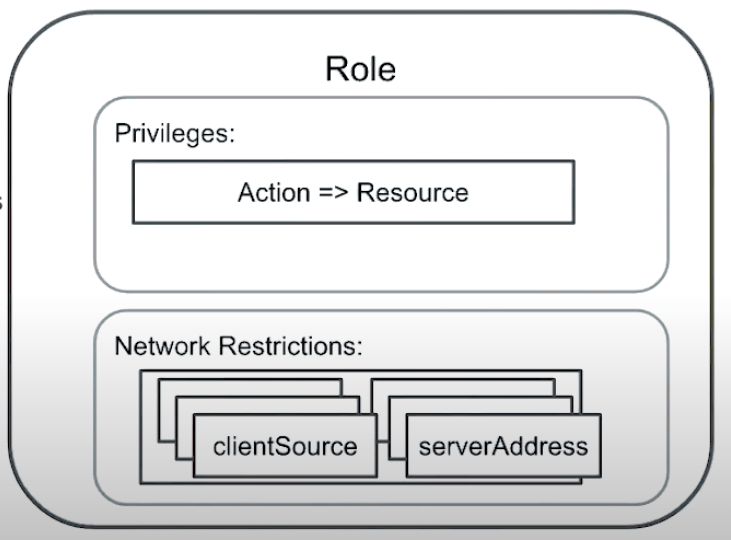
- Role Structure
- Role is composed of set of Privileges
- Resource
- Database
- Collection
- Set of Collections
- Cluster
- Replica Set
- Shard Cluster
- Actions allowed over a resource
- Resource
- Network Authentication Restrictions
- clientSource
- serverAddress
- Role is composed of set of Privileges
- Custom Roles
// Create security officer
db.createUser(
  { user: "security_officer",
    pwd: "h3ll0th3r3",
    roles: [ { db: "admin", role: "userAdmin" } ]
  }
)

// Create database administrator
db.createUser(
  { user: "dba",
    pwd: "c1lynd3rs",
    roles: [ { db: "admin", role: "dbAdmin" } ]
  }
)

// Grant role to user
db.grantRolesToUser( "dba",  [ { db: "playground", role: "dbOwner"  } ] )

// Show role privileges
db.runCommand( { rolesInfo: { role: "dbOwner", db: "playground" }, showPrivileges: true} )- Database Administration Roles
- dbAdmin
- DDL operations
- userAdmin
- dbOwner
- Combines the privileges granted by the readWrite, dbAdmin and userAdmin roles
- dbAdmin
- Server Tools Overview
- mongostat
- Give quick statistics on a running mangod
- mongorestore & mongodump
- Import and export mongodb collections in BSON format
- Create a dump folder, including data and meta data
- mongoimport & mongoexport
- Import and export mongodb collections in JSON format
- Need to specify output file name
- mongostat
// list mongodb binaries
find /usr/bin/ -name "mongo*"

// import
mongoimport --port 27000 -u "m103-admin" -p "m1-3-pass" --authenticationDatabase "admin"
Chapter 2: Replication
- What is Replication?
- MongoDB uses asynchronous statement-based replication
- Failover: one of the secondary takes over as primary when the previous primary goes wrong
- Election: the process secondary nodes vote for each other to select the new primary
- What is Replica Set?
- Replica sets are groups of mongods that share the copies of the same information between them
- Roles of a node:
- Primary node: read and write operations
- Secondary nodes: replicate all of the information and serve as a high availability node in case of failure of primary node
- Hidden nodes – provide specific read-only workloads
- Delayed nodes – allow resilience to application level corruption without relying on cold backup files to recover from such an event
- A cold backup, also called an offline backup, is a database backup during which the database is offline and not accessible to update
- Arbiter: holds no data, can vote, cannot be primary, will cause significant consistency issues
- Asynchronous Replication
- Protocol Version 1 (PV1) – default
- Operation log (oplog) – a segment based lock that keeps track of all
- Have at least an odd number of node in replica set
- Adding members to the set, failing members or change configuration aspects will trigger topology change
- Replica set of 2n nodes has the same failover as of (2n -1) nodes
- Up to 50 nodes – geographic distributions to get closer to users
- Maximal 7 voting members – otherwise may cause election round to take too much time
- When connecting to a replica set, the mongo shell will redirect the connection to the primary node
- Enabling internal authentication in a replica set implicitly enables client authentication
// Config items to enable replica set
security:
  keyFile: /var/mongodb/pki/m103-keyfile
replication:
  replSetName: m103-example

// Create keyfile and grant permission
sudo mkdir -p /var/mongodb/pki/
sudo chown vagrant:vagrant /var/mongodb/pki/
openssl rand -base64 741 > /var/mongodb/pki/m103-keyfile
chmod 400 /var/mongodb/pki/m103-keyfile

// Start mongod
mongod -f node1.conf

// Connect to one of the instance, create a user and init replica set
mongo --port 27011

use admin
db.createUser({
  user: "m103-admin",
  pwd: "m103-pass",
  roles: [
    {role: "root", db: "admin"}
  ]
})

rs.initiate()

// Get replica set status
rs.status()

// Add other members
rs.add("m103:27012")
rs.add("m103:27013")

// Get current topology
rs.isMaster()

// Force changing primary
rs.stepDown()- Replication Configuration
- JSON Object that defines the configuration options of our replica set share among the members
- Can be modified via shell
- Members field determines the topology and roles of the individual nodes
- Import fields:
- _id: belong to which replica set
- members:
- arbiterOnly: arbiter node, priority 0
- hidden: cannot be primary, priority 0
- priority: the higher the value, the higher possibility to be primary, change will trigger election
- slaveDelay: delayed nodes
- Replication Config Document is used to define Replica set
- Replication Commands
- rs.status()
- Reports health on replica set nodes
- Uses data from heartbeats
- No heartbeat info from current node which runs the command
- rs.isMaster()
- Describes a node’s role in the replica set
- Shorter output then rs.status()
- db.serverStatus()[‘repl’]
- Section of the db.serverStatus() output
- Similar to the output of rs.isMaster()
- Compare to isMaster, includes “rbid” -> count of rollback
- rs.printReplicationInfo()
- Only returns oplog data relative to current node
- Contains timestamps for first and last oplog events
- rs.status()
- Local DB
- oplog.rs
- The central point of replication mechanism
- Keep track of all statements being replicated in replica set
- Capped collection – the size of the collection is limited to specific size -> stats.capped, stats.size, stats.maxSize
- By default, takes about 5% of the free disk, can be configured manually
- The size of oplog determines the replication window, the amount of time that it will take to fill in oplog/ overwrite entries given the current workload
- Replication window
- The time to fill in oplog and start overwriting
- How long time replica set can afford a node to be down without requiring any human intervention to auto recover
- One operation may result in many oplog.rs entries
- Data in local DB would not be replicated to other nodes, and other nodes can not see them except for the oplog.rs
- oplog.rs
- Reconfiguring a running replica set
- Revoke voting privilege instead of removing the secondary node when having even number of nodes
- Hidden nodes to store backup
// To start a arbiter and add to a replica set
mongod -f arbiter.conf
rs.addArb("m103:28000")

// Assigning the current configuration to a shell variable we can edit, in order to reconfigure the replica set:
cfg = rs.conf()

// Update the configuration variable
cfg.members[3].votes = 0
cfg.members[3].hidden = true
cfg.members[3].priority = 0

// Update replica set with new config
rs.reconfig(cfg)- Reads and Writes on a replica set
- By default, cannot read from secondary nodes
- For data consistency, cannot write to secondaries
- If the replica set can no longer reach a majority of the nodes, all the remaining nodes in the set become secondaries
- Failovers and Elections
- Rolling upgrade: upgrade one server at a time starting with the secondaries; eventually upgrade the primary
- After upgrade secondaires, safely stepDown() primary
- Elections
- Take place whenever there’s a change in topology
- Reconfiguration will always trigger an election
- New primary:
- High priority
- Latest copy of data
- Priority 0 cannot run for election but can vote
- Rolling upgrade: upgrade one server at a time starting with the secondaries; eventually upgrade the primary
// Enable read commands on a secondary node
rs.slaveOk()- Write Concern
- An acknowledgement mechanism can be added to write operations
- Higher levels of acknowledgement produce a stronger durability guarantee
- Durability means the the write has propagated to the number of replica set member nodes specified in the write concern
- Trade-off between durability and time
- Write concern levels
- 0 – don’t wait for acknowledgement
- 1 (default) – wait for acknowledgement from the primary only
- >= 2 – wait for acknowledgement from the primary and one or more from secondaries
- “majority” – wait for acknowledgement from a majority of replica set members (divided by 2 and round up)
- Write Concern options
- wtimeout – <int> the time to wait for the requested write concern before marking the operation as failed
- j – < true | false > requires the node to commit the write operation to the journal before returning an acknowledgement
- Read Concern
- An acknowledgement mechanism can be added to read operations
- The read operation only returns data acknowledged as having been written to a number of replica set members
- Read Concern Levels
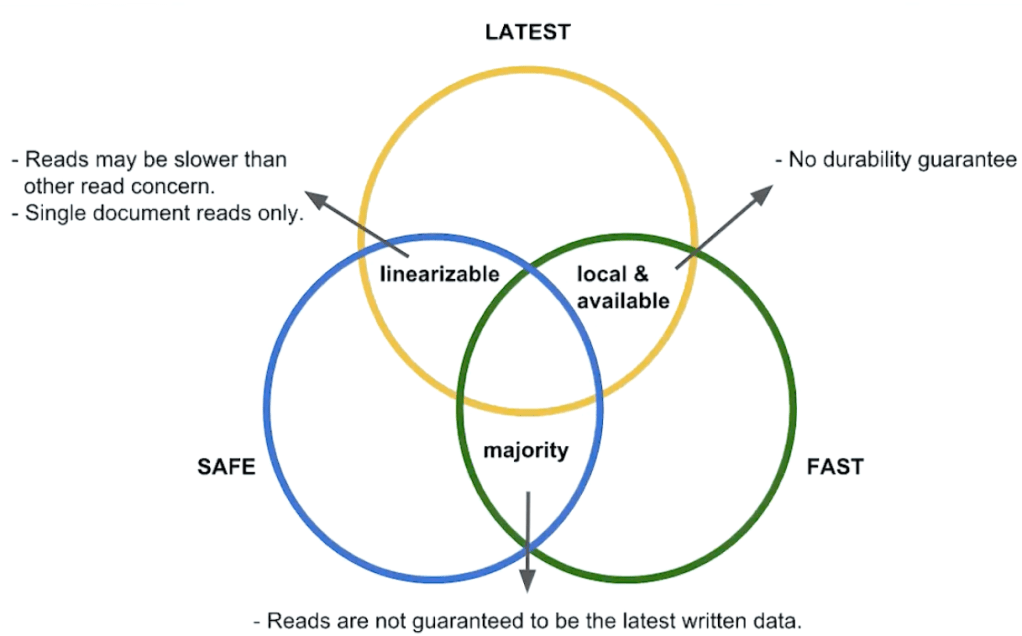
- Local (default) – returns the most recent data in the cluster, any data freshly written to the primary
- Available (sharded cluster) – default against secondary members
- Majority – may not get the latest data in your cluster
- Linearisable
- Read Preference
- Allow to route read operations to specific members of a replica set
- Driver side setting
- Modes
- primary (default)
- primaryPreferred
- secondary
- secondaryPreferred
- nearest (The node with least network latency to the host, geographically local read)
Chapter 3: Sharding
- What is Sharding?
- Vertical scaling: improve individual machine, increase RAM, hard disk or CPU
- Horizontal Scaling: add more machines and distribute data among those machines
- Shards: store distributed collections
- Config Server: store metadata about each shard
- Mongos: routes queries to the shards
- When to Shard?
- Indicators for sharding:
- Economically viable to scale up
- Throughput, speed, volume
- Operational impact on scalability
- Operational workload
- Larger dataset -> larger indexes
- Economically viable to scale up
- Sharding allows process parallelisation:
- Backup
- Restore
- Initial Sync
- Each server should be between 2tb to 5 tb
- Sharding benefits from
- Single thread operations
- Geographical distributed data – zone sharding
- Indicators for sharding:
- Sharding Architecture
- Metadata in Config Servers constantly keep track of where each piece of dat lives in the cluster
- Shards are dynamic for
- Evenly distribution of data
- Split chunk if the chunk gets too large
- Primary shard
- Stores all the non-sharded collections on that database
- Setting up a shard cluster
- Config Server – a regular MongoD, with sharding, clusterRole
- MongoS – inherits users from config servers
- Enable sharding on a RS
// Config add to a CSRS (Config server replica set)
sharding:
  clusterRole: configsvr
replication:
  replSetName: m103-csrs

// Mongos config
sharding:
  configDB: m103-csrs/192.168.103.100:26001,192.168.103.100:26002,192.168.103.100:26003

// Start mongos server
mongos -f mongos.conf

// Check status
sh.status()

// Enable sharding for a node using rolling upgrade
sharding:
  clusterRole: shardsvr

// Shut down and restart node
use admin
db.shutdownServer()

mongod -f node2.conf

// Primary
rs.stepDown()

// Connect back to MongoS and add new shard to cluster from mongos:
sh.addShard("m103-repl/192.168.103.100:27012")- Config DB
- No need to write to, but useful information to read from
- databases collection:
- return each database as one document
- collections collection:
- collections that have been sharded
- chunks collection:
- Each chunk for every collection is returned as a document
- Inclusive minimal and exclusive maximal define the chunk range of the shard key
- Shard Key
- Field or fields mongoDB uses to partition data
- Shard key fields must exist in every document in the collection
- Also support distributed read operations
- Shard key fields must be indexed
- Shard keys are immutable
- Cannot change the shard key fields post-sharding
- Cannot change the value of the shard key field post-sharding
- Shard keys are permanent
- Cannot unshard a sharded collection
// Enable sharding on a database, no collection is sharded yet
sh.enableSharding("m103")

// Create index for shard key field
db.products.createIndex( { "sku": 1 } )
// hashed shard key
db.products.createIndex({ "sku": "hashed" } )

// Shard the products collection on sku
sh.shardCollection( "m103.products", { "sku": 1 } )
// hashed shard key
sh.shardCollection( "m103.products", { "sku": "hashed" } )- Picking a good shard key
- High Cardinality -> many possible unique shard key values
- Low Frequency -> low repetition of a given unique shard key value
- Monotonic Change -> avoid shard keys that change monotonically, monotonically-changing shard key result in hotspots
- Read Isolation, take into consideration of the frequent queries
- Hashed Shard Keys
- A shard key the underlying index is hashed
- The actual data is untouched, the hashed shard key is used for partitioning data evenly across the sharded cluster
- Hashed shard keys provide more even distribution of monotonically-changing shard keys
- Drawbacks:
- Queries on ranges of shard key values are more likely to be scatter-gather
- Cannot support geographically isolated read operations using zoned sharding
- Hashed Index must be on a single non-array field
- Hashed Indexes don’t support fast sorting
- Chunks
- Chunks are logical groups of documents, with sharding, MongoDB splits sharded collections into chunks of data
- Can only live at one designated shard at a time
- All documents of the same chunk live in the same shard
- By default, chunkSize = 64MB, 1MB <= chunkSize <= 1024MB
- Change chunk size: db.settings.save({_id: “chunksize”, value: 2})
- Jumbo Chunks:
- Larger than the defined chunk size
- Cannot move jumbo chunks
- Once marked as jumbo the balancer skips these chunks and avoids trying to move them
- In some cases these will not be able to be split

- Balancing
- Responsible for evenly distributing chunks across the sharded cluster
- Balancer runs on the primary member of the config server replica set
- Balancer can migrate chunks in parallel
- A given shard cannot participate in more than one migration at a time
- Typically, the MongoS handles initiating a chunk split
- The balancer itself is fully capable of performing splits
- Detects chunks need to be split
- As a part of defining chunk ranges for zone sharding
// Stop
sh.startBalancer(timeout, interval)

// Start
sh.stopBalancer(timeout, interval)

// Enable / Disable
sh.setBalancerState(boolean)- Queries in a sharded cluster
- MongoS is the principal interface point for client applications
- Steps:
- Determines the list of shards that must receive the query
- Depending on the query predicate, target all shards or subset of shards
- Each shard returns any data returned by the query for that shard
- MongoS merges all the results together
- sort(), limit() push to the shard, skip() not
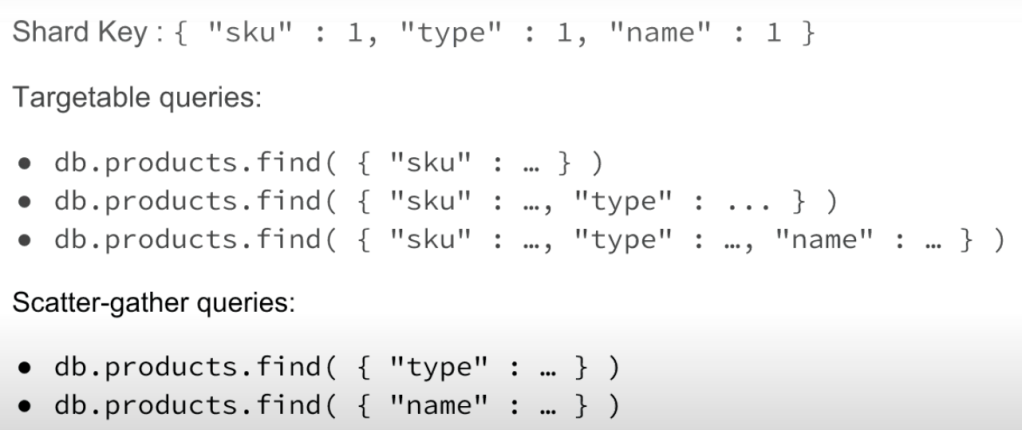
- Targeted Queries VS Scatter Gather
- Targeted Queries -> quick
- Scatter Gather -> slow
- Print info about a query: db.products.find({“sku” : 1000000749 }).explain()
- Ranged queries on the shard key may still require targeting every shard in the cluster
Final Exam
- –logpath or –-syslog must be specified in order to fork the process
- both –log and –authentication are invalid flags – instead, they should say –logpath and –auth
 Yujin's Amusement Park