Categories
MongoDB

MongoDB Basics (M001)

  • What is the MongoDB Database?
    • A database – Structured way to store and access data
    • A NoSQL database – Non-relational database
    • NoSQL document DB – Data in MongoDB is stored as documents
    • Stored in collections – Documents are stored in collections of documents
  • Document – A way to organize and store data as a set of field-value pairs
  • Collection – An organizsed store of documents in MongoDB, usually with common fields between documents
  • Atlas
    • Database as a service
      • Manage cluster creation
      • Run and maintain database deployment
      • Use cloud service provider of your choice
      • Experiment with new tools and features
    • Cluster/Databases – group of servers that store your data
    • Replica set – a few connected instances that store the same data
    • Instance – a single machine locally or in the cloud, running a certain software
  • JSON
    • JavaScript Standard Object Notation
    • Format
      • Start and end with curly braces {}
      • Separate each key and value with a colon :
      • Separate each key: value pair with a comma ,
      • “keys” (“fields” in MongoDB) must be surrounded by quotation marks “”
  • BSON
    • Bridges the gap between binary representation and JSON format
    • Optimized for:
      • Speed
      • Space
      • Flexibility
    • High performance
    • General-purpose focus
  • Importing and Exporting Data
    • Stored in BSON & Viewed in JSON
    • JSON – mongoimport & mongoexport
    • BSON – mongorestore & mongodump
mongodump --uri "mongodb+srv://<your username>:<your password>@<your cluster>.mongodb.net/sample_supplies"

mongoexport --uri="mongodb+srv://<your username>:<your password>@<your cluster>.mongodb.net/sample_supplies" --collection=sales --out=sales.json

mongorestore --uri "mongodb+srv://<your username>:<your password>@<your cluster>.mongodb.net/sample_supplies"  --drop dump

mongoimport --uri="mongodb+srv://<your username>:<your password>@<your cluster>.mongodb.net/sample_supplies" --drop sales.json
  • Data Explorer
    • A GUI in Atlas UI
    • Queries must be valid JSON
    • Returns qualified documents
  • Find cmd
    • Show 20 documents by default
    • it (iterate) to iterate through the cursor results in mongo shell
// Connect to the Atlas database
mongo "mongodb+srv://<username>:<password>@<cluster>.mongodb.net/admin"

// Show all databases
show dbs

// Select database
use sample_training

// Show all collections
show collections

// db points to the current database
db.zips.find({"state": "NY"})

// return the total number of the documents 
db.zips.find({"state": "NY"}).count()

db.zips.find({"state": "NY", "city": "ALBANY"})

// Easier to read
db.zips.find({"state": "NY", "city": "ALBANY"}).pretty()
  • Inserting New Document – ObjectId
    • Identical document can exist in the same collection as long as their _id values are different
    • MongoDB has schema validation functionality allows you to enforce document structure
    • Data Explorer
      • Every document must have a unique _id value
      • ObjectId() – default value for the _id field otherwise specified
    • Mongo Shell
// Get random document from the collection (to copy the data structure)
db.inspections.findOne();

// Insert 
db.inspections.insert({
      "_id" : ObjectId("56d61033a378eccde8a8354f"),
      "id" : "10021-2015-ENFO",
      "certificate_number" : 9278806,
      "business_name" : "ATLIXCO DELI GROCERY INC.",
      "date" : "Feb 20 2015",
      "result" : "No Violation Issued",
      "sector" : "Cigarette Retail Dealer - 127",
      "address" : {
              "city" : "RIDGEWOOD",
              "zip" : 11385,
              "street" : "MENAHAN ST",
              "number" : 1712
         }
  })

db.inspections.find({"id" : "10021-2015-ENFO", "certificate_number" : 9278806}).pretty()
  • Inserting New Documents (multiple documents)
    • Pass an array to the .insert() function
    • By default, the documents are added according to the order in the given array. When the duplicated _id detected, the insertion operation quits. Add {“ordered”: false} to prevent it.
db.inspections.insert([{ "_id": 1, "test": 1 },{ "_id": 1, "test": 2 },{ "_id": 3, "test": 3 }],{ "ordered": false })
  • Updating Documents
    • Data Explorer
    • Mongo Shell
      • updateOne()
      • updateMany()
// increment field value by a specified amount
{ "$inc": { "pop": 10 } }

// sets field value to a new value
 { "$set": { "pop": 17630 } }

// adds an element to an array field
{"$push": { "scores": { "type": "extra credit","score": 100 }}}
  • Delete Documents & Collections
    • Data Explorer
    • Mongo Shell
      • Collection
        • db.<collection>.drop()
      • Documents that match a given query
        • deleteOne(“_id”: 11)
        • deleteMany()
  • MQL operators
    • Update Operators
      • Modify data in the database
      • Example: $inc, $set, $unset
    • Query Operators
      • Provide additional ways to locate data within the database
    • $ has multiple uses
      • Precedes MQL operators
      • Precedes Aggregation pipeline stages
      • Allow Access to Field Values
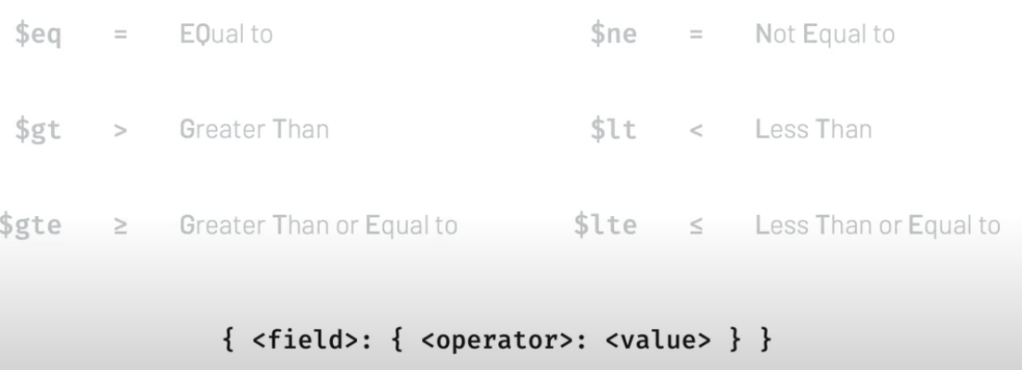
  • Comparison Operators
Comparison Operators
db.trips.find({ "tripduration": { "$lte" : 70 },
                "usertype": { "$ne": "Subscriber" } }).pretty()
  • Logic Operators
    • $and – match all of the specified query clauses
    • $or – at least one of the query clauses is matched
    • $nor – fail to match both give clauses
    • $not – negates the query requirement
// $and, $ or and $ nor
{<operator> : [{statement1}, {statement2}]}

// $not
{$not: {statement}}
  • Expressive Query Operator
    • $expr
      • Allows the use of aggregation within the query language
      • Allows to use variables and conditional statements
db.trips.find({ "$expr": 
{ "$and": [ 
      { "$gt": [ "$tripduration", 1200 ]},
      { "$eq": [ "$end station id", "$start station id" ]}
]}
}).count()
  • Array Operators
    • $push
      • Add an element to an array
      • Turns a field into an array
    • Query an array field using
      • An array – returns only exact array matches
      • A single element – return all documents where the specified field contains the given element
    • $all
      • Returns a cursor with all documents in which the specified array field contains all the given elements regardless of their order in the array
      • {<array_field> : {“$all”: <array>}}
    • $size
      • Returns a cursor with all documents where the specified field is exactly the given length
      • {<array_field> : {“$size”: <number>}}
  • Projection
    • To decide which document fields will be part of the resulting cursor
    • 1 – include the field, 0 to exclude the field
    • Only 1s or 0s
      • exception: {<field>: 1, “_id”: 0} to exclude the default “_id”
    • $elemMatch
      • Matches documents that contain an array field with at least one element that matches the specified query criteria
      • Projects only the array elements with at least one element that matches the specified criteria
{ <field>: { $elemMatch: { <query1>, <query2>, ... } } }

db.companies.find(
{ "relationships":
    { "$elemMatch": { "is_past": true,
                      "person.first_name": "Mark" } } },
    { "name": 1 }).count()
  • Array Operators and Sub-Documents
    • dot notation to access the sub-documents, iterative

Chapter 5

  • Aggregation Framework
    • Another way to query data
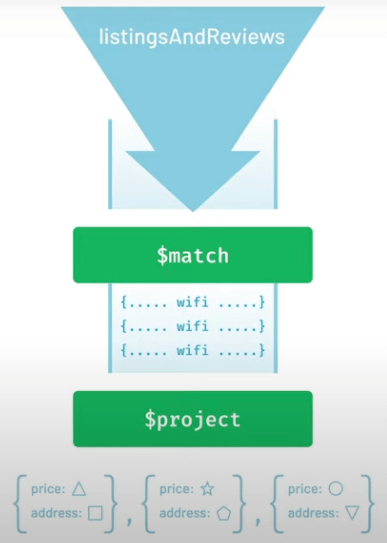
    • Order matters
    • Can do more
      • $group – takes incoming stream of data and divide into groups
    • The data within the pipeline doesn’t affect the original data
// Find()
db.listingsAndReviews.find({ "amenities": "Wifi" },
                           { "price": 1, "address": 1, "_id": 0 }).pretty()

// Aggregation
db.listingsAndReviews.aggregate(
[
  { "$match": { "amenities": "Wifi" } },
  { "$project": { "price": 1,"address": 1,"_id": 0}}
]).pretty()

// Group
db.listingsAndReviews.aggregate(
[
  { "$project": { "address": 1, "_id": 0 }},
  { "$group": { "_id": "$address.country","count": { "$sum": 1 }}}
])
  • sort() & limit()
    • Cursor methods – applied to the result set that lives in cursor
      • sort() -> 1: increasing; -1: decreasing
      • limit()
      • pretty()
      • count()
db.zips.find().sort({ "pop": 1 }).limit(1)

db.zips.find().sort({ "pop": -1 }).limit(1)

db.zips.find().sort({ "pop": -1 }).limit(10)

db.zips.find().sort({ "pop": 1, "city": -1 })
  • Indexes
    • A special data structure that stores a small portion of the collection’s data set in an easy to traverse form
db.routes.createIndex()
  • Data modeling
    • A way to organize fields in a document to support your application performance and querying capabilities
    • Rule: Data is stored in the way that it is used
    • Data that is accessed together should be stored together
  • Upsert (update + insert)
    • By default, upsert is false
    • Update the matched document if there’s a match
    • Insert a new document if there’s no match

Chapter 6

  • Atlas Features – More Data Explorer

Leave a comment