Section 1: Introduction
- RDBMS
- Relational database management system
- Allows to identify and access data in relation to another piece of data in the database
- Data in a relational database is often organized into tables
- SQL
- Structured Query Language
- A programming language used to communicate with data stored in a relational database management system
- SQL is NOT a database; it is a command line language that many RDBMss use to access the data from tables
- Top 5 RDBMS using SQL
- Oracle DB
- Commonly used for running online transaction processing, data warehousing and mixed database workloads
- Microsoft SQL Server
- It is among the most stable, secure and reliable database solutions
- Supports wide variety of transaction processing, analytics, and business intelligence applications in corporate IT environments
- MySQL
- Community developed open source
- Easy to use, inexpensive, reliable and has a large community of developers to help answer questions
- PostgreSQL
- Community developed open source
- MariaDB
- Community developed open source
- Led by some of the original developers of MySQL, who forked it due to concerns over its acquisition by Oracle
- Oracle DB
- MS SQL Server
- A suite of database software published by Microsoft and used extensively in enterprise world
- It includes:
- A relational database engine, which stores data in tables, columns and rows
- Integration Services (SSIS) – a data movement tool for importing, exporting and transforming data
- Reporting Services (SSRS) – create reports and serve reports to end users
- Analysis Services (SSAS) – a multidimensional database used to query data from the main database engine
- Different Editions of MS SQL
- Enterprise – full functionalities and blazing-fast performance
- Standard – basic data management, suitable for small organizations
- Web – low total-cost-of-ownership for web hosting companies
- Developer – includes all the functionality of Enterprise version, can only be used as a development and test system
- Express – entry-level, free and ideal for learning and building desktop and small server data-driven applications
Section 2: Download, Install and Configure Windows
- Windows Server
- An operating system designed by Microsoft that supports enterprise-level management, data storage, applications, and communications
Section 3: Download, Install and Configure MS SQL Server
- Prerequisites
- Installation of SQL Server 2016 is supported on x64 processors only
- SQL Server 2016 can be installed on Windows Server 2012, 2016 and 2019
- Cannot run SQL Server services on a domain controller under a local service account (?)
- On Microsoft Servers, a domain controller is a server computer that responds to security authentication requests within a Windows domain
- Separate disks for Data Files, Log Files and tempdb
- SQL Server Management Studio (SSMS)
- An integrated environment for managing any SQL infrastructure, from SQL Server to Azure SQL Database.
Section 4: Database Fundamentals and Design
- What is Data?
- Data – a collection of facts
- Raw data – that needs to be processed to give it meaning
- Information – processed data which have meaning
- Data, in the context of database – all the single items that are stored in a database, either individually or as a set
- What is Database?
- Base – “A structure on which something rests”
- Database – an organized collection of structured information, or data, typically stored electronically in a computer system
- Difference between a Database and Spreadsheet?
- How the data is stored and manipulated
- Who can access the data
- How much data can be stored
- How is data stored?
- Inside a database, data is stored into tables consisting of row and columns
- Stored in a standardised manner
- But tables are not the database
- What is a Table?
- Relational database system contains one or more objects called tables
- Uniquely identified by their names
- The number of tables in a database is limited by the number of objects allowed in a database
- MySQL has no limit on the number of tables
- What is a Column?
- A set of data values, all of the same single type
- Define the data (type) in a table
- Column name is unique in a table
- Table need at least one column
- Field = Column
- Sometimes, field refers to the intersection of a row and a column
- What is a Row?
- A collection of fields that make up a record
- Row = Record
- Each row represents a unique record
- A table can contain zero or more rows
- The number of rows is limited by the storage capacity of the server
- What is a Key?
- A data item exclusively identifies a record
- Can be single attribute of a group of attribute (?)
- Generate relationship among different database tables
- Types of Keys
- Candidate key
- An attribute or set of attributes that uniquely identifies a record
- Table can have multiple candidate keys
- One candidate key is chosen as Primary key
- Primary Key
- A set of one or more fields that uniquely identify a record
- Primary key’s attributes should be never or rarely changed
- Cannot contain “NULL” value
- Can contain a clustered index
- Secondary Key (Alternative key)
- Candidate keys that are not selected as primary key
- Unique Key
- Similar to primary key but allow “NULL” value
- Unique field contain a non-clustered index
- Composite key
- A combination of more than one attributes that uniquely identity each record
- May be a candidate or primary key
- Foreign key
- A field in database table that is Primary key in another table
- To generate relationship between tables
- Accept null and duplicate value
- Candidate key
- What is Relational Database?
- Stores and provides access to data points that re related to one other
- The logical data structures are separate from the physical storage structures
- What is Relational Database Management System (RDBMS)?
- A program that allows you to create, update, and administer a relational database
- Most of them use SQL language to access the database
- Advantages:
- Enhanced Data Security – control access, encryption, etc
- Retain Data Consistency
- Better Flexibility and Scalability
- Easy Maintenance
- Transaction
- A single logic unit of work, which accesses and possibly modifies the contents of a database
- Read and write operations
- A transaction groups SQL statements, so that they are all committed or all rolled back
- ACID properties
- Four properties of a transaction
- Atomicity – A transaction must be an atomic unit work
- Consistency – The DB must remain in a consistent state after any transaction, maintains data integrity constraints
- Isolation – No transaction will affect the existence of any other transaction
- Durability – Changes are persisted permanently in the database, information is immutable until another update or deletion transaction
- Ensure the accuracy and integrity of the data
- Data dose not become corrupt as a result of some failure
- Four properties of a transaction
- Normalization
- Why?
- Data redundancy
- Waste of disk space
- Creates maintenance problems
- Inconsistent dependency
- The multi-step process of organising data in a database, in order to reduce data redundancy and improve data integrity
- Systematic approach of decomposing tables to eliminate data redundancy and undesirable characteristics like Insertion, Update and Deletion Anomalies
- 1NF or First Normal Form
- Contains only atomic values
- No repeating groups
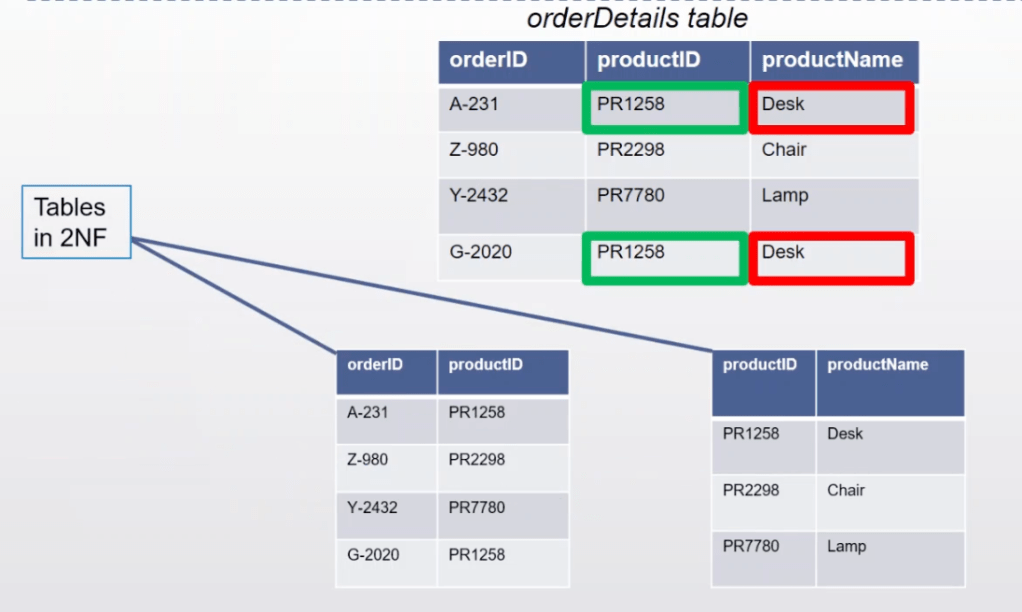
- 2NF or 2ND Normal Form
- It is in 1NF
- All partial key dependencies are removed (?)
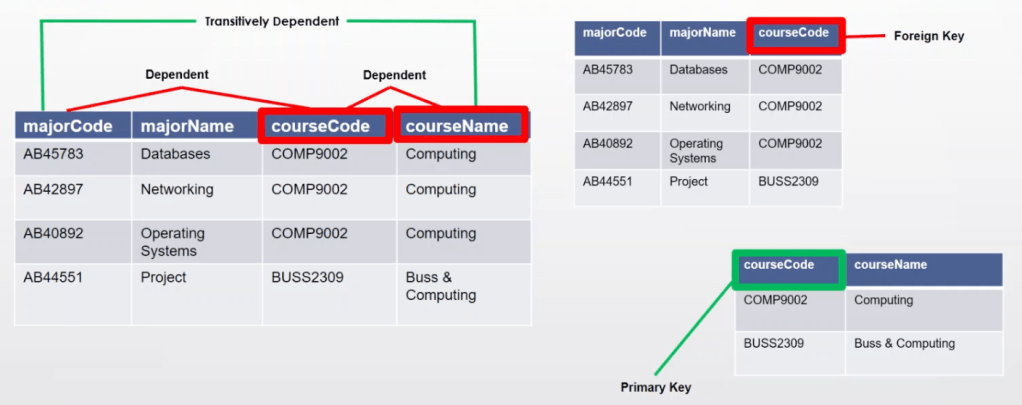
- 3NF or 3RD Normal Form
- It is in 2NF
- Non-primary key columns should not depend on the other non-primary key columns
- No transitive functional dependency
- Why?
Section 5: Introduction to SQL Commands
- SQL statements defined…
- Used to perform tasks such as update data on a database, or retrieve data from a database
- Most of RDBMS also have their own additional proprietary extensions
- Types
- DML (Data Manipulation Language)
- SELECT – with or without a condition
- INSERT – with values to be inserted to the table
- UPDATE – update existing values in a table based on some condition
- DELETE – delete existing record in a table based on some condition
- DDL (Data Definition Language) – database schemas, and description, how the data should reside in the database
- CREATE – create a new table in an existing database, or database objects such as a stored procedure, function
- ALTER – Add, modify, drop, rename a column; rename a table
- DROP – Remove a table definition
- TRUNCATE – Remove all rows from a table without logging the individual row deletions (save time but cannot roll back)
- DCL (Data Control Language) – Defines the control
- GRANT – Grant privileges on tables or views
- REVOKE – Cancel granted or denied permissions
- TCL (Transactions Control Language) – manage the transactions, changes made by DML statements, group them together
- COMMIT – begin …; update …; commit …;
- ROLLBACK – Undo changes before a commit is done
- SAVEPOINT – Temporarily save a transaction where can be roll back to
- DML (Data Manipulation Language)
Section 6: Query and Manipulation of Data
- Table(s) & Temp Table(s)
- In table, data is logically organized in a row-and-column format
- Row – a unique record
- Column – a field of the record
- Up to 1024 columns in a table
- CREATE TABLE
- A primary key can consist of one or more columns
- Each column has an associated data type and one or more constraints (NOT NULL or UNIQUE)
- IDENTITY(1,1) – Column will be populated by SQL Engine, start from 1, each time increased by 1
CREATE TABLE [database_name.][schema_name.]table_name (
    pk_column data_type PRIMARY KEY,
    column_1 data_type NOT NULL,
    column_2 data_type,
    ...,
    table_constraints
);

// Example
CREATE TABLE sales.visits (
    visit_id INT PRIMARY KEY IDENTITY (1, 1),
    first_name VARCHAR (50) NOT NULL,
    last_name VARCHAR (50) NOT NULL,
    visited_at DATETIME,
    phone VARCHAR(20),
    store_id INT NOT NULL,
    FOREIGN KEY (store_id) REFERENCES sales.stores (store_id)
);- Temporary (temp) Table
- Stores a subset of data from a normal table for a certain period of time
- Stored inside “tempdb” which is a system database
- Name must start with a hast (#)
- Valid per session
// Method 1: Select into
SELECT
    product_name,
    list_price
INTO #trek_products --- temporary table
FROM
    production.products
WHERE
    brand_id = 9;

// Method 2: Create table and then insert data
CREATE TABLE #haro_products (
    product_name VARCHAR(MAX),
    list_price DEC(10,2)
);

INSERT INTO #haro_products
SELECT
    product_name,
    list_price
FROM
    production.products
WHERE
    brand_id = 2;
- What is a View?
- A View in SQL Server is like a virtual table that contains data from one or multiple tables
- It does not hold any data and does not exist physically in the database
- A set of predefined SQL queries to fetch data from the database
// Create View
CREATE VIEW sales.product_info
AS
SELECT
    product_name,
    brand_name,
    list_price
FROM
    production.products p
INNER JOIN production.brands b
ON b.brand_id = p.brand_id;- SELECT in detail
SELECT
    select_list
FROM
    schema_name.table_name;

// Example
SELECT
    city,
    COUNT (*)
FROM
    sales.customers
WHERE
    state = 'CA'
GROUP BY
    city
HAVING
    COUNT (*) > 10
ORDER BY
city;- SQL Operators
- Symbols used to perform logical and mathematical operations
- Arithmetic – +, -, * /, %
- Relational – >,<,=
- Logic – OR, NOT, AND
- Expressions
- A combination of one or more values, operators and SLQ functions that evaluate to value
- Types:
- Boolean – age = 26
- Numerical – age * 2 > 50
- Date – Dob > DATE(‘1995/01/01’)
- Clauses
- WHERE
- Specify a condition while fetching the data
- ORDER
- Sort the data in ascending or descending order based on one or more columns [ACS | DESC]
- By default in an ascending order
- GROUP
- Arrange identical data into groups
- Follow the WHERE and precedes the ORDER
- HAVING
- Specify conditions that filter which group results to select in the results
- WHERE
- Aggregate function
- count()
- Max()
- Min()
- Year() / Month()
- Select from more than one tables – JOINS
- Don’t want repeated data in one table
- Types:
- INNER join (default) – All rows from both tables as long as the condition satisfied
- LEFT join – All the rows on the left side of the join and matching rows for the table on the right side
- RIGHT join
- FULL join – LEFT + RIGHT
SELECT
    c.id candidate_id,
    c.fullname candidate_name,
    e.id employee_id,
    e.fullname employee_name
FROM
    hr.candidates c
    INNER JOIN hr.employees e
ON e.fullname = c.fullname;- Sub Query
- A subquery / inner query / nested query is a query within another SQL query and embedded within the WHERE clause
- Used to return data that will be used in the main query as a condition for further restrict the data to be retrieved
- Have to enclose the subquery in parentheses
()
- INSERT statement
- Add one or more rows to a table or view
- Can add data that you retrieve from other tables or views
- If a column of a table does not appear in the column list, SQL Server must be able to provide a value for insertion or the row cannot be inserted
// Columns and values are separated by comma
INSERT INTO table_name (column_list)
VALUES (value_list);

// Or copy from existing table
INSERT INTO sales.addresses (street, city, state, zip_code)
SELECT
    street,
    city,
    state,
    zip_code
FROM
sales.customers- UPDATE statement
- Modify the existing records in a table
- Must include a SET clause to determine the columns to be updated
- Can include a WHERE clause to determine which rows to modify
UPDATE table_name
SET c1 = v1, c2 = v2, ... cn = vn
[WHERE condition]

// Update + join
UPDATE
    sales.commissions
SET
    sales.commissions.commission =
        c.base_amount * t.percentage
FROM
    sales.commissions c
    INNER JOIN sales.targets t
        ON c.target_id = t.target_id;
- DELETE statement
- Delete the existing records in a table
- Delete on rows instead of columns
// With condition
DELETE TOP (21)
FROM production.product_history;

DELETE
FROM
    production.product_history
WHERE
model_year = 2017;- TRUNCATE table statement
- Delete complete data from an existing table
- Delete statement without a WHERE clause
- Cannot be rolled back
TRUNCATE TABLE [database_name.][schema_name.]table_name;- DELETE VS TRUNCATE
- Use less transaction log
- The
DELETEstatement removes rows one at a time and inserts an entry in the transaction log for each removed row. On the other hand, theTRUNCATE TABLEstatement deletes the data by deallocating the data pages used to store the table data and inserts only the page deallocations in the transaction logs.
- The
- Use fewer locks
- When the
DELETEstatement is executed using a row lock, each row in the table is locked for removal. TheTRUNCATE TABLElocks the table and pages, not each row.
- When the
- Identity reset
- If the table to be truncated has an identity column, the counter for that column is reset to the seed value when data is deleted by the
TRUNCATE TABLEstatement but not theDELETEstatement.
- If the table to be truncated has an identity column, the counter for that column is reset to the seed value when data is deleted by the
- Use less transaction log
- Stored Procedure (SP)
- A batch of statements grouped as a logical unit and stored in the database
- Accepts the parameters, executes the T-SQL statements and returns the result
- Advantages:
- Better performance – Already compiled and stored in executable form
- Reduced network traffic
- Reusable
- Security – Hide detail info and encryption (with encryption)
- Modified easily
// Create
CREATE PROCEDURE uspProductList
AS
BEGIN
    SELECT
        product_name,
        list_price
    FROM
        production.products
    ORDER BY
        product_name;
END;

// Execute
EXECUTE sp_name;

// With parameters(s)
ALTER PROCEDURE uspFindProducts(@min_list_price AS DECIMAL)
AS
BEGIN
    SELECT
        product_name,
        list_price
    FROM
        production.products
    WHERE
        list_price >= @min_list_price
    ORDER BY
        list_price;
END;

EXEC uspFindProducts 100;- Function
- A set of SQL statements that perform a specific task
- Cannot Insert, Update, Delete records in the tables
- Can be called within SQL statements while stored procedures not
- Built-in functions:
- Aggregate Functions – an aggregate function performs a calculation one or more values and returns a single value
- Date Functions – to handle date and time data effectively
- String Functions – process on an input string and return a string or numeric value
- System Functions – return objects, values, and settings in SQL Server
- User-defined Functions
- Scalar Functions – take one or more parameters and returns a single value
- Table-valued Functions – user-defined function that returns data of a table type; update is on the virtual table
// Scalar function
CREATE FUNCTION [schema_name.]function_name (parameter_list)
RETURNS data_type AS
BEGIN
    statements
    RETURN value
END

// Table-value function
CREATE FUNCTION udfProductInYear (
    @model_year INT
)
RETURNS TABLE
AS
RETURN
    SELECT
        product_name,
        model_year,
        list_price
    FROM
        production.products
    WHERE
        model_year = @model_year;
- Function VS Stored Procedure
- Trigger
- Special stored procedures that are executed automatically in response to the database object, database, and server events
// DML Trigger
CREATE TRIGGER [schema_name.]trigger_name
ON table_name
AFTER  {[INSERT],[UPDATE],[DELETE]}
[NOT FOR REPLICATION]
AS
{sql_statements}- Index
- Table scan without index
- Indexes are special data structures associated with tables or views that help speed up the query
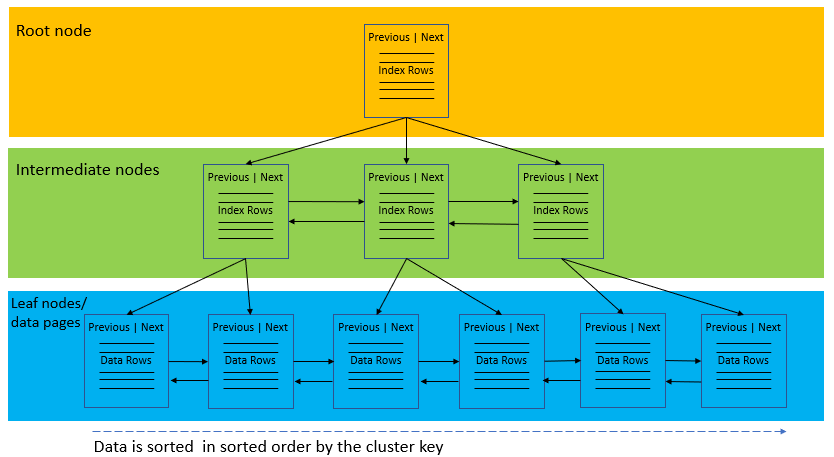
- Index organizes data using a special structured so-called B-tree (or balanced tree) which enables searches, inserts, updates, and deletes in logarithmic amortized time.
- https://www.youtube.com/watch?v=fsG1XaZEa78
- Index types
- Clustered Index
- Stores the actual data rows at the leaf level of the index
- Only one clustered index on a table or view
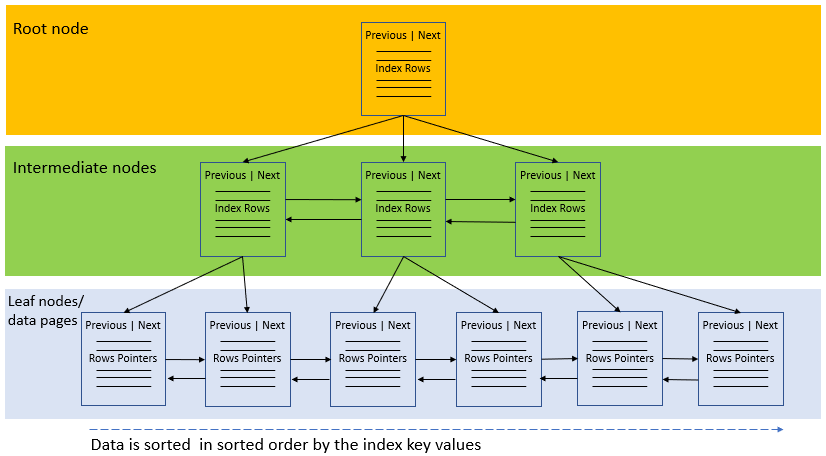
- Non-clustered Index
- The leaf nodes of a non-clustered index contain only the values from the indexed columns and row locators that point to the actual data rows, rather than the data rows themselves
- Clustered Index
- Index fragmentation
- Internal – when data pages have too much free space
- SQL Server stores data on 8KB pages
- Blank space occurs when data is deleted
- External – data pages being out of order
- Caused by inserting or updating data to full leaf pages. The extra data will create a new page which is separated from the original page
- Increasing random I/O, for reading from multiple locations
- Fix index fragmentation
- sys.dm_db_index_physical_stats DMF to analyze fragmentation level
- Rebuild > 30 (pay attention to the page count meanwhile)
- Reorganize 10 ~ 30
- Ignore < 10
- Internal – when data pages have too much free space
Section 7: MS SQL Database Administration & System databases
- SQL Server Management Studio: Integrated environment to access, configure, management, administer and develop components of SQL Server
- SQL Server Configuration Manager: Provides basic configuration management for SQL Server services, server protocols, client protocols and client aliases
- For local server only
- Default port for TCP/IP: 1433
- SQL Server Profiler: Provides a GUI to monitor an instance of the Database Engine or Analysis Services
- Database Engine Tuning Advisor: Helps create optimal sets of indexes, indexed views and partitions
- SQL Server Data Tools: Provides an IDE for building solutions for the Business Intelligence components: Analysis Services, Reporting Services and Integration Services
- Data Quality Client: Provides a GUI to the DQS Server and perform data cleansing operations
- Connectivity Components: Installs components for communication between clients and servers and network libraries
- Types of Databases
- User Databases
- Created by a User
- Can be dropped/altered without having an impact on MSSQL Server
- System Databases
- Needed for SQL Server to operate
- Keeps meta data about MSSQL instance
- Most of them get created during installation
- Each SQL Server instance has its own set of SQL Server system databases
- User Databases
- MSSQL System Databases
- Master Database
- Content:
- Records all the system-level information for a SQL Server system – Instance-wide meta data
- Records the existence of all other databases and their location
- Records the initialization information for SQL Server
- Backup is important!
- Content:
- TempDB Database
- A global resource available to all users connected to the instance of SS
- Content:
- Temporary user objects that are explicitly created
- Internal objects that database engine creates
- Version stores
- The number of secondary data files depends on number of logical processors on the machine
- Same number of data files as logical processors when less than or equal to eight
- When number of logical processors greater than 8, use 8 data files
- If contention, increase the number by multiples of four
- Cannot backup
- Optimizing:
- Size and physical placement of tempdb affects the performance
- Use instant file initialization when possible (Reclaim space without filling with zeros)
- MSDB Database
- Used by SS Agent for scheduling alerts and jobs
- For example, SS automatically maintains a complete online backup-and-restore history within tables in msdb
- Make sure the software versions match for backup and current SS
- Store system activities like sql server jobs, mail, service broker, maintenance plans, user and system database backup history, etc.
- Model Database
- Used as the template for all databases created on an instance SS
- Resource System Database
- Read-only database that contains all the system objects that are included SS
- Upgrading to a new version is easier and faster
- Backup can only be done manually
- Master Database
Section 8: Deep dive into MSSQL Working
- Pages and Extents
- Page is the fundamental unit of data storage in SS
- Disk space allocated to a data file is logically divided into pages numbered contiguously from 0 to n
- Disk I/O operations are performed at the page level
- All data pages are the same size – 8 kb
- Extent is a collection of eight physically contiguous pages
- Help efficiently manage pages
- Uniform – owned by a single project (Starting with SS 2016)
- Mixed – shared by up to eight projects
- Page is the fundamental unit of data storage in SS

- Page Architecture
- Page header contains the information about page number, page type, the amount of free space on that page, and the allocation unit ID of the object that owns the page
- At the end of the page is a row offset table to locate rows on a page quickly

- Tracking Free Space
- Page Free Space (PFS) pages record the allocation status of each page, whether an individual page has been allocated and the amount of free space on each page
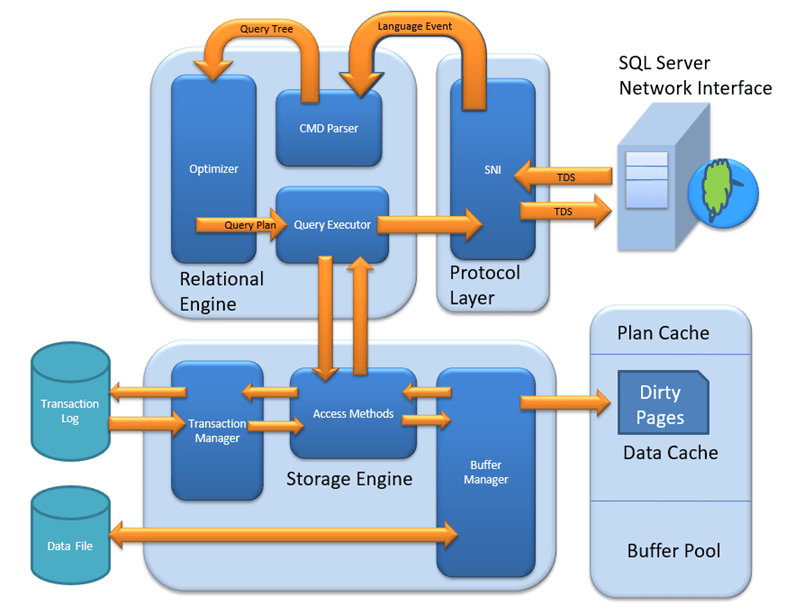
- MMSQL Architecture
- Protocol Layer (Server Name Identification – SNI)
- Shared Memory: Client and MS SQL run on the same machine
- TCP/IP: MS SQL Server provides the capability to interact via TCP/IP protocol, where client and MS SQL Server are remote to each other and installed on a separate machine
- Name Pipes: MS SQL Server provides the capability to interact via the Named Pipe protocol, client and MS SQL Server are in connection via LAN
- Relational Engine / Query Processor
- Determines what exactly a query needs to do and how it can be done best
- Be requesting data from the storage engine and processing the results that are returned
- Major Components:
- CMD Parser – check the query for syntactic and semantic error and generates a Query Tree
- Optimizer – create an execution plan for the user’s query: optimization is for DMLs
- Query Executor
- Calls Access Method in Storage Engine
- Provides execution plan for data fetching logic
- Receive the data received from Storage Engine, publish result to Protocol layer
- Storage Engine
- Store data in Disk or SAN and retrieve the dat when needed
- Main components:
- Access Method
- An interface between query executor and Buffer Manager/ Transaction Logs
- Select statement – sent to Buffer Manager
- Non-Select statement – pass to Transaction Manager
- Buffer Manager
- Plan Cache
- Data Paring: Buffer Cache & Data storage
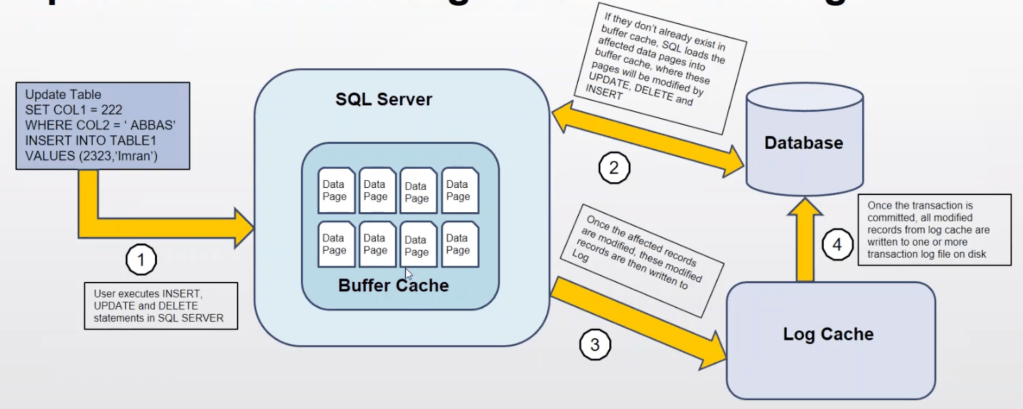
- Dirty page – updated page in memory but has not committed to disk
- Transaction Manager
- Deals with Non-Select statement
- Log Manager: keeps a track of all updates via logs in Transaction Logs
- Lock Manager: During Transaction, to ensure the associated data in Data Storage is in the Lock state
- Write-ahead logging (WAL) – all modifications are written to a log before they are applied
- Access Method
- Protocol Layer (Server Name Identification – SNI)
- MSSQL Database Architecture
- SS maps the database over a set of operating system files that store the database objects
- Physically, a SS database is a set of two or more operating system files
- Each database file has two names
- A logical filename
- A physical filename
- Primary data file (.mdf)
- Initial default file, each database has one primary data file
- Contains the configuration information, pointers to the other files and all of the database objects
- User objects within the main data file is not recommended
- Secondary data file (.ndf)
- Optional (one or more) and used to hold user database objects
- Can be spread across multiple disks
- Transaction log file (.ldf)
- Holds the information about all the database modification events
- Used to recover the database
- One or more
- Filegroups
- Group secondary data files logically for administrative purposes
- By default, one filegroup/ default filegroup containing the primary database
- Recommended to create filegroup for secondary data files separately from default group
- Transaction log files do not belong to any filegroup
- Advantage of filegroup is for backup and restoring, be brought online or taken offline separately
- Transaction Log Architecture
- A single file with .LDF file extension
- To ensure all transactions maintain their state in case of server or database failure
- All transactions are written to the Transaction Log before written to the data files
- A transaction may have multiple entries as well as locks that were taken during the operation
- Each log entry has a unique number LSN (log sequence number)
- VLFs (Virtual log files) is transaction log files logically divided into multiple sections
- If a VLF no longer contains an active transaction, marked for re-use
Section 9: MSSQL Backup and Restore
- Database backup
- Backup the operational state, architecture and stored data of the database software
- By replication of the database for database or database server by the RDBMS either locally or on a backup server
- DB administrator can use the copy to restore when disaster
- Why Backup is important? (20% work of a DBA)
- Business Protection – Data loss prevention
- Unlimited Data Access – Allows to access data without time or location constraints
- Credibility and Accountability – Trust from customer
- Time effective – Ensure the validity and time effectiveness of backup
- Where to backup?
- Best practice is to keep a copy of the backup files on-site, for easy access and a copy off-site
- Online Backup Services
- USB Drives / External Hard Drives – password protect
- LAN Storage
- Tape Storage
- Backup System
- MSSQL Recovery Models
- Recovery models – options a DBA has when recovering a database
- Simple
- Full
- Bulk-logged
- Recovery model determines how transaction log records are stored, how much data needs to write to
- And the transaction log is used to restore
- Recovery models – options a DBA has when recovering a database
- Simple Recovery Model
- Each transaction will be written to the transaction log
- Records of completed transactions will eventually be removed automatically when a checkpoint occurs
- Transaction log backup is not supported, therefore point-in-time restore is not possible
- Can only perform full and differential backups
- Suited for Development and Test, where data loss is acceptable
- Full Recovery Model
- All transactions are written to transaction log and stay after completion until a log backup is performed
- Supports point-in-time restores with transaction log
- Need to do backup frequently and in time otherwise the log file would be full
- When log becomes full, the database stops accepting transactions
- Bulk-logged Recovery Model
- Minimizes transaction log space usage when bulk-logged operations are executed
- Point-in-time recoveries can be performed when no bulk operation
- The database can only be recovered to the last transaction log backup created prior to the first bulk-logged operation
- When transaction log backup contains a bulk logged operation, the stopat options cannot be used
- Full Database Backups
- A full database backup backs up the whole database, includes the transaction log
- Represents the database at the time the backup finished
- The foundation of any kind of backup
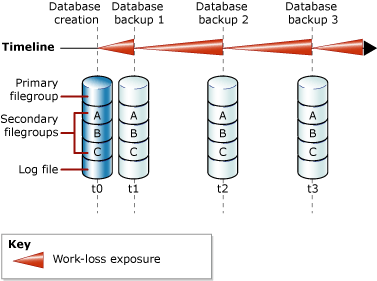
- Full Database Backups in Simple Recovery
- After each backup work-loss exposure increases over time between backups
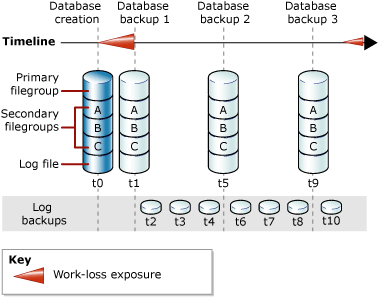
- Full Database Backups in Full Recovery
- Database backups plus transaction log backups
- Checkpoint
- Transactions that are completed and in transaction log will be written to disk, no more dirty pages
- Log is truncated in simple recovery model
- Differential Backups
- Captures only the data that has changed since last full backup
- Can be fast comparing and reduce the number of log backups (full recovery model) to full backup when backup, but takes more time when restoring
- Extents as unit; Differential bitmap page to indicate changed extents

- Transaction Log Backups
- Have at least one full backup before any log backups
- Take log backups frequently to minimize work loss exposure and to truncate the transaction log
- Transaction log backup allows to restore to a particular point-in-time

src: academy.sqlbak.com/transaction-log-backup/
- Transaction Log Backup Chain
- Transaction log is sequential
- Each backup has its own FirstLSN and LastLSN

- Tail-log Backup
- Captures any log records that have not yet been backed up to prevent work loss
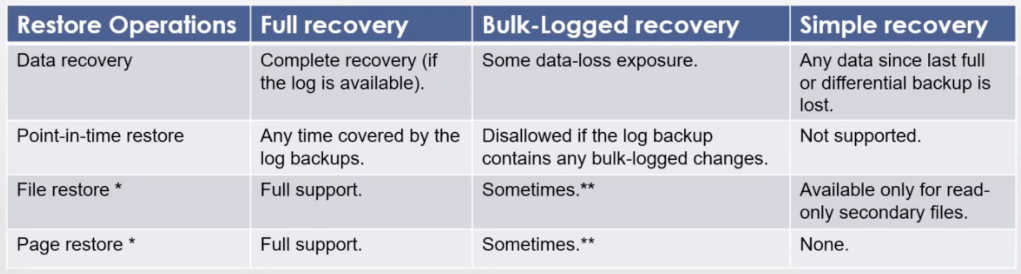
- Restore of a Database
- Types of restore and recovery
- Complete database restore – the whole database, database should be offline for the duration
- File restore – file or filegroups, the restoring file(s) are offline
- Page restore
- Types of restore and recovery
- Point-in-time Restore
- Allows to restore into a state it was in any point of time
- STOPAT option when restore the last log backup
- DBCC CHECKDB
- Checks logical and physical integrity of all the objects
- Includes three commands:
- DBCC CHECKALLOC – the consistency of disk space allocation structure
- DBCC CHECKTABLE – the integrity of all the pages and structures that make up the table or indexed view
- DBCC CHECKCATALOG – the catalog consistency within the specified database, database must be online
- Results:
- Page and row inaccuracies in catalog views
- DBCC UPDATEUSAGE
- Data corruption
- Restore to a backup
- repair_allow_data_loss
- REPAIR_REBUILD – no data loss
- Page and row inaccuracies in catalog views
- Single User Mode – Only allow the first connection
ALTER DATABASE AdventureWorks2016 SET SINGLE_USER WITH ROLLBACK IMMEDIATE

DBCC CHECKDB ('AdventureWorks2016', REPAIR_REBUILD)

ALTER DATABASE AdventureWorks2016 SET MULTI_USER WITH ROLLBACK IMMEDIATE- Page Level Restore / Recovery
- Replace corrupted pages of information with uncorrupted data from a backup
- To identify corrupted pages, look for pages marked as “suspect” in the table, msdb syspect_pages
- If the number of corrupted pages seems too large, then use full restoration
- Maintenance Plan
- A set of measures (workflows) taken to ensure that a database is properly maintained and routine backups are scheduled and handled
- Weekly: Reorganize Index -> Rebuild Index -> Check Integrity -> Back Up -> Maintenance Cleanup
- Daily: Diff backup -> Maintenance Cleanup
- Hourly: Transaction log backup -> Maintenance Cleanup
Section 10: MSSQL User Management
- Security Model
- Login to database server, Windows based or SQL Server
- User – grant access to different databases and specific tables
- Authentication Modes
- Protecting data starts with authenticating user and authorising their access to specific data
- Two modes:
- Windows Authentication / Integrated security
- Possible to use a local or domain Windows account to login
- SQL Server and Windows Authentication / Mixed mode
- Users might connect from non-trusted domains or the Server which holds the SQL Server is not part of a domain
- Windows Authentication / Integrated security
- Server Security Components
- Which user can log onto SQL Server
- What data they can access
- Which operation they can carry out
- Server Logins
- Four types:
- Windows
- SQL Server
- certificate-mapped
- asymmetric key-mapped
- CREATE LOGIN – Server level, must be created within the context of master database
- Windows – <domain_name>/<windows_account/group>; FROM WINDOWS
- SQL Server – must include a password
- Four types:
- Server Roles
- Manage the permissions on server-wide
- Could assign logins to a fixed or user-defined server role, but cannot change its permissions
- Database Users
- Create database users that map back to logins
- CREATE USER – database-level, within the database context
- One user for one login
- Database Roles
- A group of users that share a common set of database-level permissions
- fixed and user-defined database roles
- some special-purpose database roles in the msdb database
- db_owner database role can manage fixed-database role membership
- Permissions
- Three T-SQL
- GRANT – enable principals to access specific securables
- DENY – prevent principals from accessing specific securables;
- DENY overrides GRANT
- Want to grant permissions at higher level in the object hierarchy but want to prevent those permissions from extending to a few of the child objects
- REVOKE – remove permissions that have been granted
- Cumulative & Transitive
- Three T-SQL
Section 11: MSSQL Server Agent Management
- SQL Server Agent can automate repetitive tasks
- Back up an existing database
- Delete extra log files
- Process data from a table
- Drop and rebuild indexes on a table
- Running an ETL job
- Log history of job executions
- Option to restart job manually in case of failure
- Run a job on a schedule, in response to event or on demand
- Server Agent Components:
- Jobs – a specified series of actions that SQL Server Agent performs
- Schedules – when a job runs
- Alerts – automatic response to a specific event
- Operators – defines contact information for an individual responsible for the maintenance of one or more instance of SQL Server
- Security
- SQLAgentUserRole, SQLAgentReaderRole, SQLAgentOporatorRole in the msdb to control access for users that are not sysadmin
- SS Agent Jobs
- Use jobs to define an administrative task that can e run one or more times and monitored for success or failure
- Run jobs in several ways:
- Schedule
- In response to one or more alerts
- Executing the sp_start_job stored procedure
- Each action in a job is a job step
- SS Agent Alerts
- Can respond to following conditions:
- SQL Server events
- SQL Server performance conditions
- Microsoft Windows Management Instrumentation events on the computer where the Agent is running
- Can perform following actions:
- Notify one or more operators
- Run a job
- Can respond to following conditions:
- Database Mail
- Enterprise solution for sending e-mail messages from the SQL Server Database Engine
- The email can contain query results or files on your network
- Execute stored procedure sp_send_dbmail -> insert an item into the mail queue and creates a record that contains the email message
- Job Activity Monitor
- View the sysjobactivity table by using SS Management Studio
- Perform the following using Job Activity Monitor:
- Start and stop jobs
- Job properties
- History for a specific job
Section 12: Advanced SQL Server Administration Topics
- High Availability
- The availability of business applications depends on the availability of the data that the applications process and store
- High Availability means that the SQL Server instances or databases will be available and reachable, with the least possible downtime in case of any server crash or failure
- Disaster Recovery – when the primary datacenter experience a catastrophic event, the system should be brought online and serve the users in another secondary site

- High Availability Types
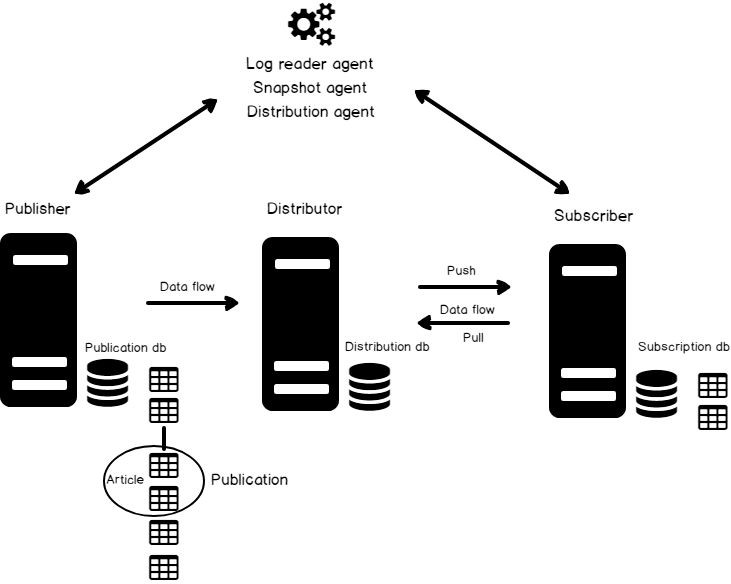
- Replication
- Object (Table) level
- Publisher is source server; Subscriber is the destination server
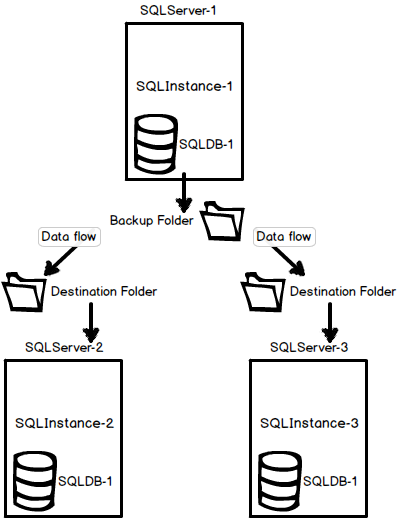
- Log Shipping
- Database level
- Source data will be copied to destination through Transaction Log backup jobs
- Primary server is source server
- Secondary server (read-only) is the destination server
- Mirroring
- Database level
- Primary data will be copied to secondary through network transaction basis with the help of mirroring endpoint and port number
- Principal server is the source server
- Mirror server is destination server
- Clustering
- Instance level
- Data will be stored in shared location which is used by both primary and secondary servers based on availability of server
- Active node is where SQL Services are running
- Passive node is where SQL Services are not running
- AlwaysOn Availability Groups
- Database level
- Replication
- Replication and Transactional Replication
- Copy and distribute data and database objects from one database to another and then synchronise between databases to maintain consistency and integrity of the data
- In most cases, replication is a process of reproducing the data at the desired targets
- Types:
- Transactional Replication
- Merge Replication
- Snapshot Replication
- Transactional Replication
- Real time, database level
- Primary server -> Publisher, distributes tables or selected tables known as articles
- Secondary server -> Subscribers
- Depends on a synchronization process with the SQL Server Transaction Logs
- Log Shipping
- Copy of a transaction log file from one SQL Server instance to another
- Steps:
- Backing up the transaction log files on the primary Server instance
- Transferring the transaction log backup across the network to secondary Server instances
- Restoring backup
- Operating Modes
- Standby mode – the secondary database is in read-only mode
- Not available while the restore processing is running
- Users can be forced to disconnect
- Restore job to be delayed until all users disconnect themselves
- Not available while the restore processing is running
- Restore mode – the secondary database is not accessible
- Standby mode – the secondary database is in read-only mode
- Database level
- SQL Server Encryption
- Data protection is critical for ensuring that your organization is compliant with regulatory compliance standards like the GDPR and for meeting the expectations of your clients and business partners
- Encryption is the process of obfuscating data by the use of a key or password, otherwise the data is useless
- Types:
- SSL Transport Encryption
- Secure Sockets Layer (SSL) to encrypt traffic as it travels between the server instance and client application
- Client can validate the server’s identity using the server’s certificate
- SQL Server Transparent Data Encryption (TDE)
- Protects data at rest by encrypting database data and log files on disk
- It works transparently to the client existing application
- TDE uses real-time encryption at the page level
- Pages are encrypted before they are written to disk and decrypted when read into memory
- All-or-nothing approach
- Important to backing up SMK, DMK and certificate
- If you have TDE enable, you have backup but lost key, you should look for a new job xD
- Column/Cell-level Encryption
- Cell-level encryption can be enabled on columns that contain sensitive data
- Data is encrypted on disk and in memory until the DECRYPTBYKEY function is used to decrypt it
- Client applications must be modified to work with cell-level encryption
- Backup Encryption
- Similar to TDE but encrypts backups instead of the acitve data and log files
- Always Encrypted
- Encrypts sensitive data in client applications without revealing the encryption keys to the database engine
- Providing separation between data owners and data managers
- SSL Transport Encryption

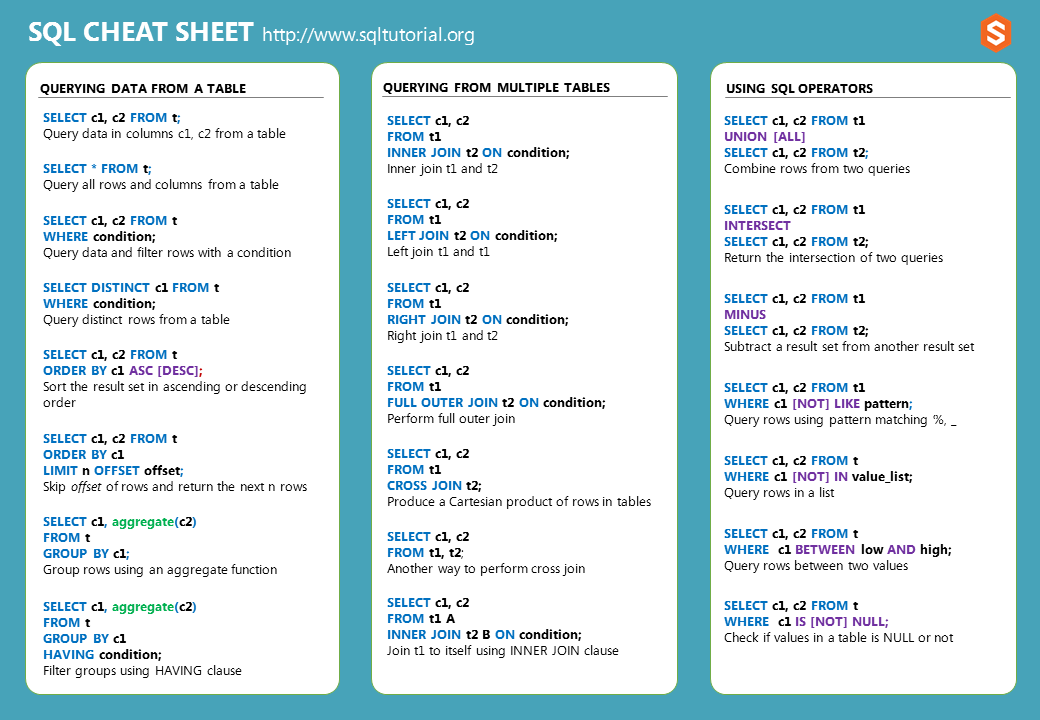
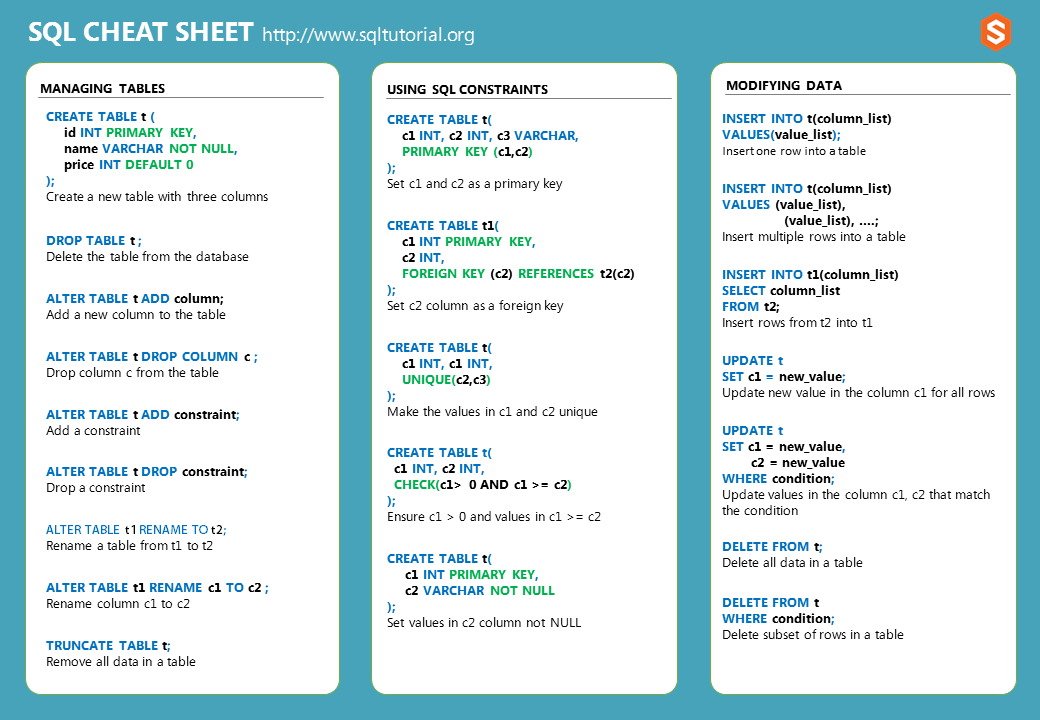
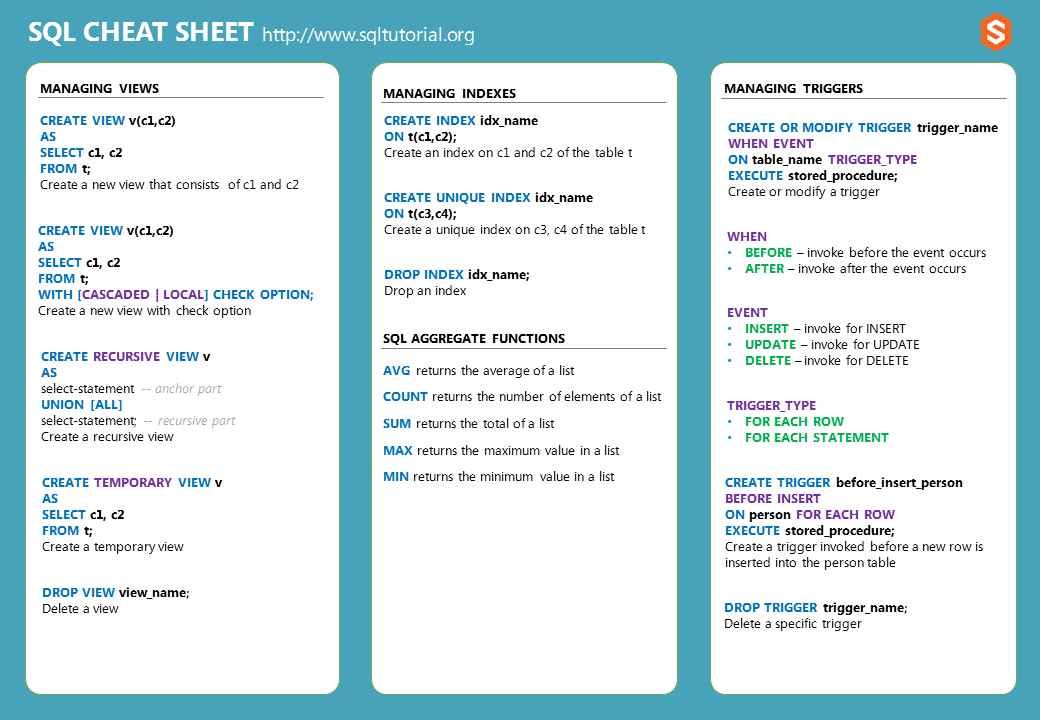
Cheat Sheet
http://www.sqltutorial.org/sql-cheat-sheet/
- Questions:
- Transactions during backup?
- Mirror VS Replication
- Recovery model and Backup type?
- Cause of data corruption?
- DENY & REVOKE
- Maintenance plans VS Server Agent
- Where do we need a Database Master Key?
 Yujin's Amusement Park