- Full Stack JavaScript Development

- What is Node.js?
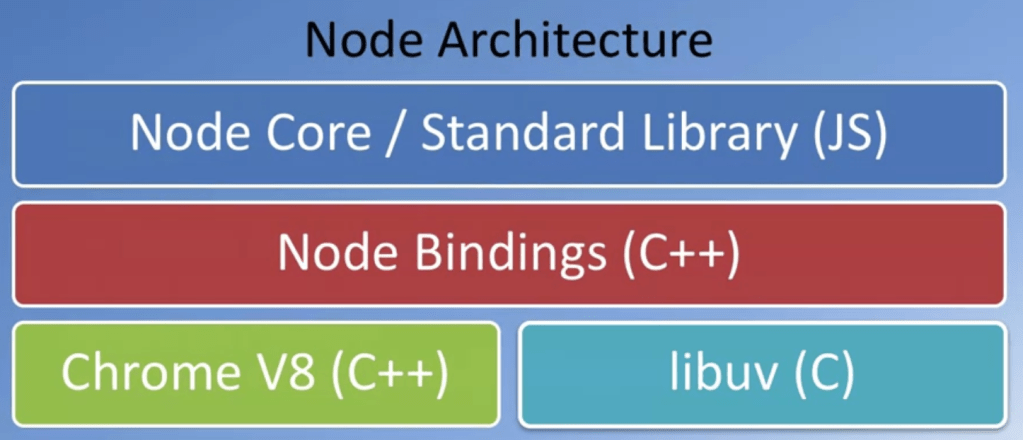
- JavaScript runtime built on Chrome V8 JavaScript Engine
- Uses an event-driven, non-blocking I/O model – lightweight & efficient
- What is package.json?
- Usage
- documentation for what packages including their versions, your project depends on
- makes build reproducible
- Commands
- npm init – in project folder, follow prompt
- Usage
- Online Git repos
- GitHub
- Bitbucket
- commands
- git remote add origin <repo URL>
- git push -u origin <branch>
- git clone <repo URL>
- .gitignore file to exclude sync files
- Why JavaScript Libraries/Frameworks?
- Complexity of managing DOM manipulation and data updates manually (with jQuery & vanilla JavaScript)
- Application architectures:
- Model View Controller (MVC) / Model View View Model (MVVM)/ …
- Binding of model and view: controllers, view model
- Flux architecture/ Redux
- Software Library (E.g. jQuery):
- Standard patterns and set of functions to implement applications (Collection of implementations of behavior with a well-defined interface by which the behavior is invoked)
- Reuse of behavior
- Modularity
- Software Framework (E.g. Angular)
- A set of generic functionality that can be selectively customised by additional user-written code
- Universal and reusable environment
- Inversion of Control
- Imperative vs Declarative Programming
- What is React?
- A JavaScript library for building user interfaces
- Declarative
- Component-based
- Technology stack agnostic
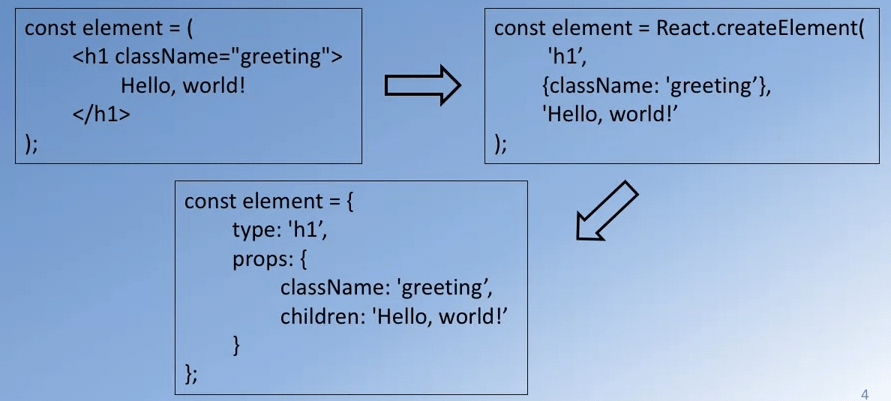
- React Element
- Smallest building blocks of React apps
- Plain JS objects that are cheap to create
- Builds up Components
- Using “className” instead of “class” which is a reserved keyword in JS
- Rendering to the DOM
- ReactDOM
ReactDOM.render(<element(s)>,<container>);
- JSX
- Syntactic extension to JavaScript – allow expressing react elements using HTML like syntax
- Shorthand notation to represent JavaScript functions calls that evaluate to JavaScript objects
- Avoids artificial separation of rendering logic (templates) from other UI logic (JavaScript code)
- Enable Emmet support for JSX in VS Code
- Emmet comes with VS Code by default
- Settings -> Workspace -> Emmet -> settings.json
{
   "emmet.includeLanguages": {
      "javascript": "javascriptreact"
   }
}
https://eshwaren.medium.com/enable-emmet-support-for-jsx-in-visual-studio-code-react-f1f5dfe8809c
- React Components
- A component returns a set of React elements
- Splits UI into independent, reusable pieces
- Accepts inputs
- Component Conventions
- User-defined component names must always start with a capital letter
- React-createElement(…)
- Tags starting with lowercase letters are treated as DOM tags
- Built-in components
- User-defined component names must always start with a capital letter
- State
- Each component can store its own local information in its “state”
- Private and fully controlled by itself
- Can be passed as props to children
- Only class components can have local state
- Declared within the constructor
- Be modified only by setState() instead direct value assignment
- Each component can store its own local information in its “state”
- Props
- JSX attributes are passed into a component as a single object
- Available in the component as “props”
- can pass in more than one attributes
- cannot modify props within the component
- JSX attributes are passed into a component as a single object
- Event Handling – similar to events on DOM elements
- Event name in camelCase
- Pass function as the event handler
- Lifting State Up
- Sometimes some components share some data
- Changes to data in one component needs to be reflected to others
- Best to move the shared state to a common ancestor component
- Lists and Keys
- map() function
- Keys to specify an item in the array
- Help identify which items have changed, added or removed
- Lifecycle
- Every class component has a lifecycle
- Stages
- Mounting
- Updating
- Unmounting
- Lifecycle methods/hooks
- Mounting phase – when an instance is being created and inserted into the DOM
- constructor()
- getDerivedStateFromProps()
- render()
- componentDidMount()
- componentWillMount() (deprecated!)
- Mounting phase – when an instance is being created and inserted into the DOM
 Yujin's Amusement Park